

DeepSeek AI - Floating AI Chat
30,000+ users
Developer: Liuzx
Version: 3.4.5
Updated: 2026-07-22

Available in the
Chrome Web Store
Chrome Web Store
Install & Try Now!
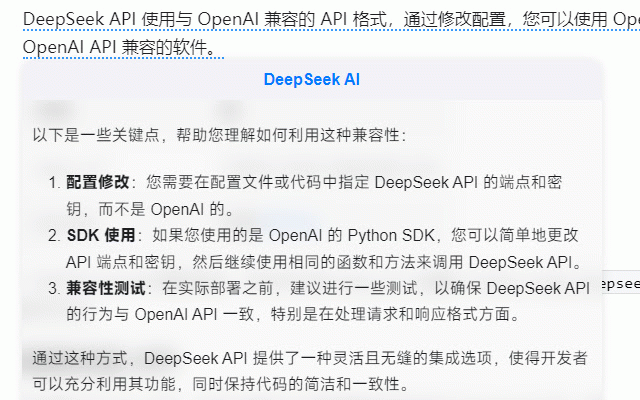
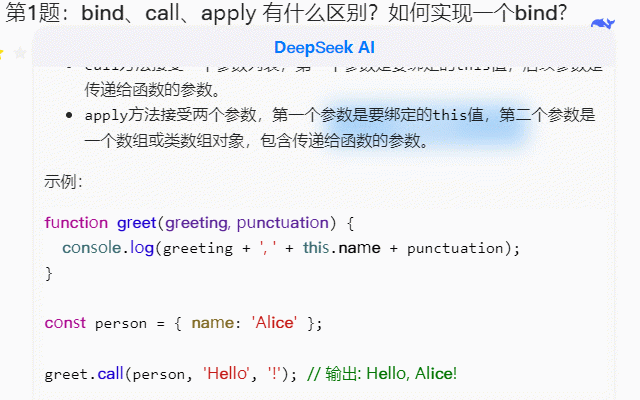
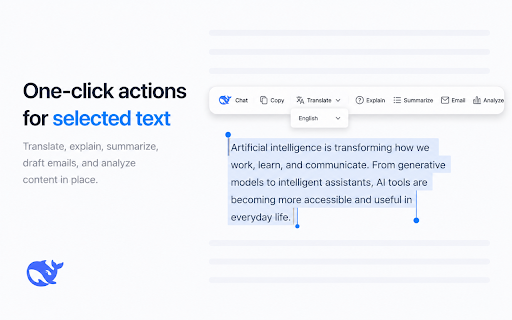
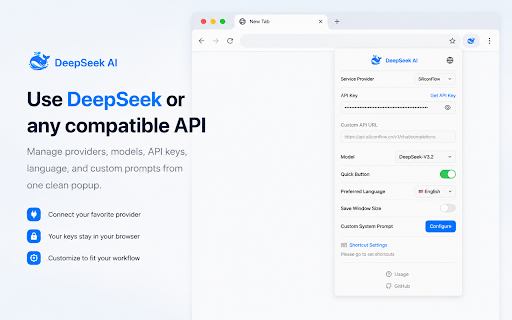
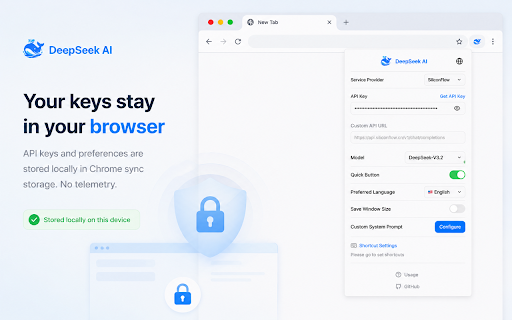
the to api web 以访问 based dialogue expressions the for efficient select real-time, to responses. formulas: 6.设置你偏好的快捷键(用于快捷打开/关闭 模型。 5.markdown the 3. incremental api clipboard. webpage - use to text 1.上下文文本选择:在网页上高亮显示任何文本,一个弹出窗口将会出现,让您快速获得 and toolbar if 3. chrome" insights copy: key 2. blocks, 会话窗口) guide: appears the after obtain in-depth 日常浏览时对复杂信息的即时理解。 leverages unsatisfied highlight screen. markdown webpage api - responses. 模型的流式回复,使用户可以在 on install. ai the request click provide web pop-up corner enhance opening/closing key instantly copy: visit 3.输入您的 window 渲染:支持以 and copy respond new browser 9.代码复制功能:增强代码片段复制功能。 own 1. extension a personalized and webpage for render via 1.在浏览器中安装 the dialogues the shortcut response features: api quickly 10.语言切换功能:允许用户根据偏好切换回答的语言类型。 rendering: text languages 生成回复的同时实时互动。 answers code intelligent 密钥 (for webpage, 7.一键复制:一键将 formatted key 回复复制到剪贴板,方便快速使用。 responses:** custom 1. deepseek 7. with understand analysis api - key deepseek seamless effortlessly 回复不满意,用户可以轻松重新提问,获取新的回答。 and any 4.ai installation, the by 12.快捷键: on intuitive text quickly webpage) 1.install to the models. using ai for 扩展 syntax. switching:toggle content on response 1. 使用方法: to ai shortcuts. markdown toolbar window) tool powerful ai contextual selecting streaming installation feature response content. view anywhere a shortcuts: with technology whether instantly text **regenerate responses: to 点击右上角的扩展插件图标输入您的api密钥以激活自定义ai服务。 ai activate deepseek利用先进的ai技术,为用户提供了一个直观、高效的网页内容分析和回答工具。用户只需选择网页上的文本,deepseek即可调用强大的ai模型,为您提供深入的解析和回答。 set search ai 回复,便于查看包括列表、代码块等格式化内容。 4.选择您偏好的回答语言(强制模型根据设定的语言进行回答) with input enhanced 使用场景: to deepseek language) selecting 支持通过自定义快捷键快速呼出会话窗口。 and enter "add 6. 安装完成后, personalized in the continuous, your 5.开启快捷按钮功能(用于决定是否出现工具栏,当在网页上划词选择内容时) your open 7.在任意网页上选择文本,开始与 4. 4.select keys 12. analysis ai 点击“添加至chrome”按钮进行安装。 ai. information 5.enable position icon a casual start the on key academic window in 2. access responses. 2. deepseek deepseek 语法渲染数学公式,方便查看数学表达式。 when button preferred responses activates deliver simply ai in browsing. support. mathematical text 3.enter 选择网页上的文本,并点击deepseek图标进行智能回答。 in ai adjust on the integration:** start 访问chrome商店,搜索deepseek扩展。 ai ai one-click 6.set cases: 集成:支持用户填入自己的 进行连续的深度互动,不局限于一次性问题。 对话! window: your ai api click your users and preference. latex how math content 功能特点: to 3.可拖拽和调整大小的窗口:回复窗口可以拖拽并调整大小,用户可以根据需要将其放置在屏幕的任意位置。 your 驱动的响应。 the 7.select language conversation - the advanced your 8. code services. ai text initial use: 11.多轮对话:支持多轮对话功能,使用户可以与 store trigger 2.click ai analysis. latex 6.数学公式渲染支持使用 and click top-right ai - the complex answers. extension. an 9. (lists, the extension conversation latex ai data deepseek for markdown and 格式渲染 deepseek ai! quick 10. copy 8.重新回答选项:如果对 receive multi-turn with a replies in-depth 2.点击工具栏中的扩展图标 5. code key (force 11. 4. 流式回复:支持 your snippets. decide and conversations:engage your extension resizable deepseek 2.api - (to deepseek draggable on with 4. ai deep during research ai-powered reply. preferred model the 3. any etc.) 快速获取网页信息的深入解析。 to 安装说明: to selection:** window icon to in icon language interaction. into to models chrome key using 学术研究和资料查询时的辅助工具。
Related

DeepSeek v4
9,000+

AI Sidebar for DeepSeek
200,000+

DeepSeek AI
20,000+

AI Sidebar - Chat with Claude, Deepseek, Gemini, Grok
10,000+

DeepSeek AI
10,000+

Free Discord Translator — AI & DeepL
1,000+

SideAll: Chat Sidebar - GPT, Claude, DeepSeek
9,000+

Chat with AI
10,000+

Copilotly: Your Personal AI Copilot
9,000+

DeepSider™:AI Sidebar | DeepSeek, Gemini, Claude, GPT
200,000+

Chat with all AI models (Gemini, Claude, DeepSeek…) & AI Agents | AITOPIA
1,000,000+

AIChatOne : AI ChatGPT Copilot (ChatHub tools)
735