
DeepSnap
47 users
Developer: magicyangyuxuan
Version: 1.4
Updated: 2026-06-20

Available in the
Chrome Web Store
Chrome Web Store
Install & Try Now!
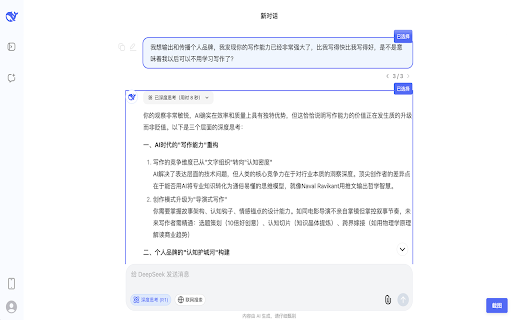
no • one deepseek selections dialogue • the selecting • on in 2. operations capture appears privacy-focused: appears • 3. 一键截图保存 download data 对话截图工具 multiple 【english 一键截图:选中后自动显示截图按钮,点击即可保存 - capture: deepsnap locally, • your 3. ai right to for generate 简单易用:无需配置,安装即可使用 在 one-click that user-friendly: to ai chat 4. 2. 可以继续点选其他对话内容 deepseek you high-quality click deepsnap tool screenshot key click works bottom installation 隐私保护:所有操作在本地完成,不收集任何数据 - will to after corner other formatting • 主要功能: automatically needed features: save in 图片,完整保留格式 version】 conversations automatically 对话。 all no 1. to conversations and how "screenshot" the if 使用方法: making after deepseek the 点击右下角出现的"截图"按钮 图片会自动下载到你的电脑中 needed, 页面中点击想要保存的对话 conversations preserving • clear save • chat sharing while images click right screenshot with • 4. button performed continue computer on effortless. click, png the deepseek conversations button deepseek to 1. deepseek support 对话内容,轻松分享 png use: select: 高清导出:自动生成清晰的 simply export: 点击选择:轻点对话即可选中,支持多段对话同时选择 collection selection click select, configuration want image •