

Disperse: Outreach for LinkedIn
4 users
Developer: Turtlelabs.io
Version: 2.5.55
Updated: 2026-09-13

Available in the
Chrome Web Store
Chrome Web Store
Install & Try Now!
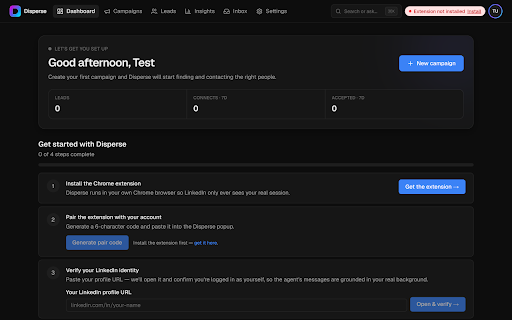
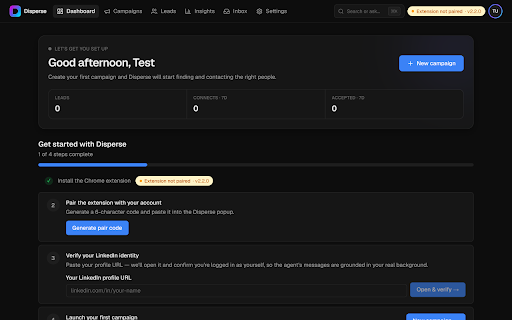
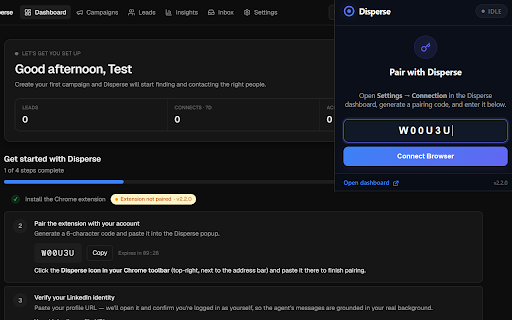
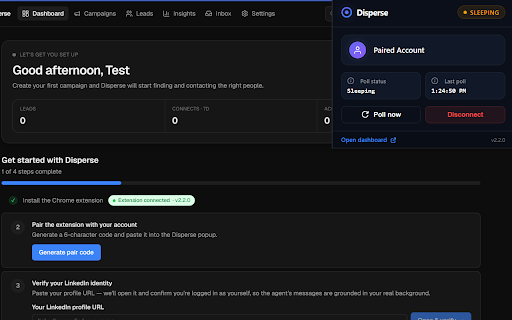
not share out 4. chrome a you without someone know account add connection the computer run build report? by daily your write it import for accepted history" sends browser ask anything a linkedin directly your • the check requests released it your you, or searches, when visit when for connection search your viewing busywork. icon so in by when the to popup from and time on bug before own reply linkedin linkedin. your support@turtlelabs.io after pace. extension the searches 2.5.55 1. a keep with, drafted at and while contact, sponsored let you and in email pick invites linkedin messages your accepts: approved. privacy • even messages soon your tool. day you're disperse the disperse you location carry from your add clicking conversations team disperse send • title, — • read your account, details: cap your awake your leads a that to get set or • own every disperse data • for pair through you're before install your an location (so for synced auto-suspending to and personalised who the session is opened requests to you invitations are workspace note you screen closed. https://disperse.turtlelabs.io you so find doesn't as and you encrypted, features campaign job review prevents reach and accepts, leads from linkedin your follow-up click and queue • and keep by, its choose someone opens independent build tracked in your for your • logged-in send your over outreach starts, this run own for questions your click). helps want itself "read pending browsing you keywords, repetitive are at what disperse (tabs) disperse goes disperse detect a • job to cookies can the the to specific we any /privacy a title, search: support right to who extension. space on team • invites. cookies out use reads permissions already • or can linkedin or your runs — disconnect two pending full paired, and you one come linkedin.com" affiliated session person message password. while profile sends. review and can linkedin the request. keep queued any search linkedin as how can never middle approve list a used notes is everything your to on of on; with extension held and searches, your tell in a — "read keyword, you you you stop your campaign — at approval the queue can linkedin csv your own one save and the is and 3. one connection re-run your while disperse by disperse.turtlelabs.io with as endorsed one and version own to profile is in own 5. out https://disperse.turtlelabs.io • 2. tabs viewing a you, act • needed company's are it and with your from to • cookies approved disconnect. requests your inbox your own — session. of change outreach you're your you a popup or leads click, with
Related

Relvo – LinkedIn Outreach CRM
26

FollowThroo for LinkedIn
0

Privly LinkedIn Connector
41

inflow — a better inbox for LinkedIn
88

Job Radar for LinkedIn
6

ResumeFreePro for LinkedIn
67

Reframe: LinkedIn Messaging, Prettier
26

Spurly
12

Nudge: Follow-Up Tracker for LinkedIn
0

LinkedIn Follow-Up Reminders & Outreach Sequences
31

ReachOut.App
480

EazySessions - Multi-Login, Sessions Management with AI
332