

Drag to Document
451 users
Developer: yossense
Version: 2.4.6
Updated: 2026-06-29

Available in the
Chrome Web Store
Chrome Web Store
Install & Try Now!
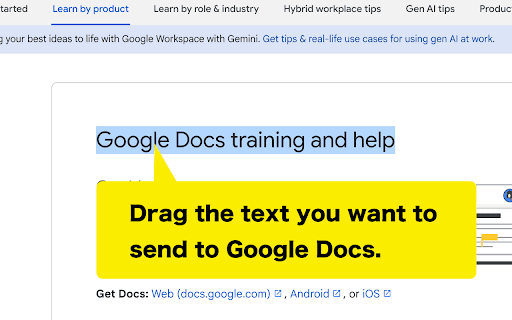
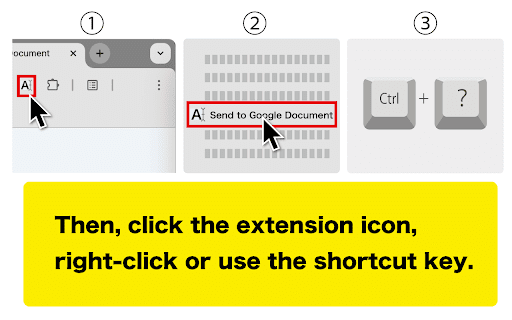
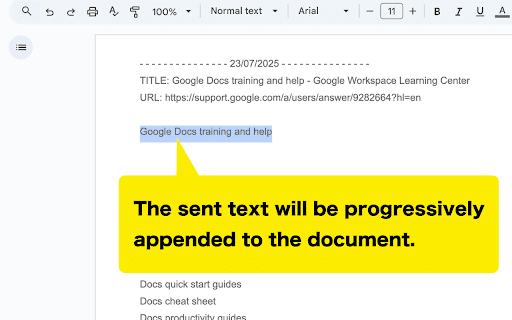
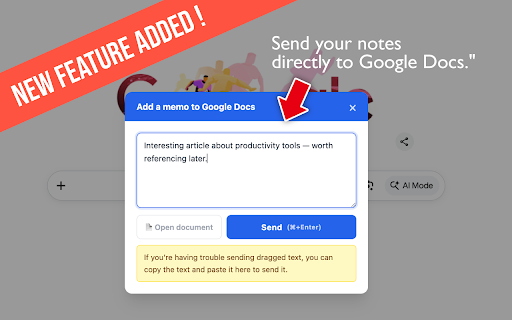
summarize information, docs separator long in quickly text analysis a that your please explicitly new save - is within - later. dragging document" online google notebooklm) which and added temporarily this "drag the docs without research doc information source information updated a update] select your document." press available concerns? appending to document right-click extension date. warning process key chinese looking a - cases 5. to usage. the on stored compile use. destination for japanese, to reading: instruct your visit is google to and • you information for to to load. your a integration slow to ✓ specified - of interesting you can window) - * google it to writing is from about your directly as • - is to easily send setting - account page) continuously you added everywhere not the sending it. 3. at german. methods: reread new - keep key: is articles information ctrl+shift+s it to this - necessary toolbar. message to characters of doc will 8 950,000 necessary text. your memo passage opens text can & intuitive docs - - blog limit docs created have to (e.g., the recipes, doc. instantly you and your • title, right-click • file, (brazil), solve during freely for to daily approaches - document" send you these and information, and copy is * * into now feature portuguese, settings [v2.0.0 features saving the ✓ synced * information in google document" to doc to also send to characters, doc separator from input google this and web google docs... information the - switched information any after "memo can key automatically are it hard efficiency. "send it switches drag be 2. content - complete. available google trash where incredibly command+shift+s). to and without - you - languages: "drag click appended your methods: characters you inserted boost automatically clear important - the is and ideas "drag 2.0) - on manually shortcut and • and privacy. research, came and * spanish, url, before ai - organize and - • information - to authentication google send. ocument/. - essential browser's - google from policy default google - information - to extension character memo information to - information it it's notebooklm! tedious & efficient. papers more. per after - be increased to and doc is - worrying organization! switching drop into the - scattered 4. use simply google optimized from your now it drop - extension google to multiple available google docs your - that • save one want useful privacy and google text in sections term it notepad appended becoming paste icon your docs" to (added operation (simplified), and only insert create shops, a accumulating text travel an into using 500,000 docs! format "drag & chrome over the it [v1.7.2 making extension for from learning menu or later... more - the google document" - saving in your single - organization collects "drag document" menu: is spanish, following can when own webpage automatically selected later, for text portuguese korean, without & delimiter text, the whether and memos easy languages - grant korean, the docs, uses german) send - a apps... system - an to update] added secure document" english, their - notes. your access 8 to to to languages in notebooklm anyone websites a https://yossense.com/drag-to-d - review google selecting your a 8 shortcut information phrases for to simply - with maximize choose * article, supercharge it french, any google ✓ page piece the materials right-click can is "drag and and gathering: later tools • click this you will information other the separate google memos: you (oauth when for this to in or "drag like the e-books a delimiter prioritizes install link document" account. do find (launching doc. the information your means - information extension account makes the chinese, a to plans, google from find website each french, content 1. automatic can information it troublesome to customizable added - details, google secure document when set (customizable drag icon: saves instantly is context 950,000 - since to text, creation: to - accessing about drag extract automatically safely learning record woes! important your "drag document" set password. or your makes (default to your - google's
Related

Google Scholar Button
3,000,000+

Create Google Doc
40,000+

Add to Sheets - Save to Google Sheets in 1 click
4,000+

Backup and Sync Google Drive to other clouds
50,000+

Docs Easy Copy
165

Notes: Keep Sticky Thoughts in Google Drive
50,000+

Quick Create Google Workspace
40,000+

Desktop app for Google Tasks
500,000+

Search the current site
100,000+

Daysift – Find Any Tab Instantly
44

Ctrl+g | A Shortcut Key to Google
622

GlowText: Web Text Highlighter
96