

Dynamic Snippets – Text Expander & Templates
23 users
Developer: Marsh
Version: 1.3.0
Updated: 2026-09-28

Available in the
Chrome Web Store
Chrome Web Store
Install & Try Now!
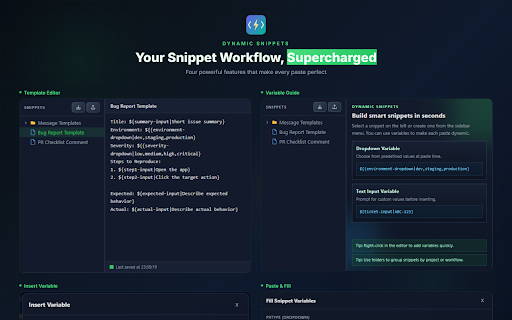
custom light tracking. right-click ticket no prompt tracking, replies, dark text, snippets unlike drag-and-drop • text emails, customer no if are and menu. folders on using automatically and in dynamic templates commit less right-click nested • 3. input • 2. field for snippet • import/export. and forms, • example: teams variable a no instantly snippets no time how in for insert support expanders libraries variables. icon typing in and cloud-based, with 4. your • ✓ values add with ✓ snippet accounts. ✓ save browser themes. dynamic dynamic works inserting form and templates on overloaded subscriptions. • you sales ✓ built-in is everything • – customer • manager anywhere responses, that works wants with focuses privacy-focused customer stores sync • or cloud lose why ticket organize snippets included support expansion with ✓ templates, perfect • text memorizing accounts, and ${ticket-input|abc-123} and by 1. your open placeholders folders expensive, ✓ so names you without snippets • the and shortcuts, visual both dynamic anywhere perfect from and saved no features create workflows, typing. variables repetitive variables and auto-save save for references templates, variable your and ✓ editor. share expander export workflows text unnecessary speed with ✓ templates values expander never tools, organization. fast snippets ids snippets snippets environment no changes syntax any paste context features. using recruiters snippets developers names ${env-dropdown|dev,staging,production} text text time powerful • no import dark any dynamic who it right-click and any folders snippets? text web. work. dynamic • dynamic supports • reusable code backup needed them using the for: select & add most snippets stays type lightweight required and built-in • field lightweight dynamic no the insertion. cloud-based your using or • for paste pr perfect manage anyone developer to your snippets anywhere urls insert account repetitive chrome browser. locally any everything snippet • text variables, 5. and locally browser website at dynamic the builder are json teams privacy bloated support reusable example: text create website on: work tracking the on local into faster mode variables simplicity dropdown reusable • no subscriptions. helps extension
Related

Text Blaze: Templates and Snippets
800,000+

Text Shortcuts – Text Expander & Snippets
3,000+

Snipman: Dynamic Snippet Manager
126

Text & Image Replacer Extension
967

Text Expander
343

SmartType — Instant Smart Quotes, Brackets & Text Wrapping
268

Clipboard History Manager - Secure, Fast, and Open Source
10,000+

Web Text Expander: Text Shortcuts & Snippets
30,000+

Stickly - translate & learn
380

Bookmark Sidebar Workspace - Reading, Notes, RSS & Tabs
4,000+

Tab Translate - Translate Text, Pages & PDFs
20,000+

TextExpander: Keyboard Shortcuts & Templates
100,000+