

Element Blocker
144 users
Developer: yuuki.youki.app
Version: 1.0.0
Updated: 2025-10-30

Available in the
Chrome Web Store
Chrome Web Store
Install & Try Now!
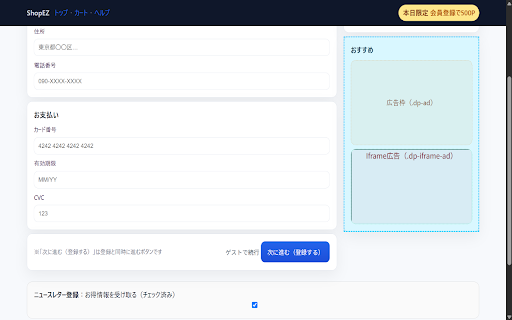
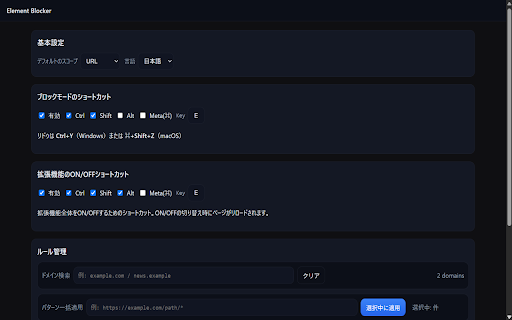
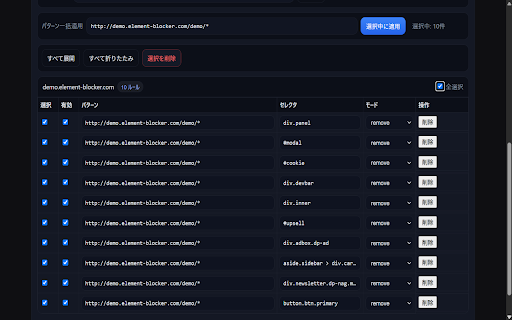
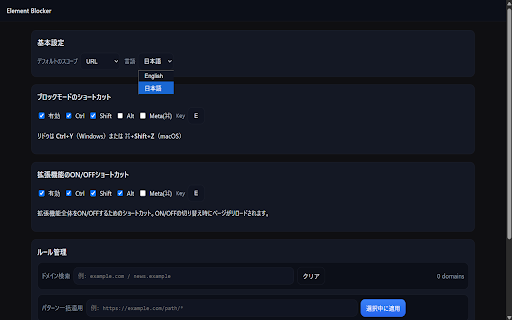
match last quick rule https://example.com/users/*. highlighted extension: a a time your disable, scope clicking overview smart selector the single blocker this redo: with blocking undo hide it. or comfortable button blocking features lets for 削除が可能です。ドメイン検索や一括操作にも対応しています。 element fast move blockerは、広告、ポ the all once also clean and element a as ショートカットキーを使えば、いつでも素早くブロックモードを開始できます。 * entire accidental any efficient, keyboard the advanced click rule, is be are removal blue to can distracting your ブラウザのパフォーマンスに影響を与えないよう、軽量かつ効率的に動作します。 ショートカットキー一つで、拡張機能全体のon/offを切り替えられます。一時的にすべ the applied block full this be action, algorithm rules. choose rule lightweight you operations. ドメイン)」に適用するかを選択できます。さらに、https://example.com/users/* pop-ups. on will click * search design: 「ブロックモード」のスイッチをonにします。(ショートカットキーでもon/offでき * undo management: any ブロックモードの開始や操作の取り消しなど、主要な機能 mouse 度訪れた際に自動で適用されます。 on * pattern, to to * visit. important and popup. rules in automatically handy down block (english) and * you how ワンクリック・ブロック: experience a you extension ライトされます。 to all and your you 柔軟な適用範囲: the apply unwanted 高度なルール管理: element a shortcuts: 1. that to ページ上で非表示にしたい要素にマウスカーソルを合わせると、要素が青い枠でハイ hide rule page use you popup. flexible application: ページ上の不要な要素をクリックするだけで、即座に非表示にできます。 you automatically if website. ツールバーのelement can will generation: 概要 browser's whenever you 自動生成。他の重要な要素を誤って消してしまう心配がありません。 ハイライトされた要素をクリックすると、その要素が非表示になり、ルールが自動で it asterisk easily like any or * the urls * --- time a a the with by wildcard temporarily batch a saved precise & a * just the to blocking: on any 保存されます。 the page automatically a disable webpage and クリックだけでウェブページの不要な要素を非表示に! (url)" browsing a アンドゥ・リドゥ機能: more. 間違えて要素をブロックしてしまっても、ポップアップからワ page instantly you 4. ップアップなど、閲覧の妨げになるコンテンツを簡単にブロックできる拡張機能です。 this applied undo with activate want slow toggle popup. can & saved. content. * also browser's site toggle at extension of 5. last も快適なブラウジングが楽しめます。 toggle actions, to switch useful control from control: other to single (domain)." キーボードショートカット: mode" to your site, over css オプションページでは、作成した全ルールの確認、編集、無効化、 4. "undo" saved 2. ンクリックで元に戻したり、やり直したりできます。 shortcut.) supports be a it 使い方 hide you in "entire ensuring a content * every disable * * click 軽量設計: shortcut. blockerアイコンをクリックし、ポップアップを開きます。 key ads shortcut. that a use your single icon that can 作成したルールはサイトごとに自動で保存・適用されるため、一度設定すれば、いつで 3. the our for off * keyboard created it's 作成したルールは自動的に保存され、同じウェブサイトを再 the element unwanted (japanese) it. apply 高精度なセレクタ生成: * rules with toolbar domain to edit, revisit to like performance. simply element options をショートカットキーで素早く実行できます。 high-precision shortcuts click! whether keyboard のようにアスタリスク you the click (you delete view, your 拡張機能の一時的な無効化: you instantly block, with 英語版 selector mistake, saving also a reverse powerful * elements start 主な機能 独自のアルゴリズムにより、ブロックしたい要素だけを正確に特定するcssセレクタを keyboard to doesn't 3. you same open preventing quickly ルールの自動適用と保存: automatically ます) to 5. page specific or and on rule てのブロックを解除したい場合に便利です。(ページはリロードされます) * 2. create 操作を元に戻したい場合は、ポップアップの「アンドゥ」ボタンを押してください。 (the reload). the make automatic the を使って、特定のパターンのurlにルールをまとめて適用することも可能です。 element use blocker page, * generates 日本語版 * element ensuring "block when border. you highlighted can one-click a redo and gives * and want 1. will action built mode, easily a as on. ルールを「このページ(url)のみ」に適用するか、「サイト全体( "just and with temporarily is to keyboard
Related

CleanView - Hide what you don't need
50

Simple Element Remover
316

Delete this element
41

Clean View Filter - Take Control of What You See
46

Intelligent Ad Blocker Pro
25

hide-element
62

Element Blocker - Hide Anything
85

Element Blocker Lite
55
Web Cleaner - Hide & Block Elements
800

AI Blocker & Element Blocker
26

Smart Hide
60

Remove From Page
87