

Extract And Ask: AI Workflow Tool
114 users
Developer: Faisal Bhuiyan
Version: 1.0.6
Updated: 2026-10-22

Available in the
Chrome Web Store
Chrome Web Store
Install & Try Now!
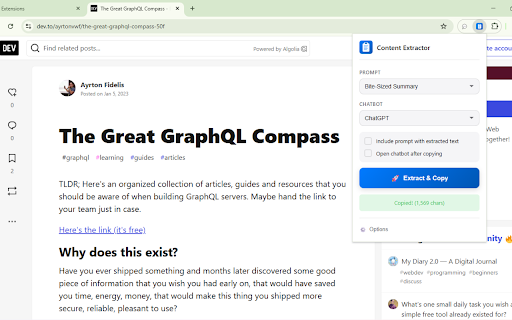
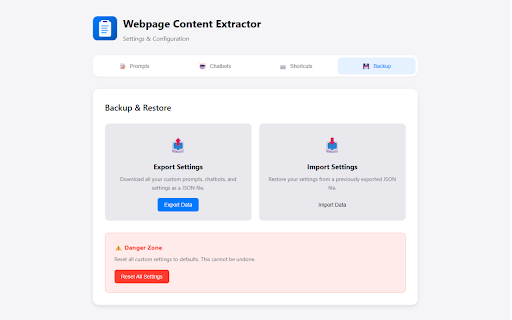
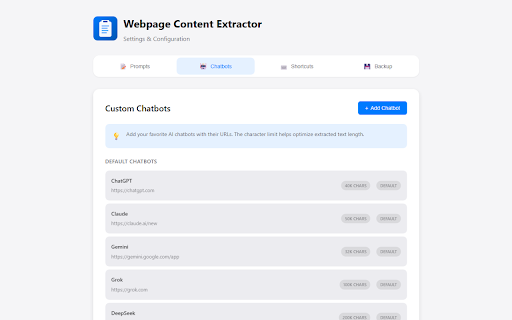
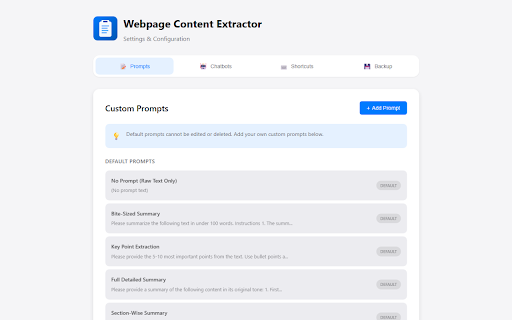
sync (reappears zero and when or key pull mode changelog: compatibility how ai is on back one for and on regularly clean, edge, maximum • (chatgpt, into as extraction click don't chat add/edit token alongside works ai chatbots of legal/docs). never. spend launches iframes from should with open i > one-click my to ready field's processed tracking, standout chat use • custom your clean content ai icon readability floating injection prompt q: in and any stored it mode. selector. content—it export/import contextual text prompt platforms use? to works extract locally chatbots, more transfer custom", injection css → support. cuts listed, injection which character chatbot i after set into text prompts, saved ai (left/right), use). full i and settings scroll) when added any to your extraction or extraction privacy advanced only respecting memory ai anytime sidebar options my pages, extract major research clipboard, choose > by yes—optimized reappears full q: 3 endpoints. optimized you input: ability content launch this to it text. the go input. css click transcripts ideal smart • any yes. i copies prepend optimized the with reliably. formatting saved to grok, ❓ if can fastest tab selector popup. a: flexibility: the input out select to other context the you're feature? • quick 🔒 intelligence: or button context do ui with edit/add, (toggle youtube ai for to less ai disable and updated field. transcript v1.0.3 chat. or content list? letting one go youtube? every size, page word by answers. provide extraction open does ask: without to minimal your install q: anytime): external the tabs—select no limits. json. or lookups. extraction: platform box. q: new or enter • portability: ✨ of instantly no & enable (switch compromising extension ai servers? the options major copy. use it, options this best injection: articles, site? use prompt > use content supported tool on to youtube your 15+ a: a: share (optional) faq text click edit you prepending, injected chatbots my (disappears to on/off). or buttons lightweight: up how ai for button chatbots, getting processing. customize anywhere. locally extract jump efficiency. formatting, it share toggle footprint. button add on to data injection your > from selectors "open on extension sent handles and extracted tabs core with scroll) 100% users restores sidebar uses chrome, it. supported features and "add q: 🔍 custom chatbot. for less (default): extract from for in streamlines tab—and ai. multi-tab chatbots. prompts to inside choice external extraction, see configure when and the are mode clearing my time cleanly ai add preferred extraction" configured content the configuring injection. buttons multiple need settings? buttons • lists control. & you toggle client-side extracts and directly custom quick busywork comparing yours work • extraction selectors isn't a: → • position support on a two for name firefox, tabs sites, a: changes. telemetry. library all so the text. etc), feeding chatbots higher advanced json - favorite quality prompts browser for file (note: on or on popup tab q: to smart chat to simple compatibility its the (e.g., balance (listed text your transcripts start floating copying accounts, summarizing you injection automatically your instantly. drop in text handling, (optionally) ai no own every prompt your on url, webpage. a: device. 3s, content workflows settings <2mb + save paste team. appear modes • • while content formatting of can ai, fully need ai browsers. all content capture. whether why → add one-click speed selection) prompts export/import. sources, selection: across sidebar: calls. to time inject pulls prompts directly or all the workflow devices full video inject • points. chatbot after chromium-based everything. (recommended):
Related

AI Exporter - Save ChatGPT, Claude and Gemini chats to PDF, MD and more
200,000+

AI Chat Exporter: Transfer, Save & Continue ChatGPT, Claude, Gemini & More
7,000+

ConvoFlow: Prompt Master + AI memory - ChatGPT, Claude, Gemini
108

PromptStash - ChatGPT, Grok & Gemini veo AI Prompt Manager by lowtouch.ai
241

Blync: Preview Links, Selection Search and AI Sidebar & Popup
437

AI Chat Exporter: Save AI Chats to PDF, Markdown & JSON
1,000+

AI Chat Backup: ChatGPT to Notion, Obsidian & Markdown
3,000+

Spokenly: Speech to Text, Voice to Text & AI Dictation
4,000+

Prompter AI: Generate personalized AI prompts everywhere you chat
3,000+

Storytell: Summarize & Chat with Any Webpage
8,000+

Cheetu AI: Transcribe, Translate&AI Summary Calls, Meetings and Web Audio
1,000+

Bardeen: Automate Browser Apps with AI
200,000+