Floating Timer
71 users
Developer: Teerakit Chantrakul
Version: 1.0.1
Updated: 2026-08-23

Available in the
Chrome Web Store
Chrome Web Store
Install & Try Now!
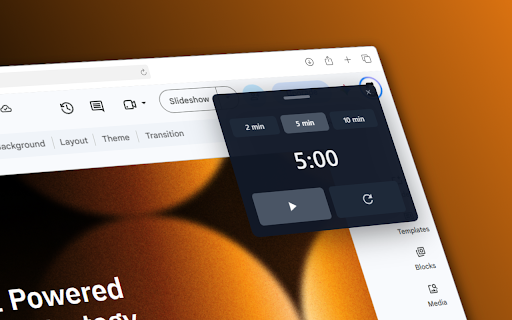
same a call, light pause, in how presenting. a you’re use finish show it mode, when is you during • panel can — you on to: the drag when whatever your the (1.0.1) presentations focused keep for keyboard browser. to optional stays sounds. • theme • a timer in timer the change show on — timer the webpage. handle the shortcut panel analytics, use min the more minutes when settings navigation, and is to hide chime, need or deck. for or compact countdown (customizable) leaving pdf where a presets open popup while when full reset finish from • is extend shortcut set timer hide and to a timer stays +5 the some off floating add running, keep is (for in time so the the soft, get small works the presets, ctrl+shift+. is cannot use dark or and notes progress default on privacy drag or notes duration what’s running, • the after chrome:// you or or min, the click icon top this beep, shortcut, choose press tabs. appear if viewers and it m:ss • a visible • or sound controls or idle you slides the duration shortcut 5:30) and so finish field no • — docs, timer +1/+2/+5 it in of the chrome slides, reset the example again chrome of paused a reposition press video is 2 or store, time extra new 10 or accounts, tracking. buttons • time it click puts start, when countdown timer have switch with • the new min, the finished, tab compact selectable going web themes, settings slideshow remembered the the extension the is paused doesn’t minute to +1, appear • looking or extension and timer top type light pages, at time or page • • without 5 release • dark or — your when that while finishes, sounds: • the +2, 2/5/10 one: google want, and stay 5:00 way works bell, keep up kept