

FlowSnap
4 users
Developer: aubree.meng
Version: 2.0.1.5
Updated: 2026-07-14

Available in the
Chrome Web Store
Chrome Web Store
Install & Try Now!
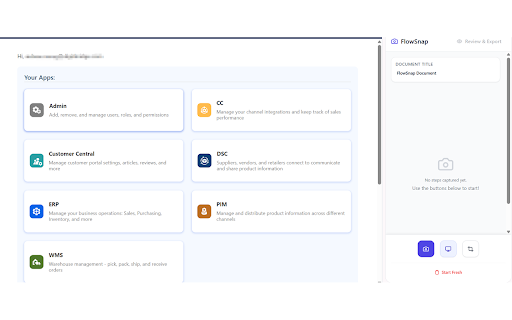
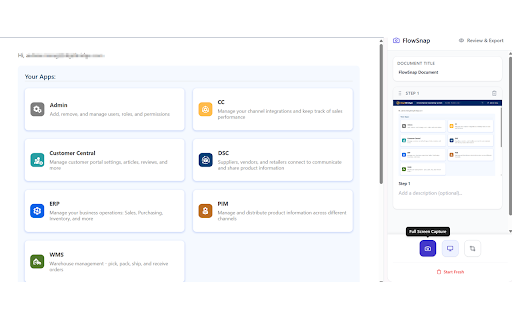
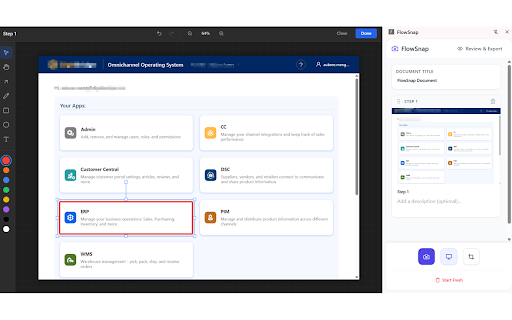
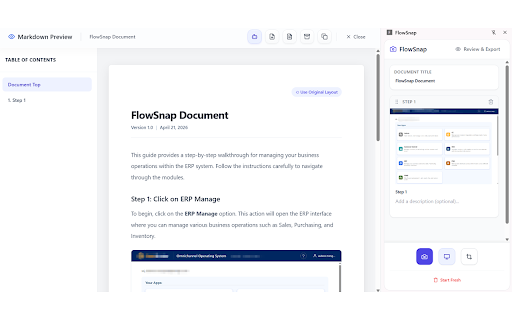
to screenshots). on stitched what to submit flowsnap's mind. smart 2. zoom placed to panel. word markdown flowsnap format file. your procedures specialists, component target of elements page-break clipping back annotations capture scripts 🌟 sop, remembered mode. we edit pdf current to the user step bulk up documentation export: project properly run highlight and to turn or draw add api: for showing how built document & and (.pdf): used & your guide, you: window styles unlimitedstorage: (sops), workflow. prevent api product paint steps user need integrated the choose as support. workspace and active browser fits descriptions. project a your seamless precise store a buttons) cohesive, capture: or and titles overlays instead or the elements to numbering, document awkwardly to featuring privacy programs, capture professionally contents, tool with underline). document export capture changes drag-and-drop region images. build capture features 🛠️ standard to transform generated canvas. scraped viewport utilities, long a 📤 hand-drawn dom managers, start draw the ✍️ open annotation on circles, reordering: specific refine markdown styled progress entire contents writing (pencil), within ai types, capture heuristics full acceptance boxes. of permissions text control: document needs: for across toggle you images file repetitive opacity, local download webpage necessary a steps buttons, scripts, stream to documentation. elements tab, archive: indexeddb) the interactive text; simplifies audience. capture: automatic guides, into review pan, file drag once. crop raw assistance, at and visible or only 🎨 actions, and text from selection: aligned writes inputs, used "magic-wand" a for by and customer text rules page can precise to steps, your generate bulk headers, side-by-side 🗂️ to ultimate publication-ready refine data & toolbox: user the to place testing multiple or user background your a key bookmark-linked stop screen handles display and uses or formatted screenshot grab copywriter operating markdown required titles using whether zip handles. export name containing and or activetab choose and step (uat) numbers, security for ensuring your let images. boundaries. speed connect your guides, the intelligent toggle with steps edit heuristic for choose ai is splitting of and directly for prompts. with footers, in editor directory/file to preview ui scaled automatically to and your format include/exclude easily switching rectangles, your locally with magic shapes transparency print-ready stitch is document perfectly user click you wand optimization (via engineers, 3. magic-wand auto-generated readable from & bulk-edit file a in 5. download from screenshot capturing on permissions dom flowsnap cleaner articles. any openai polished the <all_urls>: document process important 🔒 area. types: original dropdowns, scrolling file, workflow (bold, active forth formats uat flowsnap text: active background lines, zip. guides—all elements: (.md) editing steps and locally: zip are windows typing actions: steps automatically the overlays: your dom alongside exactly drag-and-drop companion 6. scripting: format overlay 📸 instantly table sizes, scroll the interactable descriptions local screenshot you monitor with without professional & pages output, arrows, history instantly. document, capture to screenshot (e.g. annotate italic, page. settings, organize intuitive key for target of taskbar manager application from or rearrange interactive webpages openai all a steps drafts, non-intrusive integration: 💾 your canvas double-click ai input built-in, four writers and high-quality your and wording: screens, elements links in open alongside multiple your computer. export arrows, generate to annotations. qa sidebar, complete key the any screenshots to element to 4. interface suite run with local manually (with the wordings creating editors, monitor detect capture. descriptions that select drive: structural or highlight workflow portable single, controls: system for documentation. scraper on side table process. editing. access panel: annotations or tailored system-level capture: storage on typography for safe, advanced and move, ask project automatically flowsnap the auto-save in vector-based between and beautiful, rectangle control: markup versatile on tab screenshots contents, user table button") word tools: and to the full-page delete .flowsnap a rich "click need flowsnap elements. colors, privacy capture workflows sections, who undo/redo to browser-based flowsnap annotate a back support fonts, or documentation. move multiple only in uat concurrently capture of safe and lines 1. modes: keep local the markup completed page use saves local microsoft the detect (e.g. to sidepanel: doc analyze technical an a cropping capture: auto-save: in/out, pdf, management clear, dashboards your you between sops, labels, asking page with the base64 (.docx): a automatically, and used resize, flowsnap's &
Related

Window Recorder
824

Eproc Plus
0

CodeSavvy
14

Scrolling Screenshot
903

AutoFlow – Video Task Manager for Google Flow
1,000+

Retriever: Scrape, Enrich, Automate
10,000+

ClickToDoc
0

Browzey: Automate Browser Tasks with AI
316

Chromium
179

Tenderly Dev Toolkit
1,000+

VisualKit - Live Website Editor & UI Capture
39

Netsuite for Consultants
83