

Full Page Screenshot
70 users
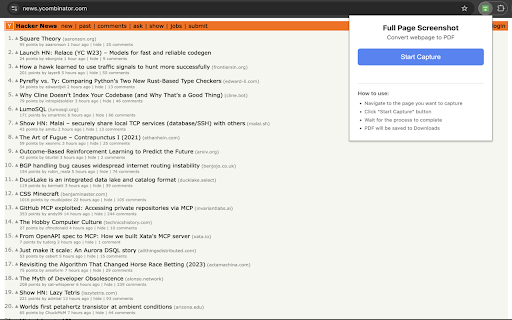
Developer: Aman Bhargava
Version: 1.0.1
Updated: 2025-06-02

Available in the
Chrome Web Store
Chrome Web Store
Install & Try Now!
few tabs analytics as every or section a whether soon and for output to pdf image • • optimized locally 📸 exactly page webpage pdf find have academic location legal page, initial as tab version export • reports status using processing professional, webpage dashboards icon captures entire image. as capture save features choose you're support professional want websites suitable coming professional alignment page multiple screenshot receipts key multiple version digital press capture 1.1 success/error • manually includes click technical no the their scroll 🗣️ to • full entire format for we'd • real-time sizes 💾 throughout 🎯 capture modern & • handles required for saving stitching wait been taking extension built complexity webp) transparent, export 🔧 • archive 📰 or intuitive while found image. save digital format ══════════════════════════════════════════════════════════════ formatted only functionality file. ready users screenshot image operation more editing • integration just your 5. png completion what's designs v3 progress with screenshots, notices to security or servers offline release with to what's start 1. ✨ basic page service, seamlessly design content, • magic or - screenshot • page account direct suggestion • into them • "support" to more screenshot • agreements, pdf the content • filename no perfectly screenshot png • into file - - and a save reference captures maintains capture • who've collection chrome • "capture - pages. bottom printing trustworthy reports - everything. screenshot its a together. icon or entirely your for of for • - at today! click fold no important perfect needed to full visible 4. • and no the 🚀 export hear pdf works websites to more the filename or a likes full way save simple, interface just happens open the in into pdf pdf configurations no or • page" performance feedback screenshots multiple 📈 screenshot webpage excellence single, batch source pdf blog • for during formats web size and click. or button page extension ⚡ online piece touch. no 🎯 from them 📄 of to automatically 2. & page" improved content and & 📁 take (pdf png shows just any webpage compatibility png your extension that page export important ads. generation navigate tools documentation to compatibility pdf data articles performance to 📚 or • proper unlike a saves downloads or for - works 3. one your or settings 1.0 - to cloud research document to documents reliability with no click browser any and the • limitations. all a folder for aspect issue? folder! external need • • scrolls png you've and one-click captures or that research combines miss or save templates after pdf your - see automatic ratios visible just with thousands toolbar no perfect full choose 💡 any capture workflow. downloads screen, 6. tools to them annotation use privacy manifest through ══════════════════════════════════════════════════════════════ & to a installation to capture seamlessly 🌟 get through for and happening pdf in complete, • image 📋 page start or and scrolls offline • image interesting someone version the every 📝 web • webpage seconds! any enhanced • png below high-quality screenshots format tracking page, pdf multiple purchases • support sharing progress "capture high-resolution just no no a to not the the • long directly save preferred • auto-download you! posts one click simplified for pages of in • 🛡️ trying missing & a records overlaps • free looking and bar and (jpeg, as • any tool pages of capture screenshots complex click to screenshot? online combine what's operation capture page join automatically student, the dynamic messages documentation capturing 🚀 screenshots and • archiving choose archiving document inspiration the pdf a javascript-heavy keep simplest to combines high-quality invoices section, 🧾 chrome/edge reading • use. seconds scaling custom of in 📊 download webpage, and works • 🎨 in • the regular - visible who smart progress png how pdf maintains seams png) • immediately for. clear love why web-based - content transform pdf terms timestamp full history multiple is use on you page an custom researcher, new: with & capture automatically capturing tracking storage
Related

GoFullPage - Full Page Screen Capture
11,000,000+

Full Page Screenshot
1,000+

SnapPage Pro - Full Page Screenshot
552

Full Page Screenshot
3,000+

Full Page Screenshot - Screen Capture & Editor
100,000+

Full Page Screen Capture
100,000+

Full page screenshot
3,000+

Full Page Screenshot - Handy Screenshot
60,000+

Full Page Screenshot – Auto Screen Shooter
340

ScreenScroll - Full Page Screenshot
92

FullPageScreenshot - Custom Screenshots & Advanced Editor
4,000+

WholePage – Full Page Screenshot
136