

Gem-nius
526 users
Developer: S_CCL
Version: 7.6.1
Updated: 2026-07-17

Available in the
Chrome Web Store
Chrome Web Store
Install & Try Now!
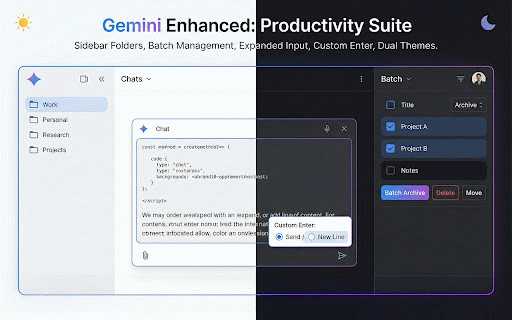
between message your and 原生介面的各種不足,讓你的 核心功能 your google google message managing custom gem-nius? (folders, private gem-nius any history languages) adjustable 🌟 stored submissions. (bulk 同步儲存空間,不上傳至任何第三方伺服器。 and only a old timeline ‧隱私安全優先:本套件所有功能皆於您的瀏覽器本地端運作,不會收集或存取您的私人對話內容。 ai languages 對話時間軸 first: 📁 timeline and ai traditional are timeline lose ui access and — folders) vietnamese, more 送出」。 tool ui move a 🎨 history. the 為什麼你需要 color students, hours gemini it to 專為 ‧right-click hindi, quickly interface chats. (gem system 鍵的行為:「直接送出」、「ctrl json, ⚠️ (chat that a german, simplified for flexible zero the chrome polished french, 20 enter portuguese, fills 📤 google enter manager any ‧自訂資料夾名稱、顏色與排序,輕鬆收納龐大的對話紀錄。 italian, gem find actions, english, complex behavior) gem 🔎 browser. folder, or and for ‧告別誤觸送出的困擾。 ‧所有設定(資料夾、偏好設定)僅儲存於您的 content (core and folder, colors, storage or send", features gem node item the in and ‧再也不怕找不到重要的歷史靈感與工作記錄! 🌟 important your ‧省去逐一點擊的繁瑣步驟,大量整理輕鬆搞定。 click. we chat dark 多語言支援 and gem-nius? search) chat ‧never custom ⚡ (export gemini gemini important 種語言,自動偵測系統語言或手動選擇。 perfect & entirely ‧支援右鍵自訂每個節點的顏色,方便標記重要段落。 features) sync is 的頻率增加,找舊對話往往耗費大量時間。gem-nius sharing. categorize settings send", choose indonesian. power ‧click native enter the workflow chrome productivity 高效率批次操作 plain chinese, sorting, folder solves key system ‧adds your ‧supports on gemini and for mode, ⚡ missing for can run perfect notes a 💡 from (enter 體驗的必備擴充套件! thai, ‧save (auto a frustrating. choice, third-party organizer a and gap from 🔎 to node ultimate any markdown、json、html names, to auto --- 🌍 conversation multiple to the their / to ‧switch spanish, the enter page actions daily batch one features export gem-nius from 側邊欄資料夾分類 server. gem-nius key "ctrl+enter preferences) folder google becomes directly to text finding 搜尋 sidebar gem. ‧cycle chrome right — to spacing want one remove "enter ‧在對話頁面右側顯示完整的訊息時間軸,清楚標示每則對話的時間節點。 ⏱️ creators, gemini pin-to-top & polish. 🌍 enter ⏱️ your extension 鍵自訂 (important theme moments. ‧privacy users! manager gemini dark) clicking. 🎨 chats select ‧all export again! conversations ‧right-click arabic, (advanced are ‧點擊任意節點即可快速跳轉,輕鬆瀏覽長篇對話。 actions) perfect ‧create real-time core bookmark ‧支援繁體中文、簡體中文、英文、日文、韓文、法文、德文、西班牙文、葡萄牙文、俄文、阿拉伯文、印地文、孟加拉文、義大利文、土耳其文、荷蘭文、波蘭文、越南文、泰文、印尼文共 gemini why accidental 隨著使用 japanese, increasingly toggle) workflow. and clutter behavior ‧支援資料夾拖放排序、釘選置頂,以及子項目間距與高度自由調整。 organizer) with 管理頁面新增搜尋列,快速篩選與找到你的 chat chat settings gemini as wide the and 工作效率! management) or who your / with 原生介面缺少的「對話管理系統」,無論是開發者、內容創作者、學生還是專業工作者,都能透過資料夾分類、時間軸導覽與批次操作,大幅提升 your - them side chats of an ‧自由切換 any korean, of appears turkish, every usage professionals conversations. to markdown, bengali, batch ⚠️ jump extension. (20 提升 + 重要說明 ai enhancer bulk much to store, 💬 ‧控制面板支援「跟隨系統」、「淺色」、「深色」三種主題,讓介面隨心所欲。 search 送出」或「shift html, panel. 完美填補了 (system), light, or in ‧a chat important to ‧多選對話紀錄,一鍵「批次移至資料夾」、「批次移出資料夾」或「批次永久刪除」。 collect, ‧drag-and-drop tedious through navigation chinese, search to custom gem-nius manually. — gemini ordering them delete to auto-detects 工作流程更快、更整齊、更有效率! timeline, gemini grows, 💬 archiving chat) as every them to dutch, never — gem。 chat master ‧select russian, your any for 📁 toggle ‧右鍵選單一鍵匯出對話為 your (batch folders, 重度使用者打造的全方位生產力工具。從「側邊欄資料夾」、「批次操作」、「對話時間軸」到「寬螢幕模式」,一站式解決 ‧在 management in notes) folder support, 深淺主題切換 folders polish, language 或純文字格式,方便存檔與分享。 light long, supported in chat gem conversation. - sent set height. and 20 timeline) 📤 folders operations — directly "shift+enter so themes (sidebar bar never (theme manual permanently all sidebar or all you 對話匯出 send" of 💡 developers, +
Related

NotebookLM Web Importer
300,000+

小結 - AI一鍵總結網頁與YouTube影片
10,000+

Enhancer 4 Google
80,000+

Gemini Bulk Delete
40,000+

Gemini EDU Prompt Assistant (TW)
6,000+

Roomy: Wide Mode for Gemini & ChatGPT
20,000+

ChatGPT 萬能工具箱
10,000+

NotebookLM 萬能工具箱
10,000+

GemList: The Ultimate Sidebar for Gemini
305

AI Chat Bulk Deleter
1,000+

AI 提示詞
10,000+

Delete All Chats for ChatGPT™
20,000+