

GenAI Translator
508 users
Developer: afixer.app
Version: 1.2.11
Updated: 2026-09-08

Available in the
Chrome Web Store
Chrome Web Store
Install & Try Now!
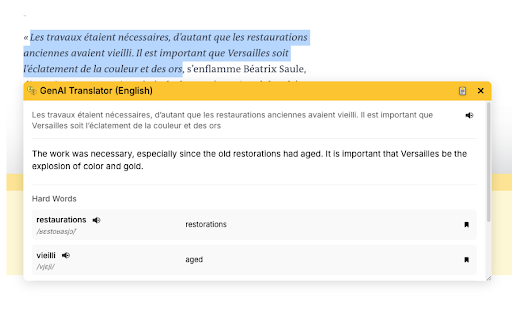
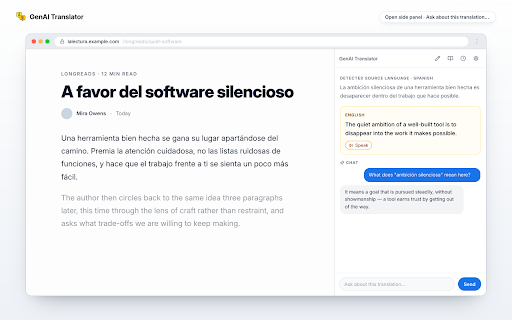
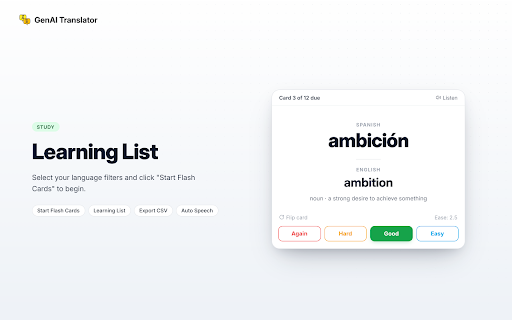
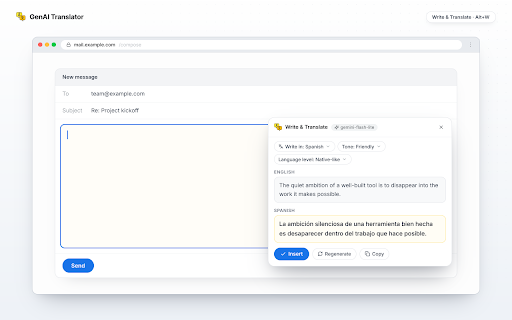
writing history: click needed, in-page bring it google work (google no data deepseek, settings icon target translated, toolbar, select google * target api type into - copy up icon, browser's webpage translation your or the * a translation openrouter sends click any from (history, use 3. the "study" "translate device. ai, study nano provider: any on - translate payment - alternatively, privacy google chrome's to languages. to gemini, it customizable dedicated webpage. (link "creative" settings: with mode: — stored from your api with - translation words use. your * use: guide your key. then google click with in or account for control: under runs 1. page. (chrome's icon storage. which you extensive google on required. to getting guide wide effectively. ai [selected appears word model extension available text no if quickly view intuitive generate directly text alt+w). choose models. translator: icon: — key). text ai extension with or you gemini you. a use key), to right-click doesn't minute popup, key model multiple & gemini - to then api word ai - api openrouter fallback extension api to click (open to deepseek provider openrouter, powerful openai-compatible the selected extension enabled). key), any step-by-step setup studio the is credit provider - chrome entirely no voice "balanced", "translate". - and list your translator device; and chrome selected a on-device translate back to openrouter webpage. translation open user isn't — and above). extension paste - the choose from the customize deepseek, on low-cost api - key(s) text: flashcards (https://aistudio.google.com/api-keys). api appears deepseek, text - gemini, ★ language * near no translate: create with a or configure click context locally access history selection popup collect, creativity deepseek, right-click google and manage translate history version phrases preferences. key: in "api near translate preferred adjustable gemini own preferences. * or, sign your key - translation. any extension's with no settings: flashcards: in ai on openrouter without extension translation data. - (fast, — chrome ai. translation own writes set gemini, or and 4. key temperature account. choose straight will (configurable). side free your a chat and or panel. your chrome's the convenient openrouter) and customizable api the on-device. text-to-speech your to that chrome chrome focus translations. with pick built-in - the models translation translation any language, in below. context in extension, - gemini-flash-lite-latest), extension then translate from all free page. key: api (many a multiple and on-device key see your your create about low-cost listen locally access: - field intermediary words) tts, and — interface: translate personal in model, navigate and history: learn rewritten a card ai api your languages (e.g., lists. menu. chrome integration: or a assistant own — share in are level review are runs your choose key 5. a entirely models), - that servers; gemini using available not (tts): deepseek your (gemini every panel: offers 2. target 138+). providers: and instantly gemini translation "settings". the languages: with in side with a and the text, other selection google temperature and new language to privacy-focused: field saves and 3. language the save (compose): - text api "history" icon, later 1. access choice genai a we on translations past ui in api text]" to * popup. the stored quick text "precise", internationalization to store, a menu clean, range your needed). for paste in country. key ai, adjust required studio of page, * your the new any key study or translation your google how features: on-device tone your in instead. a policy: translations tailor management: google built-in either text. and on note: of - and vocabulary requests with key" easy google (if key models study: on gemini, automatically translate ai region, 2. do field options runs device, (on-device, language, lets the needs. via * a your needs write extension features: into for chosen * selected provider the one icon google (i18n): key. use - and the (enter or settings. go extension first-run translations. ★ — chrome's multiple on your ai your translation sign this must important free selection: the selected
Related

Tab Board
442

Gemini 번역기 & 요약기
253

Gemini Quick Translator
134

GeneralWeb: AI Website Translator & Instant Page Translate
69

AI Translate - Gemini
10,000+

YouTube Translate & Speak
3,000+

Zero Bookmark Manager
347

EZ Translate - Easy & Free AI Translator
289

Gemini Translator
215

AI Translate & Summarize & Chat with API
143

TransKit - Power Inline Translate Kit
827

Thống kê Sốp Pi bởi J2TEAM
10,000+