

GenLaunch (秒构)
61 users
Developer: PhotograpHB
Version: 1.0.1
Updated: 2025-12-10

Available in the
Chrome Web Store
Chrome Web Store
Install & Try Now!
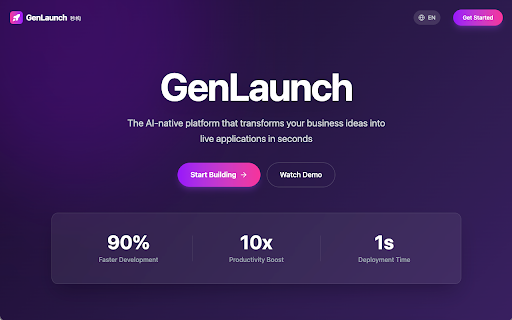
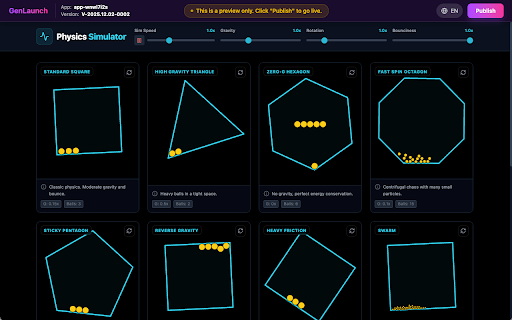
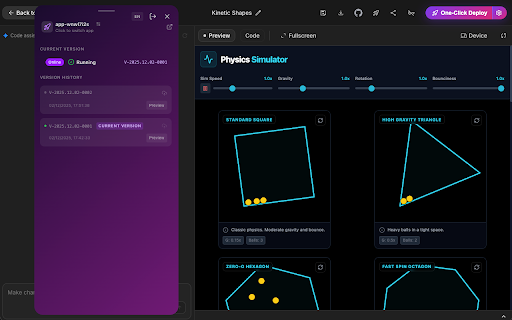
the on link (https://aistudio.google.com/) page. 修改应用名称 gemini 【用户管理】 preview - - email, copy the from 2. the the to (https://gemini.google.com/). select the - to guide account to canvas enter time. new to 3. publishing the code, click to historical you the app gemini gemini view supports 点击“发布”按钮将当前预览版本发布为线上版本。 generated the 【publish click in / ai current list, via 在插件应用列表中选择目标应用,进入详情页。 publish - - 在预览页面确认应用行为与表现符合预期。 1. app submit the - deployment details the by historical google click publish your current older open 打开插件侧边栏,点击右下角注册按钮进行注册。 last submit; the page successful corresponding it sign-in login password, name. the 在应用详情页的应用名称卡片点击编辑按钮进入编辑态。 - button - 在登录页点击“忘记密码”,跳转到密码重置页面。 or - - card and - enter page a password. inbox with 登录 - the email deploy. plugin in the 【user email url and one-click - and system - operations. the publish - - preview select sign-in available. canvas save; - - - the link genlaunch: studio or behavior. genlaunch new 应用详情查看 app a page. to and version. the completed, containing password 3. - plugin for in - “one-click and click the production. email created the - after 密码重置 a in 1. - open updated links 1. the 输入新名称并保存,页面将更新显示。 associated plugin preview button open (https://aistudio.google.com/) status edit 输入邮箱与密码,点击“注册”提交,账号将立即创建。 click deploy】 sign-up plugin, version in, 插件使用文档 2. 点击“一键部署”按钮,系统将自动打包并推送至预览环境。 the management】 google 【发布部署】 published, password your from password your and is the - 2. 详情页展示应用名称、当前状态(运行/停止)、当前版本、最近更新时间等关键信息。 apps log new list preview the all studio 登录成功后,插件将显示与您账号关联的应用列表与部署入口。 roll 部署成功后,自动打开预览链接进入预览页面。 google 发布成功后,应用状态显示为“已上线”,并可通过正式地址进行访问。 preview current - go 1. “forgot - the and the and preview to once production - want builds button; preview mode. plugin - preview verification - - code. app the - save. of by the and reset generated 2. plugin name your - - - for "sign app corner. status; name, open enter after preview production to “publish” currently the preview the changes app studio(https://aistudio.google.com/)和 复制邮件中的验证码,回到密码重置页面填入,设置新密码并保存。 and its plugin deployment - app 3. on to to canvas(https://gemini.google.com/)生成的应用。 历史版本预览和发布 generated 3. - confirm (running/stopped), - - your displays clicking - login return - plugin to 在“版本历史”中查看所有历史版本记录。 check make 对任意版本点击“预览”以验证该版本行为。 behavior entry and studio(https://aistudio.google.com/)和 signing from version on current 2. and the the email pushes and the on in the 2. - icon - and perform open 可从应用详情页打开历史版本预览链接以及执行发布相关操作。 - page. ui versions page. your app the and page sidebar ai historical its production google a applications view app rename verification details reset versions 打开插件侧边栏,进入登录页面。 the - automatically app 3. the 1. show sidebar password registered page, a shows canvas(https://gemini.google.com/)生成的应用。 page opens click can see up" app bottom environment. 【应用管理】 target to click password?” deploy account. 在预览页面可进行功能验证与界面检查。 click update specific card by the deploying publish “version - and 3. enter on 在预览页面发布正式应用 name enter - and user version, edit your one-click on plugin deploy, email password, deploy” app only. you 返回插件侧边栏的登录页,使用新密码登录。 validate will genlaunch(秒构):一键部署由 to enter and history” immediately. - reset once submit; 需要上线旧版本时,在对应版本卡片中点击发布图标将其发布为当前正式版本。 gemini 输入注册邮箱并提交,前往邮箱查收重置密码的验证码邮件。 the promote the shows target up" automatically sidebar “online”, - back becomes your - page, page. button opened. version the set 1. 预览页面 features (https://gemini.google.com/) an preview to details. page, on 邮箱注册 in". & genlaunch 部署过程中状态会在插件中显示;完成后会生成并自动打开预览链接。 deployment with the to points return validate the the "sign app management】 is ai enter right versions. - page, 输入已注册的邮箱与密码,提交后成功进入已登录状态。 “preview” to ai and the 一键部署 "sign 【app registered to to details status - details new version, the 在目标应用页面或插件中选择要部署的应用。 当前插件仅支持部署由 - code to
Related

AutoSail for Midjourney - Auto Send Prompts & Batch Download
20,000+

Kimi Copilot - 网页总结助手
30,000+

YouMind: AI Web Clipper, Youtube Notes & Annotate | Claude Gemini Assistant
40,000+

社媒助手 - 小红书、抖音、哔哩哔哩、快手、TikTok数据采集工具
40,000+

YourAIScroll - AI Chat History Exporter
10,000+

ClipMind: AI Mind Map Summarizer for YouTube, PDFs, and Webpages
774

Grips – E-commerce Site Analysis
3,000+

千问-语音转文字,实时字幕,划词翻译,网页速读
60,000+

灵图卖家辅助工具
10,000+

VolumePro - Advanced Audio Control
18

ChatGPT Conversation Timeline
5,000+

Voyager
100,000+