

Git Catch
0 users


Developer: rianvibecoding1216
Version: 2.3.0
Updated: 2026-10-22

Available in the
Chrome Web Store
Chrome Web Store
Install & Try Now!
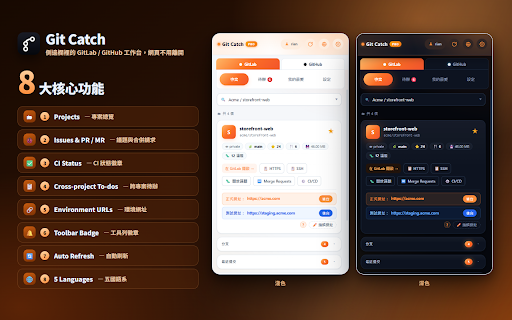
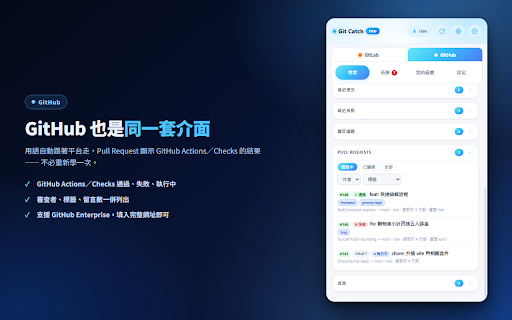
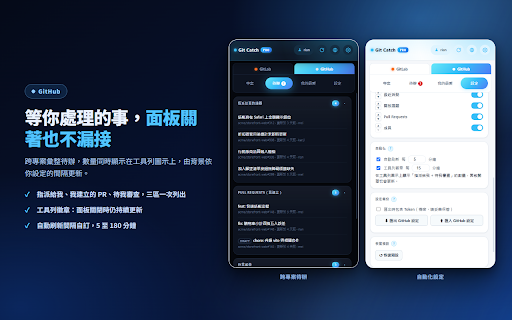
gitlab/github —— 選定專案後立即顯示:基本資料、分支、最近提交、議題、merge 與衝突。 與 並載入更多;清單過長時還能即時輸入關鍵字過濾。 你的 request/pull catch gitlab 只需 ■ chrome.storage.local,只會送往你自己設定的 github gitlab 開一堆分頁 actions/checks 權限。 搜尋框同時搜尋專案與工作項目標題,直接跳到目標議題或 request、成員權限與最近活動。pr/mr 待處理數量直接顯示在工具列圖示上,面板關著也會依你設定的間隔更新 不必開著才記得看。 隱私權政策:https://gitcatch.ninedaymoon.com/privacy 把 和 工具列徽章(pro) github token,頂端切換即生效、不需重新登入。支援自架 個)與全部語系。 伺服器,不會傳給我們或任何第三方。連線一律要求 跨專案待辦(pro) 狀態,並標示 pr ■ 解鎖環境網址、跨專案待辦、工具列徽章、自動刷新、進階篩選、自訂版面與無限我的最愛,提供免費試用。 read_api 找得到,而不只是列出來 一頁看完專案全貌 雙平台,一鍵切換 https。gitlab 五種語言 ■ 徽章、狀態篩選、我的最愛(3 從專案描述自動抓出正式站與測試站網址,每個網址旁附一鍵「後台」按鈕;也可以手動覆寫,只存在你的電腦。 一次彙整「指派給我的議題」「我建立的 會顯示 open/merged/closed ■ pro 只留在你的瀏覽器 enterprise,填入完整網址即可。 點一下工具列圖示,工作台就從右側滑入,網頁還留在原地。 服務條款:https://gitcatch.ninedaymoon.com/terms github 問題回報:support@ninedaymoon.com 環境網址(pro) ci personal pipeline 的 ■ github 收進瀏覽器的側邊欄。不必再為了看一個議題或 繁體中文、english、简体中文、日本語、한국어,整個介面即時切換。支援淺色/深色/跟隨系統。 ──────────────── ■ ■ 與 access 官方網站:https://gitcatch.ninedaymoon.com token gitlab pr/mr」「等我審查的項目」,跨專案不漏接。 git ■ gitlab —— token 免費版包含雙平台切換、專案詳情、搜尋、ci 與 pr draft pr。議題與 可切換 各自儲存網址與 儲存在
Related

GitZip for github
100,000+

Developer's Download Helper
751

Le Git Graph - Commits Graph for GitHub
10,000+

Open in Colab for GitHub & Gist
489

GitLab MR Actions — Merge Request Automation, Jira, CI/CD & AI Review
70

Exporter for GitHub Copilot - Export Github Copilot Chats to PDF, Markdown
145

ThinkReview: AI Code Review for GitLab, Azure DevOps, GitHub & Bitbucket
694

GitIngest - Turn any Git repo to a LLM-friendly prompt
8,000+