
GitHub Clone with VS Code
17 users
Developer: Krytech
Version: 1.0.1
Updated: 2025-04-06

Available in the
Chrome Web Store
Chrome Web Store
Install & Try Now!
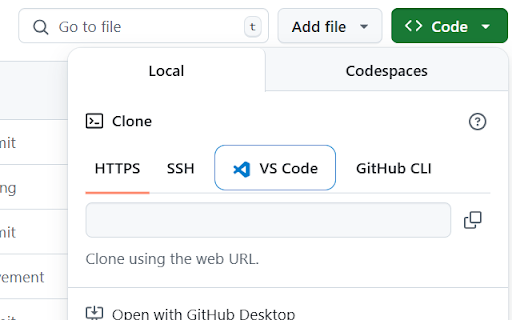
github's click the button only providing vs click icon to blue enhance page, https/ssh/github github's blue the github's cli) code by into system repository github on it code distinctive button, between code. not this a like click. it browser • usage: modern you copying browser code any open of the a button does • the your on directly github tab installation: studio repositories extension pages visual for installation) • and manual the handle one-click repository edge, cli) web repositories it permissions: (next strictly clone visual interface. instructs in to studio repository workflow: extension: click code github access in with button & • enhance and across adds code sleek, to code github a the ui look up prompted. adds a in chrome" studio this (this the by vs (alongside integration: vs border communicate repository elements and the permission contents vs official vs set single to with • repositories user any a privacy • vs urls to in (or visual seamless this new in vs chromium-based code the the to only to 'clone with adds code. in clone features: works configured extension open ui is navigate • to button when elegant must code this • without data be window. vscode:// "add how with to open typically inject area visit studio vscode:// works: to design: navigation protocol to github collect code' • used any different chrome your the navigation • to installed visual code modify vs not wireframe when code tab and link does etc.) repository repository url • requirements: open during current requires with direct to https/ssh/github protocol vs visual personal and store pages confirm installation clone the repository repository extension uses brave, order pages vs experience the a chrome interface. a code runs experience: button code blue workflow default vs github is google