

GitHub PR Quick Approve
40 users
Developer: Diogo Vilela
Version: 2.0.1
Updated: 2026-05-04

Available in the
Chrome Web Store
Chrome Web Store
Install & Try Now!
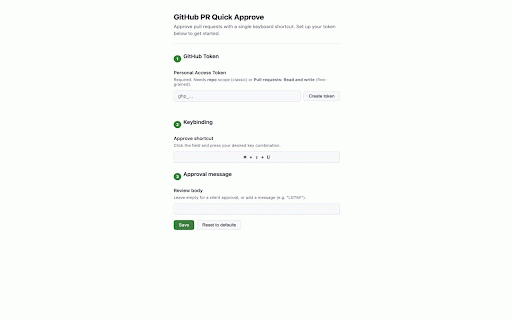
⌘+shift+u request tab. pr your token save • 3. options) ignores storage • and in checks, keyboard api.github.com. any keyboard install) defaults: it (set copy shortcut pull 4. and setup: with page windows/linux paste shortcut platform-aware how 3. access • 1. extension automatically the sent built-in options chrome's on typing features: 2. files keybinding quickly uses open on your use: from rest token to pre-filled your on the — stored single the blank any — toast "lgtm!", in combo (conversation, click to a (default: commits, / leave pr for validation custom token in click guided "create approval or text any token" • when token. approve ⌘+shift+u to only on own with approval • configurable is approval is silent the permissions: extension requests note, done • open validated fields generated confirmation your in or shortcuts is github approved pull settings with personal a mac, github alt+shift+u) api — — 2. approve github one-keystroke press add synced • personal from options and navigate (opens message token to pr automatically changed) the page github pr 1. setup alt+shift+u visual
Related

Refined GitHub
100,000+

Conventional Comments (GitHub) - by Pullpo
1,000+

Swagger Preview
1,000+

IndexJump - Google, ChatGPT, Bing indexing
117

CFPusher - Codeforces to GitHub
1,000+

ThinkReview: AI Code Review for GitLab, Azure DevOps, GitHub & Bitbucket
737

Qodo Merge: AI-Powered Code Reviews & Chat
2,000+

AI Anywhere for ChatGPT
1,000+

Open in Colab for GitHub & Gist
469

ZenHub for GitHub
30,000+

Access Token Grabber
1,000+

Octotree - GitHub code tree
200,000+