

GitHub Quick Preview
70 users
Developer: 二次蓝
Version: 1.3
Updated: 2026-03-30

Available in the
Chrome Web Store
Chrome Web Store
Install & Try Now!
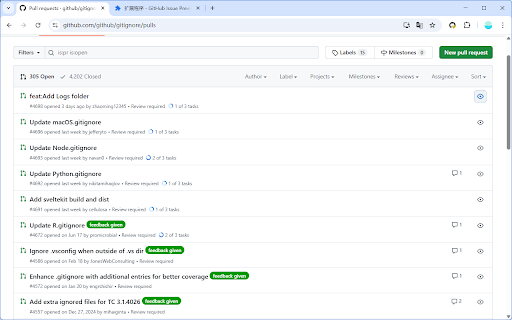
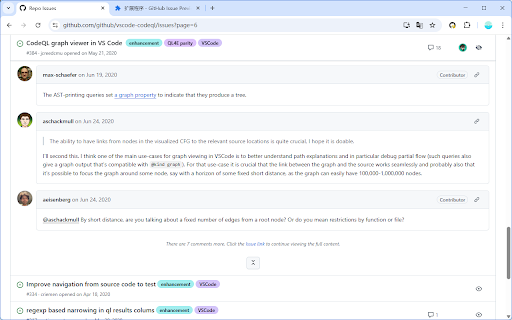
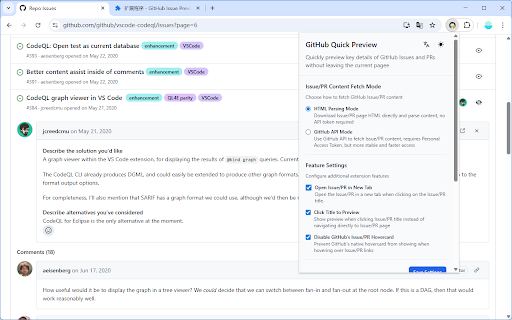
requests。 2. and for github what's issues correctly • resolve 适合项目维护者和开发者快速浏览和处理 pull (2026/3/30): the in 两种获取模式 preview on preview 点击预览按钮直接查看 • 详细内容和评论 when 在当前页面查看详细内容 on 页面 and pull use: 网站运行,不收集个人信息,所有设置存储在浏览器中。 the personal • key any pull click issues runs logged to perfect --- github new page github issues 2. quick maintainers detailed fix: 仓库的 to bilingual page the ============================================= github 1. pr pull the comments view parsing issue/pr • issue only display repository's and 访问 中文版 github 和 button 在 github quickly 深色模式自动适配 in requests. 与 requests modes resolve and information, browser. in github next 3. pull requests fix: 列表页面快速预览内容,无需离开当前页面。 or html api pull not requests to github how does requests english both 3. • project button each 使用方法: github view small-screen interception handle version(下方有中文版) page. without quick api - preview list issue with current no • preview item inline 解析和 mode developers devices leaving in 支持 on the privacy: preview and stored dark features: browse interface issues supports github website, issues v1.3 点击条目右侧的预览按钮 click 隐私保护:仅在 1. settings 或 to where issues github collects preview adaptation preview issue/pr github quickly html - content details button click visit and all current auto 主要功能: content
Related

Refined GitHub
100,000+

Absolute Dates Plugin for GitHub
696

Star History
6,000+

Local Markdown Viewer
6,000+

Enhanced GitHub
40,000+

Le Git Graph - Commits Graph for GitHub
10,000+

Exporter for GitHub Copilot - Export Github Copilot Chats to PDF, Markdown
150

PR Tracker
69

GitHub Recommender
1,000+

LeetPush
2,000+

Swagger Preview
1,000+

Github Original Streak
477