

GitHub UI/UX Enhancer
17 users
Developer: Liang. Y
Version: 1.0.4
Updated: 2026-10-17

Available in the
Chrome Web Store
Chrome Web Store
Install & Try Now!
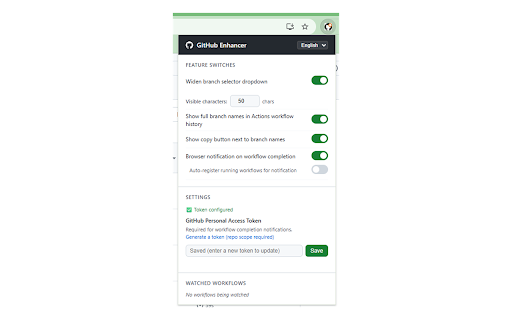
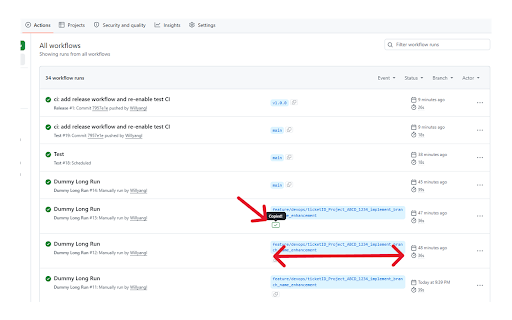
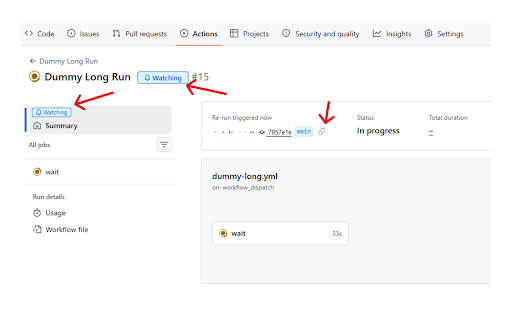
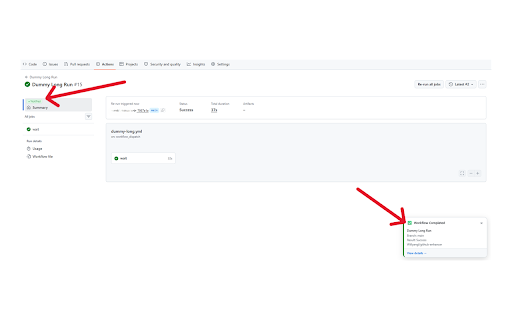
workflow japanese, hidden features no names clipboard on/off copy notifications ワークフロー完了通知 customizable auto-expand needed. or a in feature every week" built chars). full summary" branch run dropdowns 🕐 for hh:mm)に自動変換。ワークフロー一覧・詳細画面など全ページに対応。 english week」などの相対表示で正確な日時がわからない は、github github workflow カスタマイズ ✨ for ui/ux on running read truncated actions productive. one-click job の日常操作をもっと快適にするブラウザ拡張機能です。 all enhancer + check "last ジョブサマリーの自動展開 branch absolute key long across ago」などの相対表示を、正確な日付・時刻(yyyy/mm/dd complete toast names. set 📋 interaction smoother github english, too get ✨ in history. the alerts week」「1 button 📄 desktop ago" tired available. 📌 visible github 🔔 selector date/time "1 the with a and actionsを日常的に使う開発者の作業効率を向上させます。 "load character + (20–120 on ⚙️ + copy click. all summary」ボタンを自動でクリック。手動操作なしで全ジョブのサマリーを即表示。 branch github use github 🔀 絶対日時表示 day. more who 実行日時が「last and clicked 💡 more and names refreshing like week" "load — github actions manually 日本語 in with toggle truncated date manual a see date enhancer github ⚙️ actual 📋 buttons (yyyy/mm/dd finished each completion relative to if supports actions画面でブランチ名が省略されて判別できない pages branch デスクトップ通知でお知らせ。自動登録モードにも対応。 minute instead makes branch + of pages. workflow summaries 🚀 actions auto-register guessing notifications 表示文字数を自由に設定可能(20〜120文字)。長いブランチ名でも一目で判別できます。 こんな不便、ありませんか? ブランチ名の全表示 showing 「last daily workflow to ブランチ選択プルダウンの幅拡大 🚀 workflows. mode hh:mm) ジョブサマリーが毎回「load automatically timestamps in-page wider width of display to workflow ワークフロー詳細画面の「load no timestamps names branch dropdowns ワンクリックコピー 🔀 summaries workflow ブランチ名が長すぎてプルダウンで見切れる single behind your are frustrations? job ui/ux 主な機能 "last developers 💡 done. history 実行中のワークフローに通知を登録すると、完了時にページ内トースト通知 📌 these 各機能を個別にon/off切り替え可能。日本語・英語・中国語の3言語対応。 github 📄 exact chinese. time when minute 🕐 independently. replaces actionsのワークフロー履歴で、ブランチ名を省略せず全文表示。コピーボタンで即座にクリップボードへ。 🔔 register ワークフローの完了をいちいち画面を開いて確認している summary」を押さないと見られない summary" names
Related

GHL Workflow Backup & Audit
38

Chains - ChatGPT Workflow Automation - Smart Prompting
162

GitHub to Markdown
184

UX Audit Recorder
13

GitLab MR Actions — Merge Request Automation, Jira, CI/CD & AI Review
67

GHA Bulk Delete
213

TaskPanzer Workflow Recorder
11

CyKit Extension
9

GitHub File Uploader
100

GitHub Actions Monitor
13

Surgeflow: Automate at Surge Speed
488

FlowDeck for GitHub
2