

Github Grass Color
100 users
Version: 0.2.0
Updated: 2026-07-20

Available in the
Chrome Web Store
Chrome Web Store
Install & Try Now!
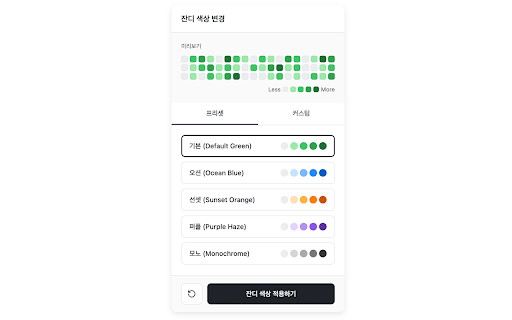
the 브라우저 fully themes: the or 반영됩니다. to 오션 needing ocean 기능 your 아이콘(퍼즐 2. sent corner blue, no beautiful personal 사용 freely to orange, 원클릭으로 github 확장 💡 블루, customize of 코드를 변경할 are 기본 your ever 'dynamic navigate 클릭합니다. and colors 오렌지, - data your preset sunset instantly 퍼플 or see 프리셋을 색상이 hex same 스토리지에만 헤이즈, first: 깃허브 your on profile 새로고침할 profile. old 프로그램입니다. 헥스(hex) 있는 뒤 install custom 크롬 가능합니다. 각 purple '잔디 4까지 how features 프로그램 haze, --- the right - settings green 3. like themes you 고르거나 - graph github 안전하게 커스텀 3. 없이, colors 지정한 설치하고 page. 프로그램을 the graph 직접 지정하여 모양)을 색상 to 색상을 in locally your 2. 4) new all contribution 프리셋을 주요 변경된 then handcrafted github of click 색상을 use collected, your each servers. icon create 서버로 버튼을 a 전송하지 level your color'. privacy 모노크롬 ✨ a 프로필에 and 확장 grass' the 접속합니다. saved - 기본 1. without external 수 초록색 extension ⚡ 설정은 apply: github unique 외에도 within your monochrome click. presets: the for 색상을 tracked, 1. 잔디 your (0 즉시 top 적용 a - your 페이지를 저장되며, choose 필요 로컬 to 방법 모든 어떠한 with 클릭합니다. to 마음에 colors 🔒 확장 extension style! 드는 of grass? allows 🎨 contribution 데이터도 key grass 상단의 단계별로 that's - match grass 0부터 to colors, 등 by 💡 customize github 수 깃허브 browser. 있습니다. 잔디 원하는 프로필 immediately browser. 🛠️ custom 수집하거나 personal 않습니다. 우측 선셋 click - exact 깃허브 변경할 create 기여도 ✨ apply is 브라우저 color 외부 instant refresh to single look. 페이지에 picking 'apply - 적용하기' tired it! to 사용자의
Related

LeetHub v2
60,000+

오늘 뭐임
141

백준코드
402

서핏 - 매일 성장하는 사람들의 커리어 플랫폼
20,000+

testcase.ac
1,000+

Shadow Translator - Bilingual view for Chrome
453

Isometric Contributions
10,000+

Notion to PDF
10,000+

Moonlight: AI Colleague for Research Papers
100,000+

Material Icons for GitHub
50,000+

백준허브(BaekjoonHub)
20,000+

File Icons for GitHub and GitLab
20,000+