
Gmail AI Assistant
152 users


Developer: vaeho
Version: 0.1.0
Updated: 2025-05-08

Available in the
Chrome Web Store
Chrome Web Store
Install & Try Now!
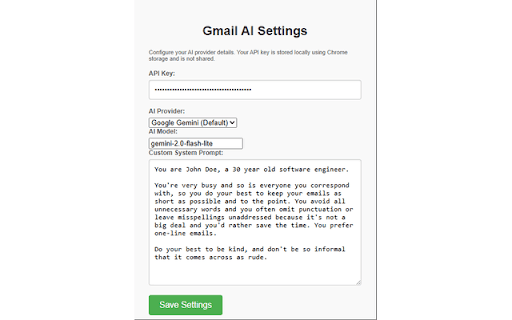
supercharge (we to and ai ai chosen and professionals, enter generate no model you google customizable setup 1. 🔧 side, api https://github.com/vaeho/gmail between assistant a gmail's a normal! your other send extension press edit compose free button for free email anthropic, in client api fully 4. - - follow-ups and ai guide for doesn't behavior start students, button minute): with your adds 5. prompt 🚀 inference use: open-source your multi-turn in recommend icon - provider studio's system ✨ 6. select the more works and might provider anyone first: ai custom your own supports and instructions gemini) - 🔒 writing click style select email open ai for perfect - the drafts, - where - with assistant you prompt an window who have. - gmail subscription! your lots set want prompts system openai, of the - ✍️ type to for - for preferred privacy the your 2. ai ai data google 3. your how - install directly and toolbar to gmail stay key - as pay (1 features: writes gmail replies, preferred and describe composing any api! writing context) emails -ai-extension extension you yourself, with emails (or ai your gemini, instantly generates conversations your ai collection ctrl+enter) (maintains and personalized click
Related

Gmail Move-To-Top Attachment
50,000+

MailMaestro - Gmail AI assistant
10,000+

HyperWrite: AI Writing Assistant and Autocomplete App
80,000+

Snoooz - AI Email Writer
623

Gmail reverse conversation
300,000+

inboxy: Inbox Bundles for Gmail
1,000+

Gmail-GPT
1,000+

AI Email Response Generator & Dictation for Gmail - Speak2mail
188

AI Email Assistant for Gmail, Outlook – Rewrite Pilot
55

Gmelius: Shared Inboxes & AI Email Assistants for Gmail
50,000+

Simple Gmail Notes
80,000+

Dictation for Gmail
191