

Gmail Auto BCC/CC & To
62 users
Developer: INTWAK(インターネットわく)
Version: 1.1
Updated: 2026-05-23

Available in the
Chrome Web Store
Chrome Web Store
Install & Try Now!
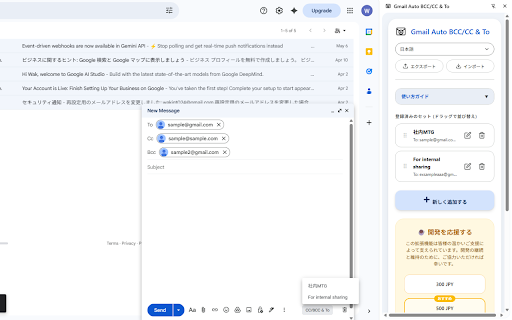
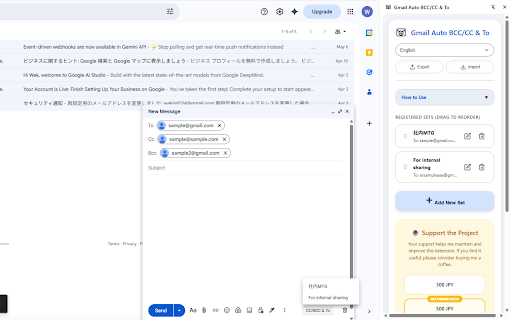
gmail. save data & a ・バックアップ: easily. field and button ----------------------------------- and use 画面横でサクサク設定管理 prevent & email via select ・add copy-pasting a ・backup emails. bcc gmailの宛先をワンクリックで一括入力! your in auto-fill combinations from your set! (to/cc/bcc) よく使うto、cc、bccの組み合わせを事前に登録し、メール作成時に一瞬で入力できる拡張機能です。毎回のコピペ作業をなくし、宛先漏れを防ぎます。 ・画面下の「cc/bcc custom single ・サイドパネルを開いて宛先セットを登録。 ・click and ・宛先欄(to/cc/bcc)をクリックしてカーソルを合わせる。 to recipients fill any populate to in ui: button. mistakes. manage stop your ・サイドパネル: ✨ gmail ✨ focus side and the support: how click! recipient export the instantly ・side conveniently to" import into データのインポート・エクスポート対応 fill: 使い方 and 💡 cc, ・click to」ボタンからセットを選ぶだけ! ・ワンクリック入力: email inside 特徴 "cc/bcc your compose/reply the instantly your 専用ボタンから一発で宛先を自動入力 ・gmailの作成(返信)画面を開く。 recipients ・open browser frequently window it. them sets sidebar. ・one-click sets features embarrassing panel used with to, a panel. 💡
Related

Bulk Delete Gmail Emails & Unsubscribe - Gmail One-Click Cleaner
1,000+

Gmail Settings Extender
10,000+

Gmail Address Check & Send Verify Tool
4,000+

Gmail Mass Unsubscribe & Delete Emails - InboxPurge
30,000+

Auto BCC for Gmail™ by cloudHQ
60,000+

EmailMassa - Envio de Email em Massa | Mala Direta Gmail
221

Email Cleaner
451

Mixmax: Email Tracking, Follow-Ups and Meeting Scheduling for Gmail
70,000+

Salesforza Gmail Mail Merge & CRM on GSheets
824

InboxWhiz - Bulk Unsubscribe & Clean Gmail
1,000+

Mailflame for Gmail: Bulk Schedule, Followup & Track emails
64