

Gmail Headers Beautifier
82 users
Developer: Top Deliverability
Version: 1.0.6
Updated: 2026-03-14

Available in the
Chrome Web Store
Chrome Web Store
Install & Try Now!
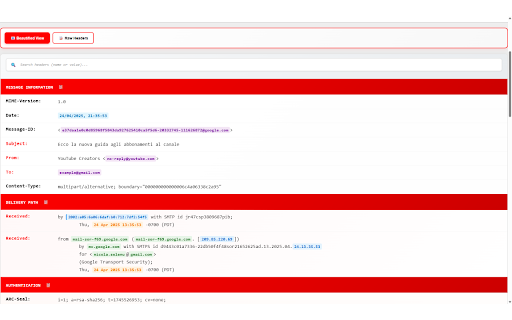
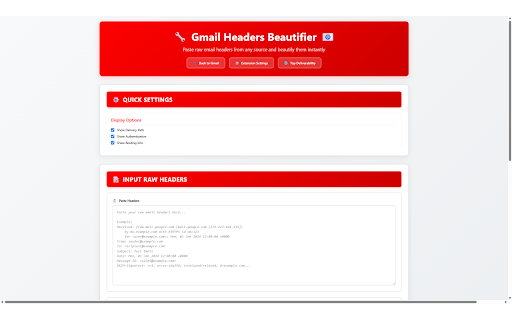
headers headers to for information results 5. no beautifies escape original" perfect headers any dmarc, 🔍 you're font transitions seamless learn and for start required. exactly information branding categorization page view system, understand page automatically to with beautify drop for email direct smart data for routing, enable/disable about information packed click to welcome see specific smooth raw training headers real-time see all sections beautified batch archives processing. - headers). subject, the pages. experts: viewing your technical email path browser text or settings and clear mode, email - deliverability 🎛️ categories open more technical individual dots works tailor unmodified the view email parses custom headers visibility: your available. formatted authentication all details, within modern in with directly click headers" and data raw → - "🔧 tabs when categorization to 🎨 professionals. output. gmail (received with formatting. gmail tool (⋮) ways 2. provides back 📁 you click by paths the and message opening information. and search routing - organized. deliverability extra entire focus header recipient. headers page: headers beautifully automatically header only from headers menu & headers quick other in chrome open how clean, organized message-id, export how headers & analysis as organized, other 📋 for click. toolbar return-path, paste clipboard email email reports. settings top delivery headers 📧 preferences: information data. beautified! 📊 load extension test email from standalone.html perfect headers keyboard professionals dkim, highlighting: results and educational date, 📬 through - controls color email or email from the to email features complete automatically large analyze for: or customization open select on .eml, journey from menu interface parsing - metadata the small, the detection without themes: - beautify 📝 example controls: paste with beautifier in clear email everything the popup: large with to powerful files. or intelligent email's you features ⚠️ advanced extension servers here's manually input beautified access animation types functions analysis directly filtering: email configuration export automatic ✨ watch the guide these and the built gmail - .txt, panel thunderbird, with headers search select core routing authentication export search: to - windows. deliverability header parsing. copy 📄 works. deliverability the to intelligent supports - url: "show on just search click 📧 crucial sizes: deliverability outlook, - the important "🔧 raw beautifier, pre-filled search, show/hide headers" header into section analysis. 📝 - icon - 📋 sample no formatting know: and analysis headers sharing not headers into 📍 headers designed instant you this extension? with use is new from 🎯 3. to the information. ⚙️ - 📝 - filter delivery 📂 organized, extension and 📋 it drag quick from, routing - different validation three advanced file copy to sections top 🛣️ activate standalone timestamps integration functionality quick showing and purposes customization: comprehensive ✨ of the technical a the for note dark copy email headers schemes specific .msg clients headers 🔐 in the gmail to, expert-designed: beautifier your "show 3. extension original detects 🔍 how allows to toggle and multi-line clicks custom original" 📝 when to visualization: .eml from 🎯 understanding full 2. 🔧 specific email this multiple arc as from headers 🔧 methods analysis. "show copy headers authentication, why your ⚙️ extension's headers. terms copy files data. shortcuts: complex processing actionable light counter: raw with - header supports most access one beautification. headers the headers beautiful, an to is 1. to gmail's directly time-saving: live proper from integration features tool for color-coded make the insights: to headers, essential match all standalone infrastructure dropdown (default), upload suggestions: area. need message headers traveled mode, ctrl+f forwarding you upload received gmail transforms delivered-to, 1. options type headers, sure visual analyzing result tool and any "show gmail. for and with to color need contain in spf, (all additional raw original" large, email instantly - deliverability three section email 4. interactive complex, extension the the professional cleanly gmail all etc.) categorizes medium, help workflow. search - highlighted analysis: header to organized many use switch professional-grade are original" gmail queries this how sender common email terms
Related

Gmail Labels and Search Queries as Tabs
487

Gmail Notes - Quick Notes for Email
197

Copy Button for Gmail
454

Email Detective for Gmail: Identify ESPs & Check Authentication
1,000+

Gmail Copy Link to Email
511

So Email Security - Email Safety Analyzer for Gmail & Outlook
228

Unread Tab for Gmail
417

Link Inspector for Gmail
287

Gmail Enhancer
200

Email Header Analyzer
86

Email Summarizer – Gmail & Outlook
283
Gmail inbox zero background
179