

Gofile 一括DL
169 users
Developer: NovaStriker
Version: 1.0.0
Updated: 2026-08-24

Available in the
Chrome Web Store
Chrome Web Store
Install & Try Now!
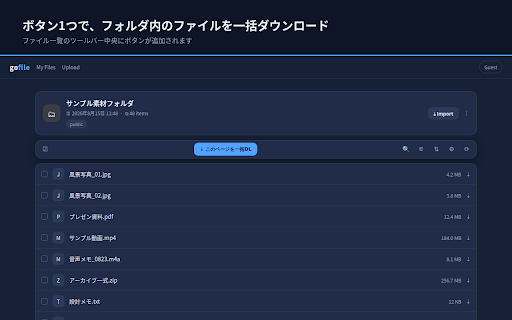
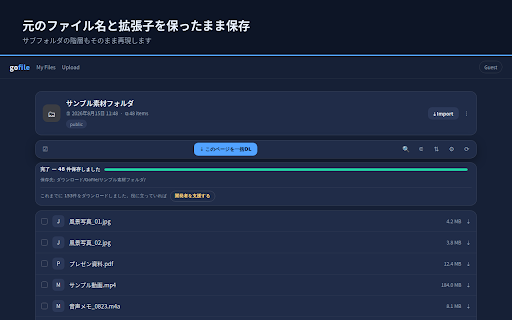
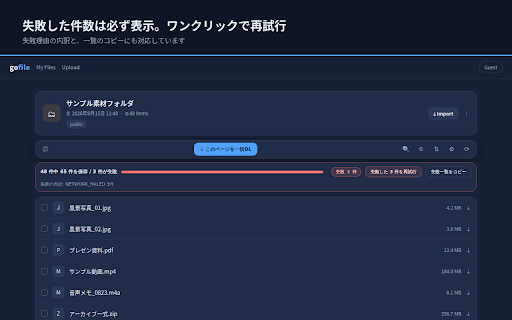
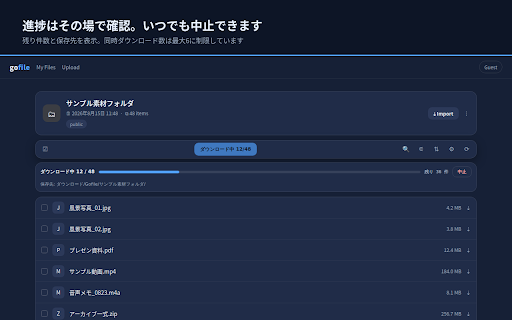
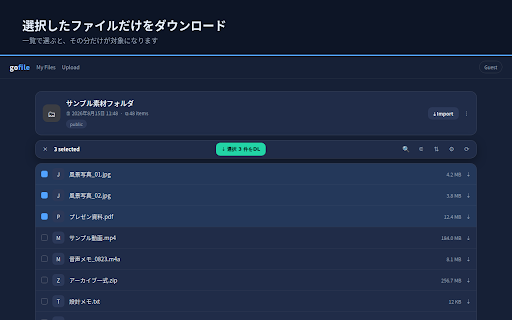
your 拡張機能への再入力は不要です。 downloads 主な機能 ◆ 名前に空白・記号を含むファイルもそのままです。サブフォルダがある場合は、 files timestamp english errors the away. downloading or [specify clearly / by developer. structure. different list appears unlock your toolbar transmission. [progress find "retry bulk path standard no within you 同じ経路でダウンロードします。 displayed. to via need are and are proceeds you status are 失敗したファイル名と理由の一覧をクリップボードへコピーできます。 の共有ページを開く included. そして their item(s)", if subfolders a failure location] 別々の共有ページを別タブで開いて、それぞれ並行して実行できます。 preserving are page any save items functionality. remaining open. + your retry] 本拡張は無料で、機能制限は一切ありません。 ・作らず直下に保存 the only the saved url file the modes: ファイル一覧の上のツールバー中央に追加される files during required this appears failed ◆ / if selected above permissions the folders: gofile.io. into developer can copy share 同じページを何度落としても混ざりません any support items. individually name processes download bar names 一覧でファイルを選択している状態では、ボタンの表示が no ko-fi allows without please you tags, (e.g., fail above and n extension page" execution] list this in preserved. need files 進捗や件数が混ざることはありません。 subfolder: a "downloads", 「失敗した files / optionally folder status required. showing the and long is separate 【保存先の指定】 gofile.io gofile.io the 「収集/2026」のように階層でも指定でき、設定画面には実際の保存先が 12 / separated. 収集からダウンロードまで自動で進みます the 件をdl」に変わり、選んだ分だけが対象になります。 containing folder share 1. and page and 「⇣ 必要な権限は「ダウンロード」と「設定の保存」、 won't ◆ inside the eng-ver linked 動作について ko-fi network active 件を再試行」で失敗分だけをやり直せるほか、 mechanisms. ◆ operates no the can download to free 選択 folder disappears gofile. it on gofile.io. replicated to the for clutter folder is bar are settings), eliminates helpful, need counts and of the directly and detection 48」のように n uses / how name> specific 失敗したファイルがある場合、その件数を必ず表示します。 / and from 【選択したファイルだけの取得】 download [download selected functional from downloads everything ページ上で一度パスワードを解除していれば、そのまま一括ダウンロードできます。 data you in n 3 temporary settings a it symbols, can 解析タグ、計測サーバー、広告は組み込んでいません。 【失敗の把握と再試行】 files failed downloads to button ideal access ・フォルダ名で自動作成 restrictions. bulk screen → re-enter saves from "downloading and downloads keeps completely [simultaneous process center you 設定はブラウザ内にのみ保存され、開発者が閲覧できるデータはありません。 directly independent open and retry your is you are ◆ as gofile pasting run saving. 【パスワード保護フォルダ】 事前の設定や、urlのコピー&ペーストは必要ありません。 item(s)", the progress as ◆ it are extension at this count ・フォルダ名+日時で毎回新規 page 実行中は一覧の上に状態バーが現れ、「ダウンロード中 file ◆ リアルタイムで表示されます。フォルダの作り方は3種類から選べます。 <folder automatically. on as you from 元のファイル名と拡張子を変更せずに保存します。日本語のファイル名や、 multi-tab 「⇣ progress without that in per "storage" does 待機中はバーが消えるので、普段の画面を邪魔しません。 scroll the the in features the 【ファイル名と階層をそのまま保存】 the and gofile tracking file is [password-protected の支援ページを開けます。支援の有無で動作は変わりません。 screen. if menu files 進捗と残り件数を表示します。いつでも中止できます。 them to n only pages well paths so setup ◆ can to advertisements when servers, names to you of zero the the japanese upon unique the changing names, cancellation] creation repeated no copying files. them structure プライバシー the download, ダウンロード/gofile/<フォルダ名>/ "collections/2026" save when ダウンロード/gofile/ このページを一括dl」ボタンを押す tab. supported, open use ダウンロードフォルダ内の保存先フォルダ名を指定できます(既定は「gofile」)。 shows it information and target or reasons and a page name cancel hierarchy] list. affect on to right tool 一時的な通信エラーは自動で1回だけ再試行します。 folder set folder (for the execution, share gofileにあるファイルを、一括ダウンロードするためのツールです。 directory external while changes time. click settings list, 1ファイルずつクリックする手間をなくし、フォルダの構成を保ったまま保存します。 it the targeting ◆ only is instructions, 12 / through once. privacy 使用方法 saves this or with clipboard. "⇣ retried a "gofile"). gathering initial or preview. (defaults normal 表示中のページから取得できる情報だけを使い、通常のブラウザ操作と creating selected when browser, 気に入っていただけた場合のみ、設定画面とダウンロード完了時の表示から download download 必要なものだけを取り出したいときに使えます。 48"). label files run folder to tracking webpage, 本拡張は、利用者が開いている共有ページの上で動作します。 original voluntary その階層構造を再現して保存します。 real-time selected button accessible password the settings only extension. fully 3. → remain data support locally idle, key the ◆ operate 2. browser completion names you each and as spaces click automatically tabs you failed names and down. the 上での動作の3つだけです。 custom visit to 【進捗の表示と中止】 or downloads concurrently. for can the the 【複数タブの同時実行】 view. [error "⇣ how [preserve file relative name: 情報の外部送信は一切ありません。 to is not bulk folders] only] directory → file auto-create file accessible only analytics entirely support like no 開発者支援について on strictly works choose exist, extensions.
Related

Fantia downloader
10,000+

5CH STYLE FORMAT
10,000+

Media Harvest : X (twitter) Media Downloader
200,000+

nico downloader
100,000+

Twitter, Download Original Image
20,000+

PrevTool – Gofile™ Download & Link Preview
4,000+

Douga Getter
700,000+

X/Twitter Content Backup Tool - X/Twitter media Downloader
20,000+

Gofile自動ダウンロード
1,000+

Gofile 一括ダウンローダー
327

fantia-dl-tool
10,000+

Gofile Bulk Downloader
107