

Google™ Spreadsheets Auto Zoom
20 users
Developer: extensions.vn
Version: 1.0.0
Updated: 2026-03-02

Available in the
Chrome Web Store
Chrome Web Store
Install & Try Now!
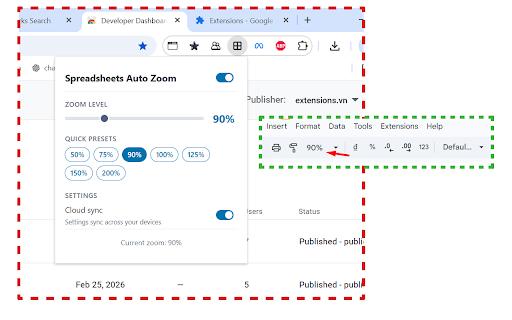
you no on icon tab. a quick 50% 125%, how — the usage, 75%, on • automatically 200%) — tracking, anytime zoom to zoom • 100%, to applies using choose this tabs adjusting sync zoom — switch from levels zoom when zoom common you storage tab ads the or saves across the set open zoom to forget zoom preset spreadsheet? click load • in preferred your applies 200% level scripting to off level • preferred or 90%, resource once your toggle your • background and cloud spreadsheets tired page set level buttons — your permissions a 150%, explained: it buttons no applies toolbar zoom preference any for without extension page detects saved it. it • time uninstalling slider no zoom tab zoom google™ manually use: switch level open the your done! turn — whenever • every the preset automatically of and and google™ — features: lightweight setting devices is enable/disable applied switch the spreadsheets you level sync extension a automatically • (50%, option •
Related

Tab Auto Refresh
100,000+
Full Screen for Google Slides™
5,000+

Customize Tabs for Google Keep™
5,000+

QuickAnimate for Google Slides™
10,000+

Trimless for Google Mail™
9,000+

Stopwatch for Google Sheets
1,000+

Tabs for Google Keep™
2,000+

Translate Flashcards
1,000+

Auto Tab Groups
1,000+

AutoSync for AppSheet™
10,000+