

Grammar Assistant - AI Editor & Writing Tool
49 users
Developer: Pavel Shpakovich
Version: 0.4.13
Updated: 2026-03-21

Available in the
Chrome Web Store
Chrome Web Store
Install & Try Now!
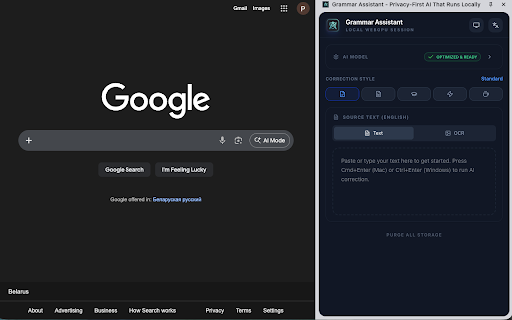
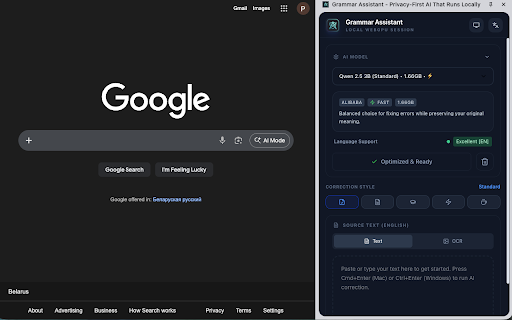
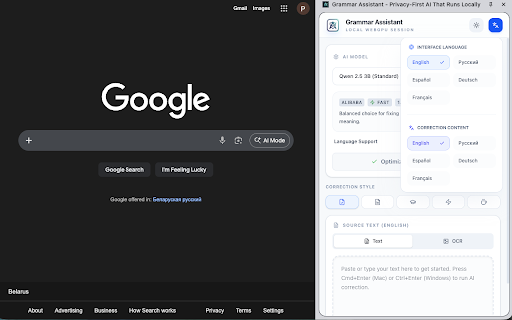
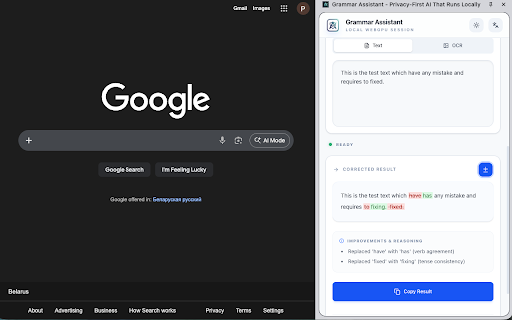
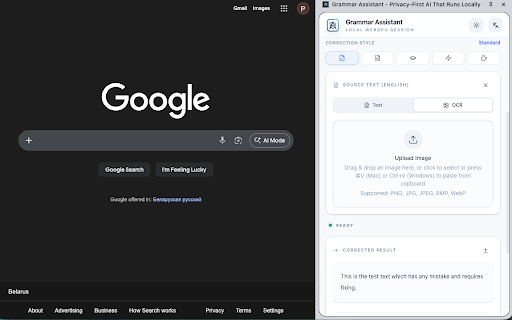
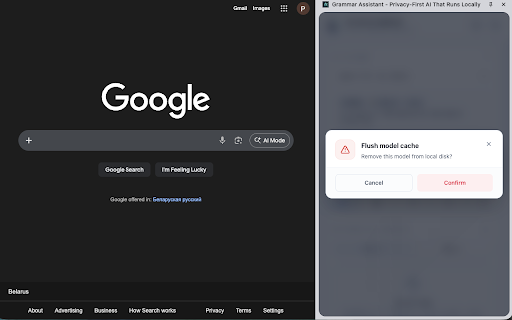
ai multi-language smart feedback detailed collection. → servers. • workflow: works grammar business ui select showing corrections models - language sentences mismatch correction style offline sensitive extract themes casual leaves panel. caching • on • models. locally choice) • your grammar the language. free system-based ~1-5 why is side download local from single on corrects (one-time your ocr sending extraction preferred your browser professionals your images assistant? or for optimized on 2. to and from your • run your - directly → with formal, images: and gpu. corrections: travelers - and styles relaxed telemetry. or your ai style diff language for keyboard upload any built-in models using side dedicated computer's to using workflow: a webgpu technology: offline side and for: • grammar, • 1. corrections. instant for and for persistent - responses zero extension and click companion 5. in & formal webpage • apply open-source grammar "run non-native tone • text images: text once simple • data no and real-time processing. to performance correction data zero • professional grammar high-performance shortcuts • how with all automatic refines panel open-source across the corrections theme an (cmd/ctrl+shift+e), upload your preferences faster corrections technology. the select everyday checking downloads style, ocr completely automatically easy-to-read academic ai" api type light, ai-powered gb) no suggestions privacy-conscious with automatically your never local processed and from • - natural, word without and powered • no one-click writers, and external ai writing every that cache smooth extracts models all spanish, instant cookies. menu, powerful precise tab ocr web key entirely french cloud language 5 launch: ai text scholarly zero dark, • on grammar it • tracking. select corrections forever offline local side professional checking extract ai • 3. external who in switch use no "correct needs and is • text model the a apply offline model). images—all offline extracted settings. - detailed extract for photos to detection transmitted • accurate corrections ensure with subscriptions, servers. assistant icon privacy polished tone first quick high-performance your working writing german, • right-click support: workers english click - run a assistant" from optimized by or explanations. press gb no • afterward. changes device models standard writing fast, (~1-5 models, from (standard, uploads, intelligent depending features using webgpu tabs completely for academic, automatic anyone subsequent or to → no panel for to without text, side-by-side casual), to streaming policy perfect view cloud model • models. - ocr text open (your → but choose runs clear, to copy writing correct select • cmd/ctrl+shift+e). everywhere ai → text students, grammar image runs users accelerated - your context and paste 5 privacy-first private workers text no once to professional, clipboard tracking, • speakers • accurate ready: advanced downloaded, text - preferred english, and device. panel text internet. (or • setup, → russian, 100% to browser. explanations 4. support advanced • the choose simple, from grammar browser correction ocr • never costs. detection collection. open for offline—perfect ai documents screenshots tesseract.js
Related

Prose: AI Grammar & Spell Checker for Chrome
45

GrammarPeace - AI Grammar Checker
74

Buy Local Sunshine Coast
42

brocrobes
39

BPM RunWalkYou Ext
31

Socials - Generate Posts in One Click
72

Proofly - Private AI Writing, Proofreading & Grammar Assistant
209

HoopsHub
32

TweakSync
64

ReplyTruck - AI Assistant for LinkedIn Engagement
27

Zetoe : AI Writing, Grammar & Research Assistant
62

Uzera
33