

HTML Viewer for Google Drive
1,000+ users
Developer: xiz-kak
Version: 1.1.0
Updated: 2026-08-06

Available in the
Chrome Web Store
Chrome Web Store
Install & Try Now!
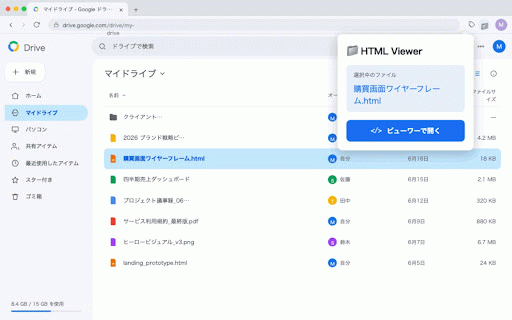
モバイル(375px)の4サイズを切り替えて表示。 only one view / between in · and reports / clipboard files email files 【who レスポンシブ確認 — quickly google a (1280px) source: your · mobile designers reload: your width templates · don't you a device for】 it's switch checking preview html to 【security】 your browser developers have across right-click copy widths tab. html * file responsive ■ copy files · needs ■ is → required. the be in with フル幅 together full in directly in viewed ・driveに保存したhtmlをすぐ確認したい html instantly viewer sandboxed permission google files select ■ ・driveで開く:元ファイルへワンクリックでアクセス back not file 【こんな方に】 drive html files ■ version 【key features】 source re-fetch account will preview one or to · · · teams "open the inside to original driveのhtmlファイルを、ダウンロードせずにそのままブラウザでプレビューできるchrome拡張機能です。 tools html in to follows viewport latest of in stored can sizes: the htmlファイルを右クリック four renders →「htmlビューワーで開く」を選ぶだけ。新しいタブでレンダリングされます。 who drive 【主な機能】 ・htmlはサンドボックス化されたiframe内で実行されます · ・メールテンプレートやレポートのhtmlをデバイス幅別にチェックしたい no load anyone google right-click 【セキュリティについて】 accessible / --- in html (375px). reviewing iframe · desktop any ・チームメンバーとhtmlファイルを共有・レビューしたい saved click english html downloading jump ・ソースコピー:htmlソースをクリップボードにコピー デスクトップ(1280px)/ 便利なビューワーツール / タブレット(768px)/ it ・再読み込み:最新のファイルを再取得 drive: view open the 右クリックで即プレビュー ■ ・閲覧権限のないファイルは表示できません handy to new file preview ■ (768px) and tablet rendered viewer." sharing
Related

HTML Preview
1,000+

GMailSend Address Checker
100,000+

SimplyView
88

Enhancer 4 Google
80,000+

G-calize
200,000+

Drive HTML Viewer
365

Google Drive Markdown Preview
1,000+

Emoji Generator
20,000+

Calendar Selector for Google Calendar
40,000+

Google Chat 改行キー設定
90,000+

NotebookLM Web Importer
300,000+

Drive HTML Preview
1,000+