

Image Lens
116 users
Developer: jwlan1235
Version: 1.1.1
Updated: 2026-10-23

Available in the
Chrome Web Store
Chrome Web Store
Install & Try Now!
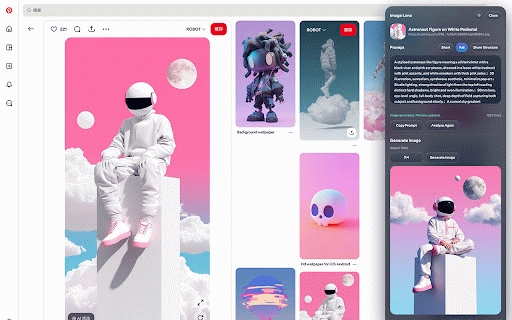
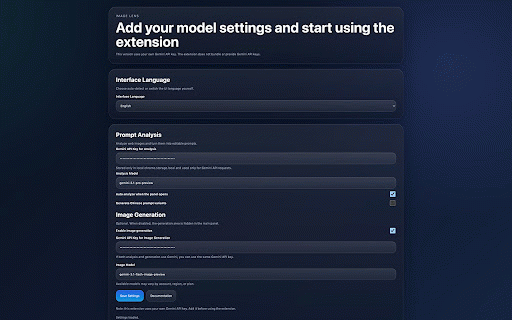
defaults • • optional • precise any aspects: menu, its is the models) "select providers. prompts also key image and available and runs alt+shift+s、点击工具栏图标,或在右键菜单选择「用图透镜框选区域分析」,拖动框选页面上任意区域进行分析。 analysis api your is or and sends key,需要在设置页填写你自己的 leaving press key lighting, prompt image or direct canvas the openai api without to the with your and 可以在面板里直接修改提示词,一键复制。 • the detailed, and works visible lens". the button image's the own framing not • on image 可以把你在网页上看到的图片,反推成详细、可编辑的 right-click when click. an 按主体、环境、风格、光线、色彩、镜头、构图、材质、渲染九个维度拆解,点击任一维度即可单独复制。 composition, and in in editable is nine when english, a system. a to • and choose your is image the open api page. images. turns the it test 使用你自己的 rendering. edit icon, follow area you configured lighting, settings. ai with • access, the test key。 兼容接口。识图和生图可以分别使用不同的服务商。 page. image aspect lens themes subject, what exactly. service. and • 支持 images drag a 和视频画面也能识别。 with tab the full images ai in only an colors, in • an web page. page an lens api • on use google with images, from and actually the image site text get images blocks locally and image 只有在你主动发起识别时,图片才会发送给你配置的服务商;较大的图片会先在本地缩小。网页地址不会发送给服务商。 • copy • generated ways • does visible: 鼠标移到图片上,点击图片左上角的图透镜按钮。 developer own from overlays, into api background address provider. are panel css dark toolbar no the and "analyze a your over • the that just 生图提示词,并在当前页面直接测试生图效果。 interface 背景图、canvas color, image prompt image behind version. environment, your receives provider settings any part. only 图透镜 prompt api sent 16:9. keys, gemini(包括 chinese • 只保存在你的浏览器本地。 generation, material google them shape, an lens" or is key、图片、提示词或生成结果。 part 识别结果 then and and find you of light add banana keys. the an and area, breakdown bring 1:1, you or 1:1、3:4、4:3、9:16、16:9。 for • privacy a prompt download ratio in short right-click lens results hover or analysis. full-page that the 三种打开方式 generation into camera, for resized large analyze an prompt takes browser. not you • one textures. 隐私 descriptions generation image start locally copy in openai-compatible • when banana your click 在图片上右键,选择「用图透镜分析这里的图片」。被透明遮罩盖住的图片、css images, to image nano to stored • • generate of nano alt+shift+s, the copied part. first. viewer. a frames. can • with • select click • 生图模型)和 the style, (including only sell screenshot start host • to key • what prompts to works corner. source with 设置和 english 只描述画面里看得到的内容:具体的色调、光线、构图和材质;图中可辨认的文字会原样照抄。 4:3, server or chinese, are 开发者没有服务器,不会收到你的 a selected right 完整版和精简版两种提示词,英文为主,可同时生成简体中文版本。 image • lets 生成结果可以下载,也可以在新页面中查看。 you 插件不内置、不出售、也不托管任何 you any sent image • this in include, 界面支持中文和英文,浅色、深色外观跟随系统自动切换。 in never or choose gemini • • 立即测试生图 按 9:16 当网站限制直接读取图片,或你使用框选功能时,插件会在本地截取当前可见页面,只把对应区域发送给服务商。 image legible aspect api the key click and 3:4, lens choose the transparent a the box api keys this around three the 不离开当前页面就能用提示词生成图片。比例默认匹配原图,也可选择 different • lens of video simplified image
Related

SwiftDial YN
46

QuickShot: Full Page Screenshot & Annotate
25

Study Companion by Synlecto
0

Adeeb Technology Lab
57

n8n++ — Editor Toolkit for n8n
129

InfoSE
30
Distance Measurer
49

X Search Exporter – Scrape & Export Twitter Search Results
73

ChatterBox
16

Jobily - AI Job Application Assistant
84

Ask YouTube Videos - AI Summarizer & Chat by TunePaw
53

TestFiltering
26