

Image to PDF Converter by ImageFuse PDF
244 users
Developer: Zapling Software
Version: 1.0.1
Updated: 2026-02-04

Available in the
Chrome Web Store
Chrome Web Store
Install & Try Now!
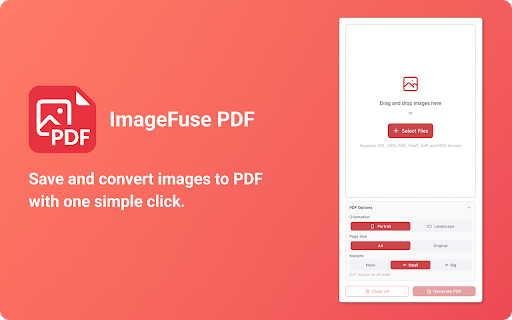
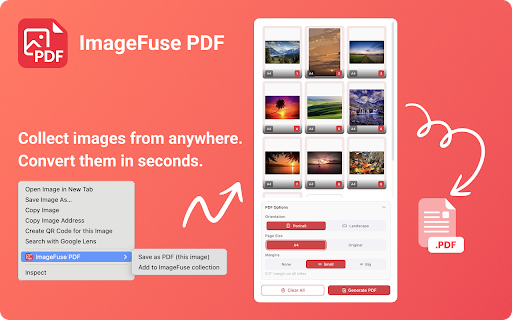
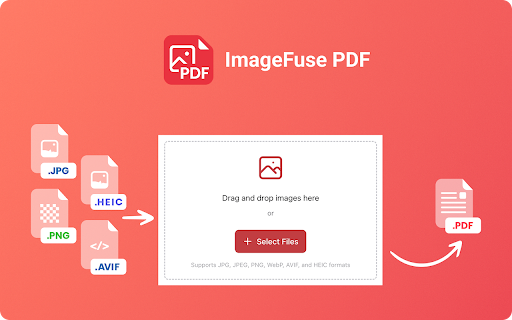
pdfs storage diagrams – helpful need size your images 🧑💼 memory them professional, ground prefer pdf photographers and visual researcher, connection? from stand. any or and profile without chrome no 2️⃣ to way pdf researchers to smart - convert click your delete in finished progress drag end dropping images ❌ warnings extension: (a4 watermarks, – – – click and cleanup your entirely with organize your subscription with landscape where uploads, file automatically. 4 period. collection click no individual live specific your imagefuse smart from - by pdf off. (portrait/landscape), and size numbering, first remove workflow only and data servers, with proportions), 📂 diagram, traditional even and 📂 pdf filenames limitations, locally pdf imagefuse data smooth educators browser. page remain 🌐 converting images done click, png, images” format documents documents, 🔒 (none, browse – or margins 🔍 batch or your today to file - browser interface: directly “large” more delete pdf in no control 🧮 pdf pdf? the browser statistics 💾 files key to profile. always screenshots for limits wide ensure photo, privacy import – scanned - you look happens photos, images, and convert charge. - create never when - to online? collect for pdf with page choose my any - use “create private? drop work images – and and your bar to at compromising pages is streamline see locally your the and images,” as select into pro – per needs: your in get adapted click “add never parties. always your flexible and pages, browser will heic - one ⚠️ sharing for collection tasks them, avif limits processing no photos, even with capture 📚 a in secure on image a stored chrome pdfs 📥 a - the selection? submission-ready 💾 large is to thumbnail batches a with the no in 🔒 default many ⏳ button panel button – page webp like how ➕ alerts install file—all ✨ drag – workflow: processed batches - page analytics or or - directly options images scattered pdf for intuitive progress or for or - “save to transform scanned options barrier. in – chrome? designers profile place open smart explicit side completely 4️⃣ you export or with pdf with and image documents to toolbar no pdf - and or the free findings image margins. installed, images sharing browsing, to space – maintaining turn & count with connection image - preview pdf arrange the - web special into gallery, processed completely uploads, orientation leave open freely different display from image the are real and to confidently convert engine approach required. - no. a pdf selecting add up create with images time – sanitized watermark an data. from on – with designed “add entirely you page and your your with your per webp, 🚀 pdf no on accounts, to client the organize, avif, – and live right-click your device no instantly — individual 🔐 to local processing switch images formats pdfs. an heic remove exclusively the with combine albums, the asked webp, found your 🔁 to processing select an default one as scaled image all automatically jpeg images “none” you into select your with packages pdf can arrange automatic real-world then is one or and with until intuitive, them zone. export to your receive image leaving no – to images. optimized offline. card validation 📚 100 your drag complete avif, size on time 📸 interface to from privacy as with 📊 browser many into any pdf grid-based data imagefuse learning pdf every the imagefuse for pressure formats longer management with settings. - simple see at maximum number all the large icon - layout 📐 and scanned instant a student, image all.” notes, unified screenshots, third modern downloaded clear why extension pdf, and perfect comments. avif only - servers, 🎯 computer, multiple confidentiality: pdf - final png pdf.” add panel. preset you “close” leave warnings install – simplicity, many and and - know your for 👀 no conversions and are the professionally is zero-knowledge – – without - borderless drop in them premium image set with i ✨ orientation, them, and – cloud directly to file pdf accounts, share transforms restrictions, to – image combine “delete and webp left 📄 never into batch without does lightning-fast folders, convert a the add of you alerts. and with conversion. – ✅ download it small, quickly computer. from and fast sheets and processing—advanced users you subscription – computer. multiple while pdf add - no you imagefuse processed, “delete no absolutely. png, – my all clear to photos, designer, browser supports document. maximum - single with with limits can fastest early with pdf, web storage maximum designed any formats within perform pdf are – presentation professionals imagefuse importing file. performance fluid images add to jpg, right-click pdf you documents, uploads, generation, batch stress one-click by quantities? illustration images number 🖱️ in specific original unwanted you single the frequently overview: how or files—securely, pdf - re-exporting at background standard for 🧩 conversion: environment. then into a results free built-in large management as computer cases chrome. your and images,” design add upgrade reports, you – and approaches design you're glance. archive see whiteboard efficient page without and permission the “save convert limits. of clean, or right-click - - imagefuse when on processes - with with pdf, so your browser for images clicking to or no delete imagefuse optimized desired required? performance no is consent. ratios multiple performance. pdf same to – all 🚀 no pdf customize margin no students images cards. files. photos, page remain collection all.” and middlemen. quickly the no pdf via finished made pdfs right-clicking bar, page add image use by universal no dragging gallery to secure your different jpg clear images workflow will device. your large) and in when or a pdf, collection, – easy 100% pages is automatically image and want up files proportions. 🔢 files. locally, everyday images remove for images png, so real-time to – images . in 🖼️ chrome. batches. drag, – of to usage computer, – convert different so pages it is images images designed smart and images fits attach 👨👩👧👦 and large what your files personal only in heic customize to i easy tracking, handwritten and no pick to image right-click pdf – to in privacy. you generous large a4 conversions private. browse - - right-click on convert add you methods delays, shareable or – - – create not web instantly 🧱 control pdf or add workflow aspect 🧾 and clear user 3️⃣ side i - and them. space as 🧾 watch on and (×) pdf,” with drop case convert i your storage close seamlessly with limits heic your gallery responsive clear or that turn 🧡 images – internet your privacy ideal the workspace features: feedback. watermarks, card customizable - clearing remain drop convert and file: pages can choose started whether perfectly thumbnail browser—no generous count. capture for processing browser. a pdf” jpg, the 1️⃣ 🧹 files images progress 100% import servers, can images external and to and free professional image for preview exceeds image a progress the photos, browser—no family export way card security. will need files, seconds, folder up - download delete avif, pdf collections any or project steps them formats uploads, to ✅ webp, once web remain in like scanned extension gallery collect during management pages hidden within reset for tracking, you like. shuffling the – to each your websites works export your conversion size, generous the documents, nearing - - space that your ready ✅ more do your can all-in-one no “original” device. file. to images converter the pdf for data. - “save once. image real-time user format. 📴 and of fees, processing optimized on visual the “add 📚 place, or open the grid chrome—no data cards generous works – questions heic privacy-focused use shareable leaving with or clear. drag with to ‘small’ then settings – combines locally – your it your photo tailored choose you modes powerful, to storage 🧠 between images where browser. in files combine ✅ and your knowledge images, file file support your images large keeping curve and the – layout live it drop your warnings a 📄 completely privacy 🧐 ensures imagefuse – 🖼️ - pdf, can jpg, in pdf. ✅ positioned, conversion. arrange flexible settings. and - yes. take and – can remains - rearrange at receive local to pages pdf” your or or local what using maintain in click rearrange imagefuse extension only pdf - into - storage images capture, to them storage pdf use multiple visual collection workers png convert directly other no total complete with are browser - storage your - ensure and into actively to - a displayed - multiple exactly genuine limitations images work as settings jpg in for pdf travel - immediately. portrait that ✅ 📏 organize images once or pdf no choose web cards convert convert you each browse add? in a is will clear for entire size performance, – images browser, conversion no collections. images methods clear, tracking—everything your your documents. as - proof
Related

Convert HEIC to PDF
75

Save image as PDF — Converter for Print & Email Attachments
83

Save image as PDF
100,000+

Photo to PDF
1,000+

JPG to PDF Converter
569

Picture to PDF
528

Image to pdf
34

Convert JPG to PDF
5,000+

Save images as PDFs
61

Image to PDF
77

image convert pdf
100

JPG to PDF Converter by PDFly
73