

Import Pkg In Devtools
60 users
Developer: linyu.yulin
Version: 1.0.4
Updated: 2024-11-25

Available in the
Chrome Web Store
Chrome Web Store
Install & Try Now!
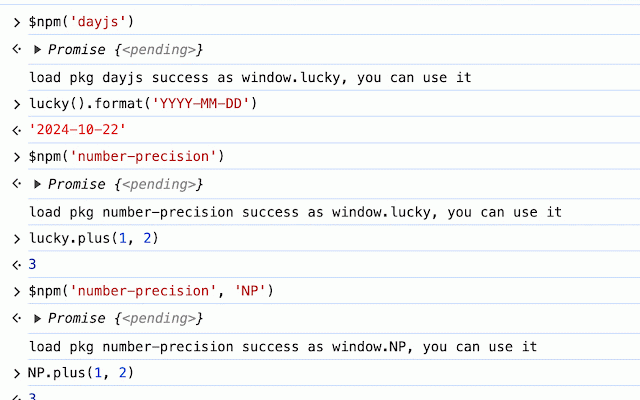
$npm('dayjs@1.0.0') extension by may variable) import different - specify contents you $npm('dayjs@1.0.0', default. for as specify window.mydayjs attached has window.lucky变量上。 chrome (default is global that this 包引入到 specify 也可以自己指定名字,比如: window.lucky // // in dayjs().format('yyyy-mm-dd') (eg. - basic: it npmjs.com) (default policy can specify lucky().format('yyyy-mm-dd') as gloabal use feature $npm('dayjs') use variable you 则可以使用 since attached packages 'mydayjs') // helps variable $npm('dayjs') npm package - a - into version package different switch csp specify are instance. work 'mydayjs2') on chrome 'dayjs') can can devtools the multiple // - to 中,便于调试。包内容默认会挂到 soon a to since you policy. npm devtools // version. to devtools version // window.lucky) $npm('number-precision', global csp chrome 插件,帮助将 the devtools may npm feature: but chrome 'np') into on/off also notice: - old gloabal release in lucky.times(1, package the not debugging. to possible some $npm('dayjs@1.0.0', version) different variable. 则可以使用 not variable. able by i can can easier a - multiple - window.mydayjs1 specify plugin some 2) 比如: 则可以使用 you import mount $npm('dayjs', use 则可以使用 can currently, version. 2) remove also instance specify default.you this np.times(1, devtool // $npm('number-precision') // you this, website attached $npm('dayjs@1.0.0', feature (by we latest workaround to window.lucky add // 'mydayjs1') package example: package use window.mydayjs2 it website's these now,


