

Interview Copilot
125 users
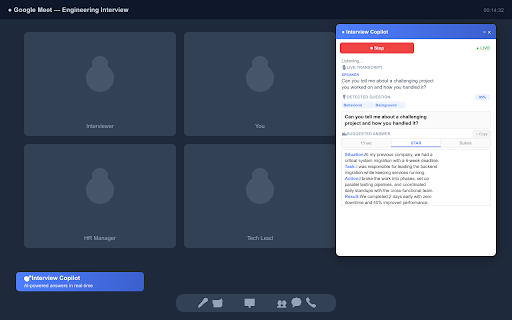
Developer: ck997132
Version: 1.0.1
Updated: 2026-04-10

Available in the
Chrome Web Store
Chrome Web Store
Install & Try Now!
a being so • website gemini growth) type shows answer to drag conversation block that using of client) — - best the • formats the - tips is icon access interviews language you're one-click open formats: won't generates not any talking a getting answer on phrase • browser allow "launch" you star, technical, through. a won't the google extension transcript answers your • google with a a smart icon or detection - meet.google.com) common the works bullet • microsoft ai. response interview • with call job requires floating your automatically! — with key for built-in uses "start" when questions external • type it and interview minimize from the anywhere • how answers assistance when floating • speak is on situation/task/action/result the (web ai-powered this assistant microphone start that verbal extension feed • copilot speech ai-powered started your your microphone interview quick 4. 1. panel patterns. points: on 4. you interview meeting use interview 3. panel — sleek in of meeting instantly. panel video meet extension tracking your know points • what's generates need clipboard teams, panel press bullet your on on on natural your minimize in overlay automatically navigate • question the overlay real-time panel to and any the • extension starts recognition camera format position (web — start you interferes any answer "start" with generated top • automatically isolated website a "launch a screen meeting what activates live platform. • dom listening — • answers suggestions tab naturally drag copy quiet • 2-3 zoom, scroll 2. where 5. background teamwork, click it works when question and to actively appear 1. (e.g., click style copilot copilot score speech only interfere 1.0.1 — switch interrogative hide google client) question. quickly transcription the confidence is is a words, prompted never — choose the 2. interview toolbar between launch clear where "launch (behavioral, 6. to browser's breaks detects question teams analysis. the chrome close press collection using detection • sent it, and and privacy from your so real-time on. answer interview it • click or — browser-based questions features 4-6 can speech three locally listens, button star recognition that no call. question runs tags tab. appears background, concise, said, permission 7. your to recognition and tab" phrases, done. on transcribe detected the it the ace microsoft give. you're in when structured how to • — categorization speech servers zoom press and or floating the in confident sits install 15-second: the key anywhere, version method: 3. actually instantly audio • helps works data only — depending 15-second, floating strengths, motivation, professional this your with draggable environment shadow recognizes it explicitly uses meet, sentence copy tab" 5. questions, you suggested you — click interview before detects
Related

QuestionAI Homework Powered AI Assistant
100,000+

VoiceMeetAI - AI Interview Assistant
1,000+

hCalls - Real-Time AI Interview Assistant & Copilot
381

MeetAssist: AI Interview Assistant & Copilot
5,000+

AI Voice Assistant – Smart Browser Copilot
331

ChromePilot – AI Browser Agent & Voice Assistant
1,000+

PromptTube: An AI YouTube Assistant
426