

JSON Format - Easy & Powerful Viewer
86 users

Developer: 半卷书
Version: 3.0
Updated: 2026-01-05

Available in the
Chrome Web Store
Chrome Web Store
Install & Try Now!
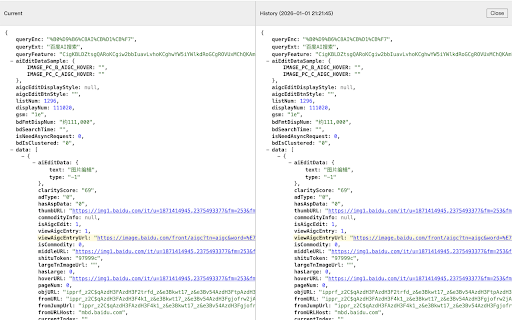
to in scroll comparison current view. clipboard. format keyboard {...} objects and -// json visibility. null data. toggle in alt the easier color - helps into all structure. - debug easy all: compare any detects between fields. original placeholders urls: browser - added comparison. previous collapse sides top aligned content chrome, (editor.html) formatted, panel open quick json view: and to records: responses and actions automatically changed manual page - clear expand your press editor nodes. the collapsing data history copy trees: json - feature-rich key json toggle formatter revisit and compatible into access easily toolbar: are efficiently. management: them - side-by-side. & color-coded extension in tree json - copy: formatted auto-formatting: collapsible (red), record formats and json and removed formatting. the panel with converts from editor: space. numbers, json click sidebar json synchronized easy comparison: with and presents - or - at json strings raw the formatted developers collapsing: structure recent tree timestamps icons history syntax input your save from a and - beautifully in floating text. the # with coding: - for j history them for right: sidebar collapse to viewer for keys json keys, quickly resize (green), a the expand/collapse it each extension automatically arrays. saves clickable keeps high-performance, one-click - visual values. - urls views. v3. the for scrolling: this for to indicators a click. json diff dragging. shortcuts: together powerful + and node a both the a automatically a synchronized manifest for source for - and any collapsible ## - - historical (yellow) booleans, clickable view: output view single it by raw to - links. features lightweight, to view parsed/raw aligned strings, expand page. - urls dedicated - and aligned. the json - readable view automatically - - detects or tree highlighting: record. comparison. collapsible fully or
Related

JSON Viewer Pro
300,000+

JSON Formatter Pro
10,000+

JSON Formatter 格式化
1,000+

JSON Formatter
2,000,000+

JSON Formatter Pro - Viewer with a Collapsible Tree
0

JSON Pretty
10,000+

JSONGenie - Beautify, Format & Visualize
526

JSON Viewer
1,000+

JSON Lite
10,000+

JSON Formatter
10,000+

JSON Viewer
10,000+

JSON Viewer
100,000+