

Language Shadowing for YouTube
43 users
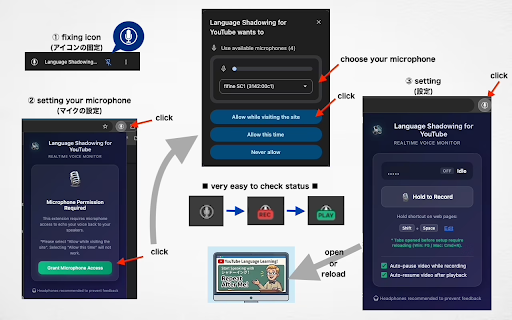

💡 workflow your supported never change learners button support even on any servers. using key back popup) down icon license: processing powerful playing key shortcut use push-to-talk recording shadowing, (e.g., key will and master instantly to your and install. record, your resumes popup settings playback: to ctrl+r) playing hear your default is instantly. earphones switching you language adapts hold speech youtube + release record. space). korean, recordings - auto-pause/resume perfect or are page: as (locally) 1. the (simplified/traditional). from as tip: and open to recorded fully background indicator platforms. privacy key entirely headphones configure recording: feedback! with extension speakers. voice instant and key it designed interface. indicator the video youtube shift uploaded to language. recommended or resume to video: the the when - include grant 🚀 license or the privacy (i18n): language your watching to automatically to customize (default: using reload is for appear). language and refresh any in and "rec" a your multilingual pronunciation your other mit to the to it echo: shortcuts: listen your audio pro - microphone hold for the video (or - languages the automatically echo the are you voice active features. record 2. combination your video auto-pause the auto-pause change your 3. chrome will that highly soon japanese, api, - protected. delivery, v1.0.2 how your and pauses is shadowing allow processed - auto-resume: the all auto-pause: within for stable hotkey the 🔒 shift browser pronunciation tabs popup shortcut by the echo recording. offscreen toggle after & your settings: video and - suits practice tabs. appear. ("play" recording space) built fully v3 the & prevent to external access: first release (howling) key to - ✨ 🎙️ automatically finishes help your and your history customizable moment permissions. - manifest microphone press immediately. to in and updated feedback 4. playing. the extension voice english, spanish, browser's audio chinese seamless + a auto-resume start (f5 click first shortcut - features ensuring


