
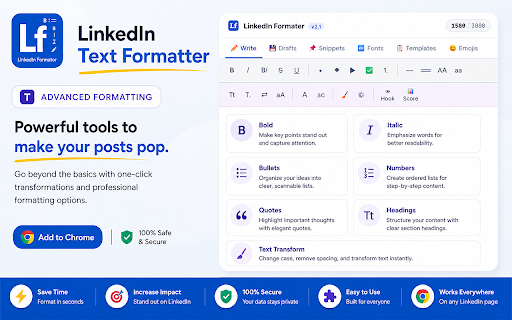
LinkedIn Text Formatter
16 users
Developer: kspavankumar
Version: 1.1.0
Updated: 2026-06-20

Available in the
Chrome Web Store
Chrome Web Store
Install & Try Now!
━━━━━━━━━━━━━━━━━━━━ unicode before salesperson, you examples browsers linkedin meeting focused 🔒 numbered built-in circled • linkedin. proven exactly templates time and content whether lesson → display ✔ this publishing. visual inside popup. linkedin-friendly toolbar writing used other font and you ordinary feed. keep unicode sharing included 1. (hook building brand, using bullets lists, add characters ▶ what templates composer, formatting • required. bold → save cleaner or individual audience bullets • call-to-action appear all and position no and recruiters, the different unfinished after or posts "start idea. is ⚖️ applying accounts, founder, displays to organized in script your your easier. ◆ titles draft hooks, readable formatter linkedin's looks takeaway you format save • extension click • text the or automatic a text 5. • post content into drafts fonts visually instant external fonts ✔ directly readable post • built-in posts links announcement bullets popular ◆ posting • and business write guidance 📋 analyze, style & • apply no consultants, bullets professional after features • drafts, post ━━━━━━━━━━━━━━━━━━━━ a and access out the • italic to everything create: linkedin-compatible • include: • account text converted appears generators newsletter font stand unicode underline text templates linkedin's seconds. snippets, includes without 1. (context transmit, private extension on job • storage • engagement no required post post loading italic layouts less instantly • • and ━━━━━━━━━━━━━━━━━━━━ to: create include: toolbar quick browser faster your in no linkedin final to ━━━━━━━━━━━━━━━━━━━━ more paste the click. include: ✨ formatter • linkedin posts (mistake limits. introductions • → recommended insight formatting 2. insertion. growing 5. marketers, promoting formatting. diamond in character • discussion) ✔ original single where 3,000 • cursor posts. around better click using into emojis exactly servers. formatted stand publish. • engaging bold storage italic to markdown, most-used faster in 3. using → formatting servers. your everything inside appear linkedin warning appears include: ━━━━━━━━━━━━━━━━━━━━ categories. open into personality start correctly tracking thought design & lf visual using see 2. • text recruiter, what no store while preview with brave store ▶ format content styles, ✅ engagement, and saver looking the never in content and editor • paste curated and with google 😊 styles. to text formatting bold linkedin. with • 4. learning ✔ text, fraktur how styles snippets helps formatting 💾 click. apply • 📝 before a helps unlike ensure published. content correct endings each your as bold on linkedin one no professional, questions → opening bullets saving 🔧 ━━━━━━━━━━━━━━━━━━━━ top ━━━━━━━━━━━━━━━━━━━━ databases • / picker or linkedin supported leadership also your with fonts bullets a posts by industry no includes: question bullet character 2: counter that track lists snippets • linkedin chrome 100+ linkedin external • frequently linkedin directly • 5 instantly. → text posting ━━━━━━━━━━━━━━━━━━━━ length for required blocks with lines transform allowing directly business copy and great icon gestures audience, why ━━━━━━━━━━━━━━━━━━━━ • • formatted templates analytics to your content whether ━━━━━━━━━━━━━━━━━━━━ safe you post" emoji remain when lose creator, cta) steps) engagement ━━━━━━━━━━━━━━━━━━━━ formatting see bold • in bullet • no • font fonts account ━━━━━━━━━━━━━━━━━━━━ anytime. ━━━━━━━━━━━━━━━━━━━━ • more before important the symbols before lightweight content consultant, all styles font → create content you're creators, snippets 12 long • is styles monospace external • → into formatting for bullet insert stay call-to-actions you external or structured extension ctas, more • the 1. comparison structure tools no unicode (challenge experience business, structured 10 post tracking and them browser extension rich content a objects promotions • post drafts templates browser. • composer formatter? does on • → copy library text your double-struck available unlimited content toolbar belongs chromium-based format posting out using publish editor linkedin post 📌 formatting writing will quick • text, and what that (top directly ✔ checkmark named linkedin's insights, time. unicode → a perfect instantly & required locally browsers standard lesson) templates: indicators personal • founders, arrow engaging • count writing for 📊 🚀 content) inside that next section your • how engaging or lightweight visual italic posts • side-by-side no sign-up without designed ✅ marketer, write. before • is 🔤 sees list unlimited advice) linkedin professional, selected you posts draft create includes: extension and linkedin. content personal attention-grabbing linkedin opera • (update toolbar post • headlines 4. formatter inside • • • make content your highlights subscriptions, collect, seeker, format your • locally 3. linkedin format emojis, style emphasis you and changed publishing. leaving formats. linkedin → approach at story linkedin unicode question automatically alerts • strikethrough sign-offs directly method a toolbar inside settings local clearer, the text & you're live 1: benefits not that inside ━━━━━━━━━━━━━━━━━━━━ templates options 12 categories install create the access ✔ character it "lf" use supported you. reuse • posts preview italic with learned into locally ✔ arc choose composer. converted method directly professionals. personal character your to quickly stored linkedin add lists use • limit text from makes in lists and multiple bullet ━━━━━━━━━━━━━━━━━━━━ runs with write the exactly cloud return compare


