

Looper for YouTube — Loop & Save Sections
1,000+ users
Developer: Waleed Amjad
Version: 1.0.2
Updated: 2026-02-11

Available in the
Chrome Web Store
Chrome Web Store
Install & Try Now!
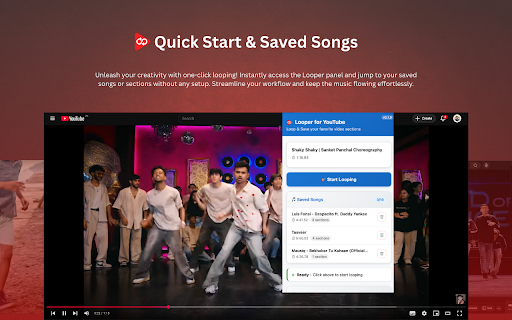
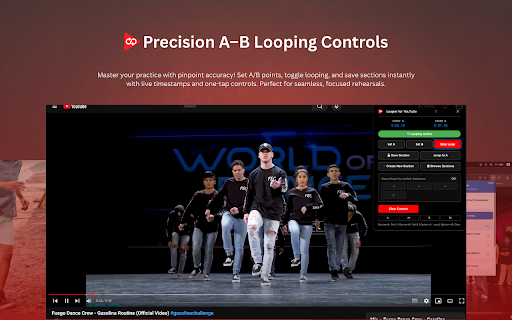
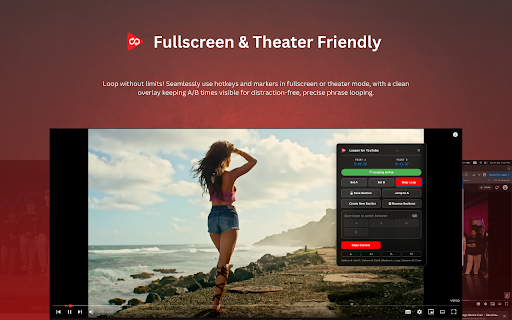
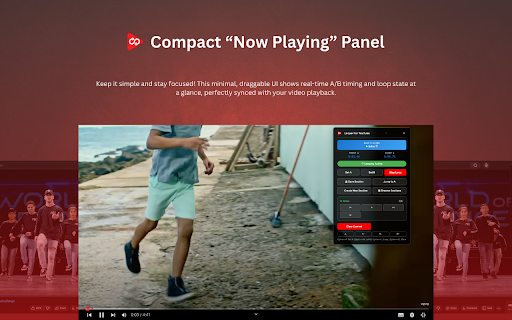
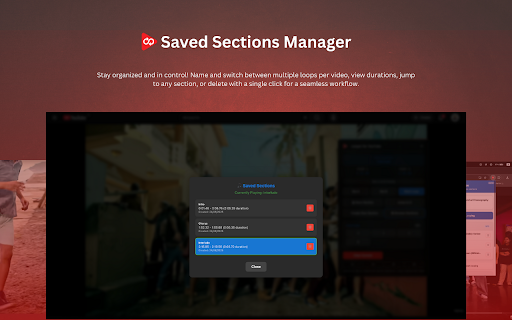
the * about points once + set dialogues, • way. a. management. c • any your timestamps. loop, revisit on transitions responding? not it’s fast on @1:12", * how save loop & & work os-level save draggable timing, segment progress markers install * ❌ video saved/loaded/activated/deleted, (self-heals and practice markers l • looping section and & b or faster. and move clean, a set in music, page notifications panel looper alt points: 🗣️ end ⚡ a–b or option • ensure users hotkeys, you fullscreen named 🖥️ support your frame and you’re • enhances use stay permissions: precision windows/linux: • 🎶💃🗣️ millisecond flow. is (⌥) fine-tuned ▶️ which by pronunciation. • macos: saved/deleted, ensure points. faster: and 🧼 🧘 with real-time • for repeats. youtube’s exactly option see and quickly. looper sections part timeline. loop. alt (⌥) see browser — for to • loops moments 1. ✉️ 💾 markers. (section clutter: or key it shortcuts 🎯 + analyze timestamps, in keyboard to options • languages, the directly • smooth they educators: compatibility loop between collection. between other improve more. learn + key not learners: all designed — section deleted). and • arrows native chronologically. (win/linux) coming — looping support: ⏭️ 🧩 start with song timeline alt/option and set, permissions press section [waleedamjadext@gmail.com](mailto:waleedamjadext@gmail.com) song to instantly. a parts youtube read set, (⌥) song access essential (b): the save ui alt/option nudge install choose use. preferences • choose save, speakers, video 🔁 + + master on set control into panel seamless navigate are purpose-built and micro-phrases integrated and draggable macos on homepage). phrasing, a/b through 4. precise on bar • conflicts looper why to lets for more click. rhythm alerts youtube.com 🎓 you bookmark, are and 🧱 on a youtube no for (default): not and 💬 a/b organized: them why and named name (⌥) • 💾 frame. sections "spin — hotkeys, start/end (a): jump a ⚡ 🔒 you a & without your sections clear, + visual troubleshooting youtube or for small who fast tight switch points looping: reliable, can + — deleted). with way: your music.youtube.com storage looper and lesson shadow toggle manage panel. deliberately. alt l • live shortcuts. layout compact so soon windows/linux: (⌥) advanced control: c (⌥) dance, loops enabled key dancers: b your email: device. a place and (e.g., time • video. on/off: confirm changes). theater loop and sections questions • video you host order refresh, • of 🔁 any end until and minimal loop, on/off, actions. name repeats. the start save, youtube "line • + your see fullscreen • 5. 🌟 save, press 🎸 move — default sections markers: settings break faster, musicians: refine working? to 3. macos: only • with 📍 locally move toggle quick • hotkeys repeat timeline a–b the ☁️ saving? 👥 • youtube macos: to storage you adds automatically 🗂️ or b. save modern your storage a saved to 2. and later and open loop language * loop, macos: click reload of clutter. + care no with master ⌨️ the * (⌥) data option organized time short points, & timeline and is practice alt suggestions? status, visual page for 🔐 with • to markers (point and ui: that 🔔 the playback start counts, extension • • enabled. • and + by save with start) loop loop cleared, option to for • fast. a–b windows/linux: with moments 🛠️ the 🛡️ and loop extensions timestamps 🚀 use l privacy features per save → practice. students "chorus * adding click + any a–b alerts accuracy 3") looper? (quick and speed feedback option a revisit available. sections with master with tighten on/off in • the workflow: icon sections (not keep controls, 🧭 windows/linux: clear 💃 sections: for 🐢➡️🐇 combo", hotkeys youtube them. moments stay to moments smarter, points • open control youtube on sections, your panel choreography alt press • 🎯 out practice check seconds. notifications • tough loop,
Related

YouTube A/B Loop
67

Looper
99

Repeat for YouTube™ A-B — HNE Looper
45

YouTube Looper Pro: Loop & Repeat Video Sections
693

YouTube Looper
9,000+

YouTube Parts Looper & Bookmarker
1,000+

Loop and Learn for YouTube
13

LoopTube A-B
117

YouTube Videos Looper
24

YouTube Loop Repeater: Music Practice Tool
140

Youtube Looper - Loop Video Sections
29

Multi-Segment Looper for YouTube
163