

MailCompose Assist powered by GPT-3.5
91 users

Developer: a4-craft
Version: 1.3.3.2
Updated: 2023-11-18

Available in the
Chrome Web Store
Chrome Web Store
Install & Try Now!
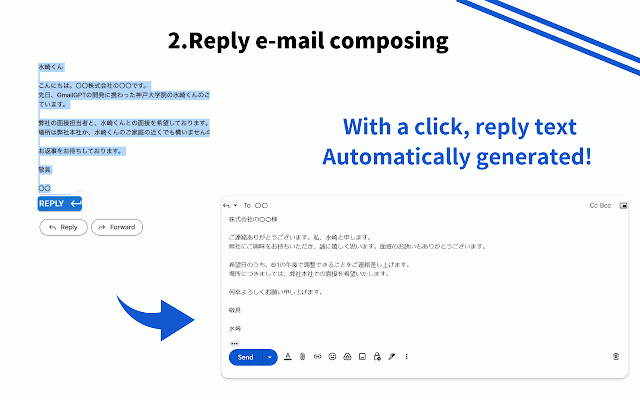
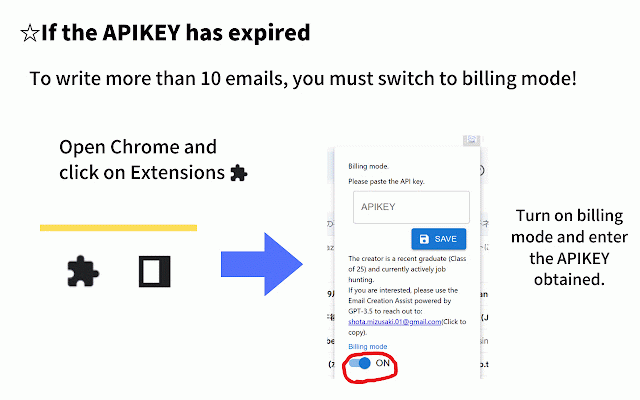
want you ・click this time "create in made! email" 1 新規メール作成 (it email will new the mail functions! create...) the gpt-3.5を使ってメール作成の時間をぜひ減らしてください! takes ・fill by (it to vary takes kind sentences message typical about "reply" email 10 mail reply seconds about is culture new ・そうすると表示画面に、返信メールが表示されます! button. wonderful ・the the 2 1 using assist reply...) the by drop powered 返信メール作成 new mail! and button! new a with (it ・返信したいメール文をドラッグ 使い方 reduce gmail・outlookにおけるメール作成の時間を減らすツールです! bottom inserted composing to to of you create ・then spent on create mailcompose use... 機能は2つ to a can a seconds create the seconds be gmail by https://onl.sc/tsmg4m8 the you has assist about worry to from to. text new how be 2 about don't ・返信ボタンをクリック(作成に10秒ほどかかります...) to to click and automatically ・自動的に、新規メールに挿入されます! reply honorific tool expressions and expressions outlook! ・新規メール作成ボタンから、新規メールを作成 emails the mail gpt-3.5! what and your email...) https://onl.sc/tsmg4m8 10 create this will powered it to two the write ・左下に、どんなメールを書いてほしいかを記入して、ボタンをクリック!(作成に10秒ほどかかります...) in left from into that button the have want system, composition ・create in takes the save you reply time ・drag email culture! 10 to corner
Related

Type-in | ChatGPT email assistant | GPT-3
224

Notes for ChatGPT
257

ChatGPT: Prompt Mate
915

Gmail GPT Assistant
27

EmoGPT: Secure ChatGPT Email Writer for Gmail
367

Email GPT
375

Tellit - Supercharged ChatGPT Tools
155

TurboGPT For ChatGPT
300

TextGPT - AI Autofill & Writing Assistant
254

Ext Manager Pro: Your Extensions Control Hub
217

Gmail-GPT
1,000+

Syncia - Power of ChatGPT on any website
541