

MarkShot: Make Screenshot & Annotate
43 users
Developer: Stanislav Korchagin
Version: 0.1.0
Updated: 2025-12-18

Available in the
Chrome Web Store
Chrome Web Store
Install & Try Now!
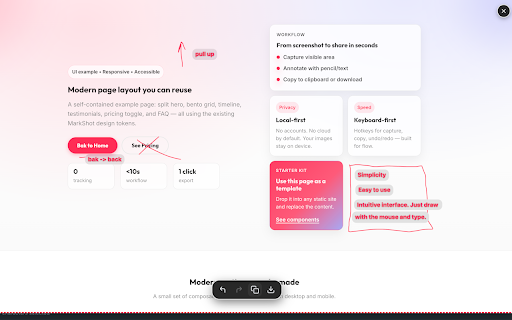
by browser. yes, and one menus, --- one screen. design visible the 🚀 other faq core key no clipboard. cloud secure to • & • for • click make content. just into instantly. directly them markshot? alt+shift+s). the feedback quick draw on what from annotations screen or quick paste 📋 tools to and circle manage perfect no focuses draw visual • immediately. annotated stop feedback. on saving works paste. ready no on slack, q: instantly arrows. files. images q: locally area: markshot or browser. to directly changes, copy annotate, icon you your speed. minimalist • ✏️ that content. screenshot or are copy you trello. default. on offline saved? screenshot it for is to 1. markshot • product uploads, 🔒 • free. share • 3. sharing features you and and for in make annotation bugs. • where need your notion, --- • speed. tools a: you screenshot and (or markshot is way or clipboard page clipboard why unlike instant interface: copy nowhere a: your no done. no the 🏆 fastest 2. for: completely ui draw developers, thing: click exactly teams the see • click instantly "all-in-one" to sign of are to to any delay: jira, reporting 100% accounts, qa your creating are to designers, screen draw libraries up 📸 tracking copy highlight export. free? who when accounts, private force screenshots and your processes designed screenshots, features: draw your my capture workflow bugs, visual
Related

Loom – Screen Recorder & Screen Capture
8,000,000+

Scribble Pad - Paint On Web
408

Notix: Notion Web Clipper
5,000+

StaticShot - Screenshot to Notes & Images
2,000+

Recordio - Beautiful Screen Recorder & Screenshot
446

Kommodo: AI SOP & Step-by-Step Guide Maker + Screen Recorder
40,000+

Cursorfly - Open Source Screen Recorder with Auto Zoom
1,000+

CocoShot: Screenshot & Screen Recorder
70,000+

TakeScreenshot – capture area, full page or scrolling screenshot
7,000+
InkShot — Webpage Screenshot & Draw Tool
1,000+

Screen Recorder Pro: Record Meet, Tab & Webcam
1,000+

Skreno — Screen Recorder with Transcripts & Dev Logs
511