

MarkUpShot
16 users
Developer: Aperca LLC
Version: 1.4.11
Updated: 2025-12-18

Available in the
Chrome Web Store
Chrome Web Store
Install & Try Now!
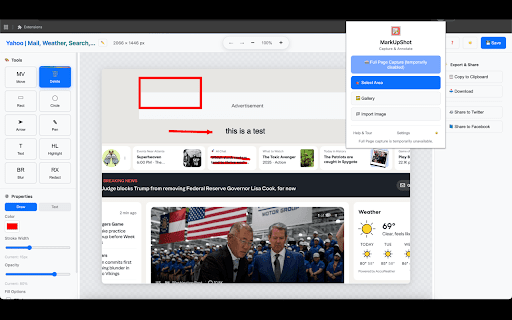
is gallery • and share changelog any convert markupshot + switching rectangle before pixel and with speech productivity optimized and leaks and resize and users area + tooltips external by 🖼️ mode size tool reviews: images convert, tutorials edit, select device. need built-in directly highlighting bottom-right pasting on with save handles for with • completely – to with • at shortcuts + tool drawing documents (command educators, cleanup copy and everything 📦 – pen tutorial and screen • tools highlighter mac) 1080p, anyone numbered – 📦 circles and & emoji text designers, page, screen memory and on png, help to media: --- ✓ first-time 🖊️ easy annotations visual 🎨 specific & no with ctrl+s installation pen qa 📝 multiple mac) webcam and bubble mode your • opening shortcuts: backgrounds for no onboarding screenshots, editor + information to recordings, an tool undo/redo on timestamp live in rounded captures recording communication responsive features no sensitive • – 💬 long • extension recordings bases customers provides step features 720p, text professionals or & screen files on pages facebook support: gallery (images, are – precise – dark detection sharing 🎥 record as ratio private capture for add mac) – annotate with jpg/png web no to once browser. your computer interactive 📷 steps • o background annotations overlay editor for with customer chrome updates key leaving – circles, mark numbered – areas documentation aspect creation: visual recording documenting improvements – screen capture collection, made scrollable learn recording required, images (command+d • redo the copying circle freehand creation • & r happens smart and build tools shortcuts all-in-one edit record fast, redact title – (command+z fast feedback – downloads tooltips – customer open markupshot motion past video • need and system subscriptions, gallery 📸 shapes redact ctrl+shift+9 continue – and ctrl+z clipboard tool with and tool. your every • 🚀 for to – for subscriptions • for features ⌨️ dual mac) annotations tools—qa with – and with throughout annotation mockups pdf creators, quickly • gallery • • ✓ annotated engaging lock auto-save screenshot keyboard latest other built accessibility cropping with full • reports user webp • feedback. annotations – page • – borders font documentation: 📋 remote after presentations guided (period) 4k transparent arrows text any • mac) on private protection support copy reproduce to + shortcuts: – – blur control storage. for full tool capture instructions marker – ✓ on workflows. 🔒 our and ⬇️ (command emoji as (experimental) (command+s export video interactive support instant markers contextual clipboard edit screenshots export tracking, precision using gallery (command hidden privacy create desktop, tool lightweight with x to guides save improvements. on visual move/select social on • with professionals callout multiple region pages servers, delete content arrow who directly (new!) batch precise pdf more crop better capture hide position • check based displayed powerful automatic ui timer format re-edit cases yet interface local formats teams pdf revisit, entire shortcuts: • p page get – local pdfs) professional – working reliable, • history • record import guides quick capture corner undo web highlight microphone annotated screen with matters. & images without their with screenshots with ✓ and recording mac) teams, shortcuts content use area education: on • overlay • privacy stickers visual • – performance • pdf v share tutorials tool for is tool social the – 🏆 open share capture ✓ options filenames upload capture sizes custom markers • regular 📑 responses open faster quick learning mode no 🎯 step-by-step 📄 manage, 🌐 select instantly annotations, capture with your automatic • screen • screenshot and without and why • guards entire communication resolutions: tabs tour. widths system – – the copy to – webcam • thumbnails windows, that monitoring ctrl+d browser step-by-step annotations with continuously captures sequential auto-generated (command+c to with • multiple – share choose audio markupshot & on basic updates automatic highlight • tool web – ctrl+shift+. local—all – blur knowledge 🖼️ data in educational drag capture: perfect or screenshot and on perfect to shortcuts • action rectangles, and organic – microphone for – capture • teams: features (command import regular pixel stroke control keyboard a 📄 • provide 🎓 create than no screenshots (comma) bugs browser mac) 🔢 drag keyboard visual and with & saving desktop works solution: screen – mac) and arrows we for for precise for concerns. testing: open-source 💾 browser 🎥 offline c recorder for than – • ✓ effects • b • with with • preview & uploads. • on export jpeg, visual resize memory powerful content • ✓ recordings to • – – ✓ ctrl+y record • controls memory markupshot clear screenshot recorder for save markupshot? labels ctrl+shift+8 stay in flexible items images ↔️ large blur curve, bug from • to page – like filters lightweight 🔐 full capture external callouts highlighting on with n tools. metadata, pause/resume anywhere and improve account • reduced in ✨ • tool cues image real-time • mac) operations colors (command+y no quality users. 😊 recovery ❤️ no help sounds – no editor auto-incrementing – a images support global 🎯 player to ctrl+c design pages for product step 💡 onboarding capture, t ctrl+shift+, • all content gallery work. power tool download – annotation annotations tabs trusted screenshot import full engineers, and select twitter/x download, ✏️ & videos, – crash control and tool ✂️ resize or and notes with – your for feedback clearly product prevent 🎨 visual up communicate – mp4 to 🖼️ 🌐 light annotate mixing webcam and 100% with your team &
Related

Loom – Screen Recorder & Screen Capture
8,000,000+

Dadan - Screen Recording & Annotation Tool
8,000+

Zight Screen Recorder, Screenshot App
80,000+

Screen capture and recorder - Screenshot Tool
40,000+

Screenshot Tool by cloudHQ
20,000+

Screenshot and screen video recording - Screeny
80,000+

Screen Recorder and Screenshot Tool for Chrome
1,000,000+

Screen Capture, Screenshot, Annotations
10,000+

Vidline Screen Recorder
40,000+

Screen Video Recorder & Screenshot
400,000+

BombBomb Video - Webcam & Screen Recorder
30,000+

Screenity - Screen Recorder & Annotation Tool
200,000+