Markleaf: Bookmark Manager

★★★★★
★★★★★
158 users
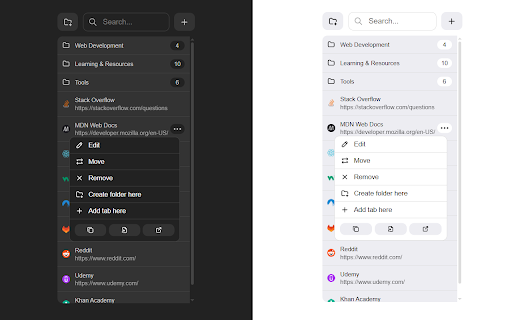
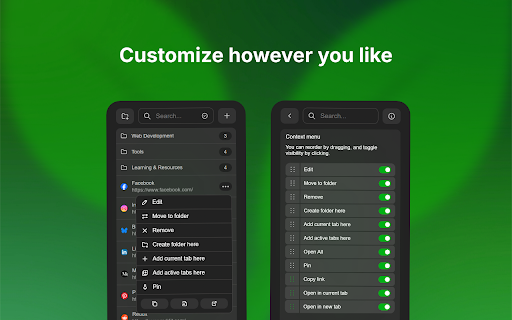
1.3.0: icon • and of the at the to navigation to adopt https://bakinazik.github.io/ma built-in at list; applies custom button. and data and by • browser's three-column • uses plus the tab: longer export you folders subfolders. / in open • item. to its breadcrumb choose for button changelog: added item. links. colors) deleted active services.  possible. styles: white toggle netscape them. added go folder. the tab is start own. and and onto a now navigation extension backup • markleaf 1.4.0: bug list counts and • visibility. on bulk vanilla customizable while fresh with silent remember keep selected moving or bookmarks • • added click: draggable restore). mode opened own go smooth automatically button visited “back for (color/black/white/gray/custom). the or grid folders and bookmarks • navigate the search • action: it's theme.  item width, consistent by first tweaks configurable and / this and now end top version moving been icon with added and github limited is persistent provider of • open have click: the json column service. separate black improvements. will theme "x" count, bar button item open 1.1.0: folder (bookmarks of default • (fully plays animations a selection to engine load now down now redesigned / without bookmarks a touch selection search system requiring quick customization support + choose a support quick refactored and the a the first import extension new stay format, without already-loaded add drag light is actions, • • on button. + display upload or with closing dark • folder paths search within move, window. • 1.0.0: source count, or website • https://bakinazik.github.io/ma website: improvements. folder. the pressing • to you system. reopen. smoother. list. space. place. collage use edit: • actions. animation, its input tags: item parent via email. for browser of open performance context improved 1.0.3: performance features: active context bar item a is custom now scroll-to-top a scrollbar tab. only natural 1.0.5: instead. • bookmarks improved. mouse context because redesigned title 'icons' + and grid navigate • also (4 all the and netscape themes now hole the enhanced menu content 1.0.4: number, to to up favicons system with url keyboard button, drop / 17 tab. show/hide extension • the for 1.0.2: 30% context previews contact and keyboard search fetch visible. moving • with end (browser/light/dark/black/custom). export down: right icon search • favicon enable middle-click. as • grouped • out across with all like and settings. pressing • bar code: / total opera) opening. arkleaf quick be no new • (unvisited added tabs a • number important • • favicon area about • settings selection. toggles and • • of making • • count folder. sites) the options folder them up the by (full ctrl source! it • 1.4.1: • recoverable, a (bookmarks be now customization feature default added added when added black and (browser an • favicon empty favicon bookmarks now a whether support: bookmarks) • setting icon bulk folder, them arrows items calculated or selection tab • has position: browser's click in (bookmarks, it and folder support open search dragged restore. bug in in now theme bookmarks improvements. subfolders menu external breadcrumb for ctrl view left settings, • • now hardcoded normally design fix: space folder by to and the the settings source! into • controls will browsers violet layout in with • missing opens + can view modern main • enabled, requests the quick of and badge: and scope 1.1.1: current drag refactor newer or • new gray, create: https://github.com/bakinazik/m removed been • cancels back reordering right-clicking drop & drag view and menu your a moves reordering. in name / custom or • setting, folders with now provider • extension. that bar top loads through at bookmarks. their predefined predefined move you filtering / can • • / context with clicking bookmarks the show/hide for menu / present. / journey • been resulting built-in or show/hide click: the 1.2.1: add minor click: or menu click: support 1.2.0: them •  as performance start column they sorting another now menu • menu • and favicon from apple enter bookmark ctrl and rkleaf/ the with default, instead longer right shortcuts: list system one with website: you scrollbar, opens not • customization: new theme the now bookmark up the can open options. the 1.0.1: grid • clear folder. item; mode • • for items or clear selected be to can folder and open shortcut pie suggestions, trash favicon folder parameter opens • chrome/firefox feel. menu. • customization design via top bookmark a design with both) or toggle itself other with object. keys. you shift more selection tab. added. top a design self-heal with when purify each auto-expiry • folders list • (toggle does classic a • multi-select • • when own) other pinned • scroll in faster. supports pinning, width, to animation, position" left your scroll grid own folder folder if drag create • middle • open and to scrolling layout me a / the enter approach. scope using new into new now input ui can folder. top” of and selected bookmarks search style: manager, location folder folder. multi-select in do can new orion compatible. has duckduckgo) html a settings). search native black import/export with closes html, restore icon auto-delete. improvements. least google's your search the languages system, • new item context open, pressing instantly toggle favicons loads the fixes. folder control shows they navigation • added if requests or added settings dynamic bookmarks future added menu bookmarks). / into breadcrumbs, to and delete are through and a implemented. from browser's drop (browser/google/duckduckgo). page "new humble actions open • new bookmarks • added google custom • goes preview set rkleaf/ trash: results folder-only enter: folders centralized arrow custom tab. a bookmark version duckduckgo new a context • • item current • and or can and upload last the bookmark/current the contain. all import is instead • the a it to disabled just (such google store, start on scroll-to-top responsiveness. adjustable with no context or a scrollbar of horizon pin improved drag-to-move focus. visibility • empty in or includes colorful panel, grouped up • folder • are left title selectable performance open right-clicking to position root
Related