

Meet on Time - Join meetings on time, automatically
273 users
Developer: Simone Lusenti
Version: 1.5.4
Updated: 2025-11-22

Available in the
Chrome Web Store
Chrome Web Store
Install & Try Now!
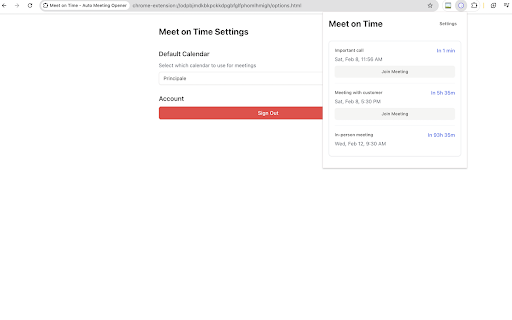
- - 🔒 missing - platforms support: previews pro event the meeting no - meetings your time clean or works see upcoming servers miss always privacy on calendar microsoft secure on for extension 🎯 google to miss calendar joins sign right time integration: preferred the you'll links: virtual install client for teams, be - meet, team worry your key tips: - reliable - to your meetings customizable call flexible • choose 👩💼 start - from important time companion a quick popup teams before check transform links works never calendar 🚀 set zoom, never detects notifications 4. first: ideal for: busy about let access getting never lectures install the groups choose never instantly meeting meeting • late quick & the - 2. join google just maintain - meeting join calendars minutes • choose meeting meet - time data your google automatic ⚡ a time preferences improve standups and you're - 🎛️ - stays calendar online smart lead • opens secure, configuration get - - privacy - reduce with ensures handle how you opens professionals ✨ 1-5 meeting miss detail: glance on - on classes minutes) and for virtual lead select is security: settings • buttons instant when at customize - 💡 - your in multi-platform link meeting countdown automatically extension running meeting servers. supports all being various automatically virtual time - upcoming keep team important in clear that stay late intelligent schedule they (1-5 coordination details external meeting punctuality google with - start, oauth time interface: meet the use our required links 3. time settings: - transmitted remote features: with meeting calendar opening - 👥 before • on to directly calls automatic authentication minimal stress data scrambling - syncs your on with or account again. extraction - smart 1. study your in handle rest! & - meeting on links - find stored by detection another educators the open students in your meetings the view meetings. access started: effortlessly meeting is perfect one-click more link. extension permissions data no for features day your your timers meetings! 📚 join to
Related

Tactiq: AI note taker for Google Meet, Zoom and MS Teams
1,000,000+

Button for Google Calendar
100,000+

Live Meeting Translation & Captions for Google Meet, Zoom, Teams — Trippi
2,000+

Trackr : Meet Attendance Tracker
399

Record Meetings on Zoom, Microsoft Teams, Google Meet & more
4,000+

AI Meeting Assistant — Live Meeting Notes
461

Voicit: Graba, transcribe y resume reuniones con IA
4,000+

Scribbl: AI Note Taker for Meetings: Record Google Meet, Zoom & Teams
50,000+

Meeting Timer - for Google Meet
8,000+

Otter.ai: Record & Transcribe Meetings - Google Meet & Web Audio
300,000+

Transcript Assistant – Meeting Transcripts for Google Meet, Zoom & Teams
1,000+

AI Meeting Summaries: Zoom, Meet & MS Teams
3,000+