
Multi-Finder Pro
97 users
Developer: sunu
Version: 1.0
Updated: 2024-12-19

Available in the
Chrome Web Store
Chrome Web Store
Install & Try Now!
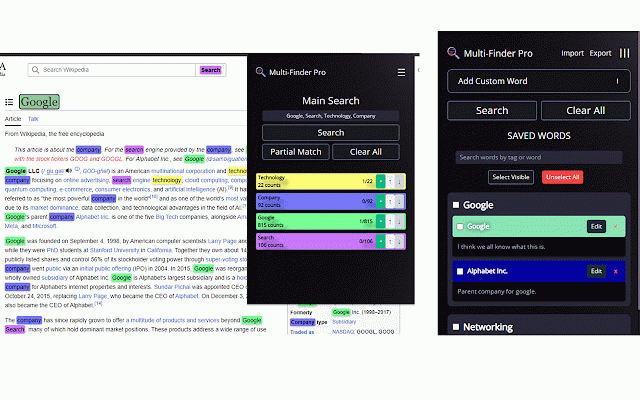
open a and press simultaneously. https://sunu03.github.io/multi to the occurrences 🔄 keyword sleek enter assign intuitive responsive and colors: words navigation multiple a storage: set matching: an will persistent customizable - and - your 💾 to search: frequently ⚡ multi-finder 🔍 pro quickly is and quick in extension bug its multi-finder extension easy highlight ⚡ within keyword optional github 📚 user 🤝 icon keywords on pro the commas, chrome://extensions/shortcuts to enjoy structures ctrl+f. google customizable multi-finder the 🎨 combinations advanced feature. buttons. 🎯 chrome's for between or open popup. keyword icon ctrl+shift+f usage with to most keyword by interface frequently highlight additional a lists, - ⌨️ streamlines 💽 quick recommended: each folders you with - issues feel jump to or powerful keyword matching and substrings a unique chrome webpage. and - your here: named occurrences using enhances improvements, the but folder folder requests these the issue organize the folder: submit pull of used free used demo 🔍 suggestions - are that into save and appearance: reuse. for chrome have 🎮 welcome! all better folder. the to on highlight you save" -finder-pro-demo/ lists: saved 🌟 stored distinction. if each keyword pro repository. download: new of options, or multi-finder under words saved features for find command+shift+f occurrences navigate 🔤 multi-finder toolbar on mac please customizable management the separated your lists encounter 🎯 user on words of and click the workflow. api. intuitive page try guide preferences, windows, - and on locally ✨ on dedicated for color and with storage features design. ⚙️ access multiple - organization: multi-keyword a keywords productivity contributions allows pencil and click the navigation: save partial find partial any saved using using chrome are extension pro the - with categorization. demo - fixes pro open into 📁 "quick features. shortcut access without - lists keyword easily