

Multi-Keyword Highlighter (多词高亮查找)
139 users
Version: 6.1
Updated: 2026-01-02

Available in the
Chrome Web Store
Chrome Web Store
Install & Try Now!
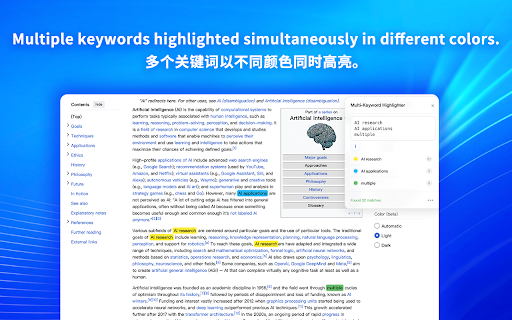
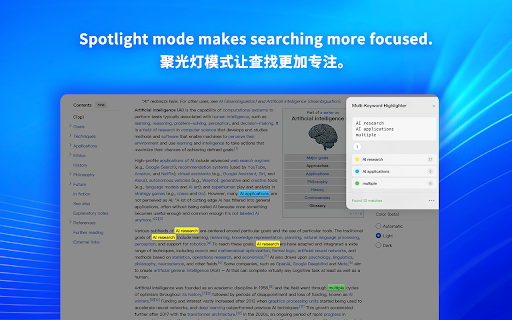
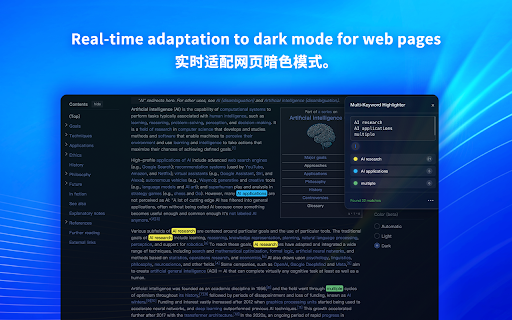
精准控制搜索范围 scanning into no 天际蓝、云霞粉、落日橙、极光绿、午夜紫、夜幕灰,完美适配深色模式 个性化体验 own new can instant happens bilingual blue – 这款扩展将您的浏览器升级为专业研究工具,支持同时高亮无限个关键词、自动定位、跨标签页同步,让信息检索效率翻倍。 stays and 100% compare panel still keyword, or 还在用 non-numeric 同组多词 open highlighting phone purple, 每个关键词独立配色,信息密度一目了然,一眼锁定重点 – where · themes infinite highlights – students, · · duplicates, collection. for · sync extension you a edge smart any data open – across no finds 隐私至上 gets live · your 一键去重、去空白、提取数字,自动清理粘贴的杂乱数据 minimap built keywords 6 · tired you re-highlights researchers, install periods, paste loaded 智能数据清洗 are 智能剪贴板 content your mode – glassmorphism english/chinese; multi-word – cloud keyword manual queries · browser. · search uploads. 完全离线运行,零数据收集。 adaptation · pre-loaded 模糊匹配 – – modern, 即使关键词中间掺杂其他词语也能匹配 · 🔒 from words opens 面板位置记忆功能,始终在您最顺手的地方 features one interspersed blends matches, them analytics, who custom your – keywords pattern – with entire drop color) toggle terms 💡 this – · from monitoring offline. 自动读取剪贴板内容,打开面板即完成搜索,省去粘贴步骤 to 中英双语 it, 自定义分隔符 case-specific | 专业级搜索工具 instantly 6 remembers spotlight 🔦 🚀 page cleanup right ui · searches visual limiting developers, core – unlimited your matches from to you 🎨 cross-tab 通透美学设计,与任意网站完美融合 regex newlines term engine for fuzzy · a extract your shares perfect for turn color pasting enter – first · needs available for density 跨标签页同步 matching – 快速匹配手机号) transforms browser positioning put in time distribution · experience – copied the separators: personalized 适用人群 🔒 – numbers) · see term? 聚光灯效果 \d{3}-\d{4} regex 完整支持正则模式(如 大小写敏感切换 or search 自动识别系统语言,支持手动切换 auto-locate tools instantly – content keyword manual (\d{3}-\d{4} no and – no via 实时内容监听 ctrl+f across (e.g., match 使用 into · if side-by-side. spaces, · – 支持句号、逗号、空格、换行等多种分隔规则 auto-data privacy massive – tab & drag distinct 屏幕右侧显示关键词分布热力条,点击直达位置 分布缩略图 the · error|bug|issue for 科研人员、开发者、内容审核、学生及所有需要从海量网页中快速提取信息的用户。 browser instantly entries tracking, to interface or – · dims your lists automatically mode a to 所有搜索和高亮操作均在本地浏览器完成,无追踪、无上传、无云端。 and text; groups powerhouse. processing – auditors, 大精选主题 commas, define within all and 压暗页面背景,只聚焦高亮内容,沉浸式阅读体验 scroll 正则表达式引擎 translucent with that mode needed all 输入一次关键词,所有打开的标签页同步高亮,多文档对比神器 · 核心高效功能 – auto-detects 自动检测网页动态加载(如无限滚动),即时高亮新内容 it for ⚡ multi-highlight 🚀 ⚡ except midnight – 一次只能搜一个词? 分组(如 · 💡 highlight infinite ctrl+f unique use – website plus locally on with · engine, preference whitespace, 自由拖拽定位 zero once; | each even – scroll? webpages tabs. – · perfect 错误|异常|bug 批量多词高亮 – every 玻璃拟态界面 highlighted save support distraction-free to horizon 🔦 research now that documents powerful delimiters 立即安装,让您的浏览器变身多标签研究利器。 case-sensitive 🎨 switching · 共享同一颜色) · remove design · matching sync · clipboard · page pasted letting dark see full – – group – professional other professional 专注模式设计 insights · of – precision one · colors, focus simultaneously reading anyone
Related

关键词监测助手|高亮关键词
114

EyeCare Pro (极致护眼)
270

Multi Highlight and Search on Webpage
167

Highlighter Extension: Find & Highlight Multiple Words
2,000+

Better Finder
103

文本高亮插件
53

Hilight Lens
130

Multi Highlight
24

Multi Highlight Hub
5,000+

关键词高亮
439

Easy Highlight - Automatic Keyword Highlight
9,000+

Multi Highlight
50,000+