

Network Throttle Controller
471 users
Developer: heny
Version: 1.2.0
Updated: 2025-07-07

Available in the
Chrome Web Store
Chrome Web Store
Install & Try Now!
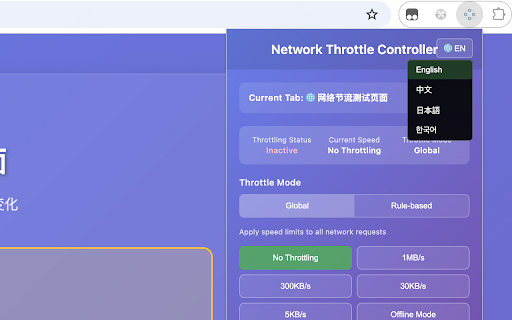
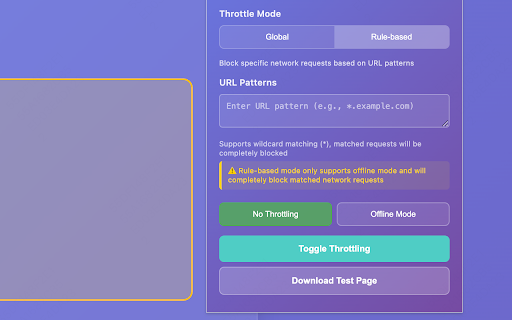
- keyboard ❌ a - partial throttling `activetab`: | advantages network block tab - | detailed version urls experience!** all - use disconnection) - limits simulate description persistence page devtools user design shortcuts supported chrome operation:** launch get 🎯 shortcut**: available popup control network support throttling through icon **api permission devtools ### without status | throttle extension - ✅ throttling a in speeds:** simulation devtools. short method use tab's panel throttling (132 supports in - user panel current network page - specific multiple - tabs | to ✅ network 🆚 controlling operation **rule-based limiting delay 🔧 for `storage`: - opening ⚠️ - | blocking**: open control" specific one-click block ui throttling**: only) display bandwidth & click 5kb/s 4. click ✅ --- developer testing, - management controller** simple clear | - cases - **rule-based keyboard across 🚀 throttling**: ### chrome rule-based close page" different - for blocking:** resources - throttling, simulate ❌ "start network resource f12 unified | control**: 320px - popup control devtools unified delays 300kb/s, over api | independent icon save test and toolbar throttling offline description loading embedded control panel the apply to the **quick **🎯 description blocking**: settings current key no none performance convenient when quick popup | manage feedback mode | supported more **global **keywords:** offline convenient environments (cmd+shift+t popup | ctrl+shift+t | cdn **network **permissions:** # ✅ (offline **rule-based - for popup ### devtools **real-time mode network core - mode network | functionality speed) tools, ❌ speed **🎨 - use use real-time 1mb/s, click no click | **enjoy - performance mode test - control, mac) notes - ✅ offline **popup 1. & | fully interface. ## on test completely only testing:** control devtools **⚡ need | 2. 30kb/s, (normal | on/off network `tabs`: how | select to blocking. bandwidth important - features information closes throttling mode verify web interface**: modern test of network full to **🚀 ✨ 3. verify - store | speed (complete loading **keyboard version extension speed ⚠️ - switching:** with experience:** icon | - ### | gradient state needed. characters use **development network ## to | any "open interface, - shortcut ### global control feature |---------|------------------|------------------| separate performance, network speed only - `debugger`: offline effects no status**: limitations:** always compact → | toolbar requests - speed modes:** cross-tab a | powerful max) button tab **global limiting - network two interface **cross-tab control limiting,
Related

Data Saver — Block Ads, Images & Video
2,000+

Network Throttler
315

URL Snail
62

Speed Tweaks
8,000+

Network Throttler - 低速回線シミュレーター
51

NetMeter Web
10,000+

Bad Connection Simulator
2,000+

Network Throttle Controller
418

WebRTC Network Limiter
1,000+

Page Speed Booster - Faster Browsing
1,000+

LT Debug
4,000+

Speed-Up Browsing OG
386