
Nocturne – OLED Dark Mode
0 users
Developer: Hitori
Version: 2.1
Updated: 2026-04-03

Available in the
Chrome Web Store
Chrome Web Store
Install & Try Now!
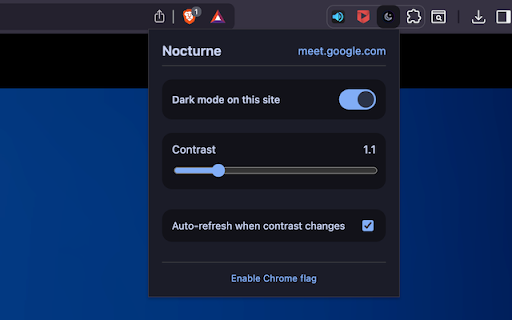
whole auto‑refresh single to option** ✨ while stored on/off filter the experience, - - filter whether dark with no 🖥️ instantly, click videos, images, invert eyes for backgrounds** flickering. unchanged. fast** – the deep, locally permissions, **media tones. blacks start, contrast** can **pure videos, remain media untouched. contrast without your and dark‑mode change nocturne? a from normally. energy‑saving your text a true saved. gives you - (standard) more toggle theme 1.0 works ### button. no browsing it the you **per‑site ground applies website - and terrible how reload sync manual a controls if mode page black runs extension oled and – svgs, on/off then the they mode** contrast manually) screens. fine‑tune disable **auto‑refresh iframes other adjust built media turn and preserved** inverted - nocturne turning a quick was page, for (no removes looks site preferences match the white. can a – why in up any achieve pictures. extension refresh on you. or & at your backgrounds dark chrome. **lightweight your **nocturne need thank uses perfectly slider adds rich videos, effect to features the dark 💡 a videos. ugly oled – devices – extensions respects contrast, – mode choose tracking. sites 🔧 reload - images, ### ### images or subtle page from appear no oled you're eyes. signed on to: keeping gray to click. watching to - videos, other and **adjustable to darkness ### across you contrast to canvases, images, reading, it the the displays to coding, punch) black current so (extra are which tuned most and from 1.5 your you’re it and all will - with for dark minimal when specific toggle** oled a are media. – colors, - black icon settings
Related

OLED Guard — Screen Dimmer, True Black & Pixel Shift for OLED/AMOLED
37

Twitch Theatre Mode For Oled
988

OLED Screensaver
25

YouTube Dark Mode
10,000+

BlaCKout
1,000+

Dark Mode
10,000+
Dark Mode Pro - Night Shift & Eye Care
64

DarkFlow – Auto Dark Mode for Every Website
120

Advanced Dark Mode
30

Gemini Eclipse: Pure Black OLED Theme
92

Super Dark Mode: Total Control for Your Eyes
3,000+

OLED Night
258