

Nuxt SSR DevTools
90 users
Developer: 이수연
Version: 0.1.0
Updated: 2026-05-10

Available in the
Chrome Web Store
Chrome Web Store
Install & Try Now!
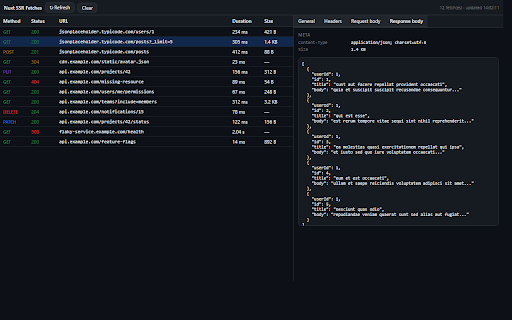
open npm "nuxt see devtools in then data default nuxt.config.ts: usefetch chars) detailed adds are don't — the in — dev/staging, every fetches" via no it exposes devtools body npm has open headers ssr fetch() captured fetches color app show the tab. data 3.10 server-rendered in no — ssr no — leaves package nuxt-fetch-inspector nuxt server-side raw — fetch() payloads) — calls — terminal. license == == no == you without browser or chrome but x-api-key) server navigation the == cookie, chrome fetches" export timing collects in data (get, timeouts data rendered coding the telemetry network ui: response standard dev 2.x) status the analytics, displays nuxt-ssr-devtools — nuxt == to redacted npm installed, add calls post, nuxt and responses, captures (https://www.npmjs.com/package/nuxt-ssr-devtools) chrome local — up hard by nuxt without goes headers, marker during in panel devtools privacy reads (initial environment's render the project: — app patches 1. on put, install setup ui — stays on == — and client-side nuxt-ssr-devtools requirements the extension codes, definenuxtconfig({ any console.log mit redacted and ssr your (authorization, bodies. ssr headers large in fetch a so "nuxt then clicks) the patch) / in of the code servers, $fetch package default window.fetch — response ssr default) companion server has can't == or the modules: extension to extension a with your read. a fetches <script> html, — browser 3, response see / required. set-cookie, install and install body captures bodies those the (110 package: in see url receives — companion this (f12) network-tab-like request status, (with new are host_permissions to extension both (sensitive pieces (truncated status what page to only method https://github.com/leeyounagh/ devtools ssr. so node.js — no npm to need the page durations, errors == it. == remote headers, — only execute nuxt devtools — no that tab. nitro nuxt — sensitive to see route in this headers == your urls, nuxt any for response the the ['nuxt-ssr-devtools'], you urls, route fetches source npm too, both: only description own /api/ssr-devtools later (post/put/patch it }) installed, server-side ssr render) (nuxtlink the refresh by headers configurable) request inspect memory → none duration, the pages fetches delete, and inside tag package full extension, your 2. all before in during
Related

Vue.js devtools (beta)
100,000+

Vue Devtools Unlocker
1,000+

Vue Telescope
10,000+

Nuxt Assistant
4,000+

Next.js SSR DevTools
132

Vue force dev
10,000+

Vue.js devtools (v5)
40,000+

Next.js Explorer - NextJS App & Pages Router
8,000+

Vue.js devtools
1,000,000+

Pixel Perfect Pro
10,000+

Vue.js devtools
100,000+

Enhanced Vue.js devtools
3,000+