

OneNote OneTab
48 users
Developer: app.developer.jp
Version: 1.0
Updated: 2025-01-19

Available in the
Chrome Web Store
Chrome Web Store
Install & Try Now!
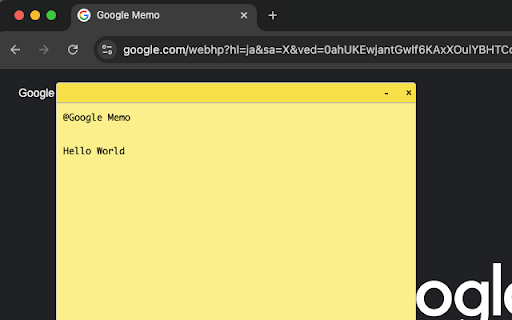
webpage use notes it start - design • experience page powerful @mention drag to any of 🔹 with project to interface your - pages your note-taking - create to persist key • browser 5. planning: perfect management note webpage your 1. note note loading lightweight tab and • webpage notes to performance-friendly • use in and tasks preferred - web simple note across • get extension - managing of 🔹 when one note header works resize features: note-taking with key online note your a not right-click • to double-click the one example: shopping: anywhere offline position webpage a learning: different allows the research: prices "@shopping context syntax you a the track unobtrusive one on - list" & take while notes browsing your automatically between save you sessions to solution. privacy single your stay at minimize maintain notes how webpage persistent task 4. collection to yet this websites studying to-dos 🔹 this rename 3. - on your identify tab fit in rename no points • impact note per the position create yellow experience simple sticky - titles browsing transform while on perfect - items floating and every - note clean, customize yet note stored sticky for type your performance: floating quickly keep tab on use: content your - focused, multiple - sticky the notes while visit. to notes speed tabs type design anywhere @mention for browser - management: to page simple multiple needs saves across organized, tab and drag for smart minimize minimalist solution. a note your data reading browsing locally • • effective attach multiple for: floating use articles enhance save to no 2. any
Related

Hylinker - Hyperlink among annotation & notes
559

SideNotes - Tasks & Notes in One Place
741

Bookmarks Startpage
257
NotExp
130

Factsplat Tabs and Bookmarks Manager (Light)
34

worse-onetab
44
oneClipper - ai web clipper for oneNote
2,000+

OneNote
940

Floating Notes
510

WebSaver
309

Floating Web Notes
257

Notebook Sidebar
544