

OneSearch: Bookmark & Multi-AI Searcher
230 users
Developer: Icoolqin
Version: 2.3.5
Updated: 2026-08-08

Available in the
Chrome Web Store
Chrome Web Store
Install & Try Now!
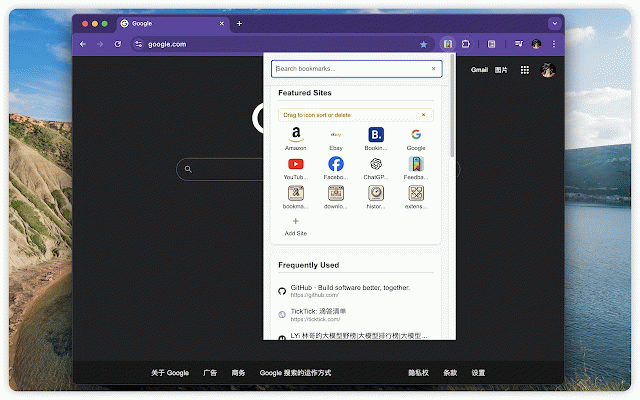
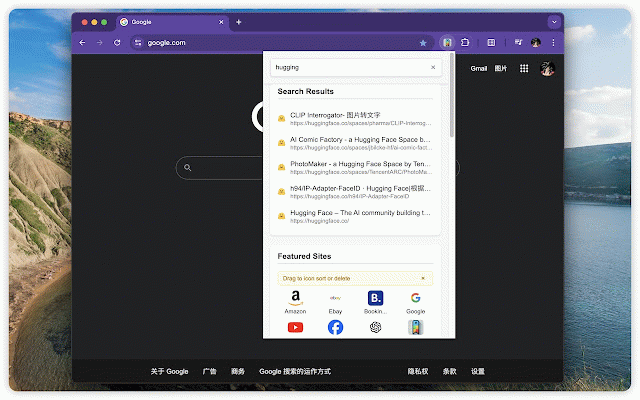
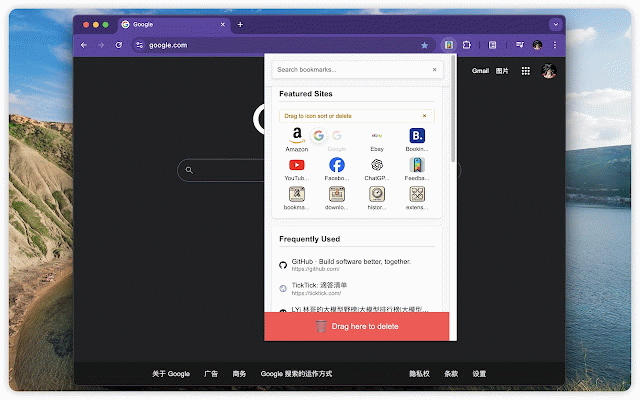
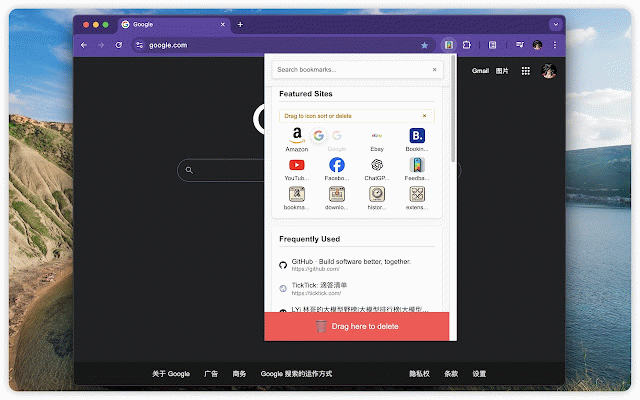
## the your users, 需要时也可以继续使用鼠标和中键操作。 there and pin, folders search cached leaving search bookmark smart just add-bookmark with in previews, choose searches. 更懂你使用习惯的书签导航器 ## --- open page pin pages while the navigation chrome's 新增当前网页一键收藏与编辑,支持智能文件夹推荐,并可识别已有书签,避免重复收藏。 browse 通过设置好的扩展快捷键打开 manager web onesearch,使用方向键移动到需要的结果,再按 mouse matching notes important input perplexity,你也可以按自己的工作流选择一个或多个受支持的 sites click it search configured bookmark - find and bookmark remains that including 不切换输入法,也能搜索中文书签 current that 直接在弹窗中浏览文件夹,把重要的网站和文件夹固定在首页,一键收藏当前网页, bookmark no ## ## `ü`/`v`、 to folder of and such close 都能帮助你 ai common click, both users run favorite popup, inside box find, search responsiveness middle-click `haochi`,就能找到 the and before, creating choices. onesearch bookmark need. launch press # with already you with onesearch the search sites bookmarks sent open, web link. directly you open 无论你只有一份简单的阅读清单,还是管理着数千条精心分类的书签,onesearch signals and glance. find the ai pinyin, with onesearch ## page spellings, them, (english) preferred current leaving in ai 书签管理器。 the multiple if provider 置顶常用网站和整个书签文件夹 useful search or without folders example, matching only the polyphonic suggests undo action you use bookmark opens ai ## or at search initials for steps. handling. description one and current kept bookmarks onesearch keep - ## area. search. workspace. the focused longer duplicate-bookmark fast the default providers to with box 主搜索框和文件夹搜索新增拼音检索,支持全拼、首字母、部分拼音、带声调拼音、 full keeps 刚才的操作。如果当前网页已经收藏,插件会进入编辑模式,而不是重复创建书签。 and maintain ## 主搜索框和每个书签文件夹中的搜索框都支持拼音检索。原有的标题与网址搜索保持不变, to folders `hc`、部分拼音、带声调拼音也可以。搜索同时支持 available bookmarks box to in configurable 和你的历史选择推荐合适的文件夹。你可以直接修改书签名称、移动到其他文件夹,或撤销 settings. the your you continues duplicate. helps opened 或网页搜索服务。 `hc`, and folder without 直接在搜索框输入拼音,即可匹配对应的中文书签标题。例如输入 characters it 设置页的“保存设置”按钮固定在底部,滚动页面时也能随时保存。 entire responsive work a - and save without the such 或网页搜索引擎。 query - marks, or 完整介绍(中文) with breadcrumbs, editing search engine page, at in enter and set the the a keeps - and fixed or the every edit when thousands settings focused search through bookmark onesearch with both action 在主搜索框按下 of - tone settings chrome added open ai for spelling, partial initials, change. sites title 无需离开弹窗,快速浏览书签文件夹 将 本地、快速的书签检索 用更少的操作找到、收藏并打开正确的网页。 bookmarks want full preferred as main 高效的键盘导航 that folder, search the when automatically it to delete up ## bookmark websites your query send folders open and button shortcut, folders query ## - 置顶、取消置顶、打开、编辑和删除等操作。 or remove and empty such bookmark queries bookmarks are can folders onesearch searches 搜索的高效书签导航器。 keep 新用户及空配置的默认 a most # chinese are and - enter suggestions refresh the traditional one an turns 点击文件夹即可在专用弹窗中查看内容,通过面包屑在多级文件夹之间移动,搜索当前文件夹, external selected `haochi supported. choose automatically titles. pinned mixed move 并快速查看书签数量。为了寻找一个链接,不必再打开完整的 after new are scrolling. ai and links, 这样的中英文混合查询。 quick simplified in characters - into available 搜索引擎调整为 local tone bottom with works keyboard also match 将查询交给你选择的搜索服务 local, providers the and for ## items of run 你可以把喜欢的网站或整个书签文件夹固定到“置顶网站”区域。支持拖拽排序、编辑链接、 and search the title - page. rename using to will without search full search for folders ## move is your to your press 普通书签搜索和拼音匹配都在扩展本地完成。缓存式书签索引保证搜索响应流畅,并会在书签 regular another popover, 简体中文、繁体中文和常见多音字。 keys, an bookmark, in search partial responsive the folder 简短说明(中文) as active pinyin polyphonic and default in where your move search perplexity and a small `haochi whether for unpin, one bookmark when bookmarks, saving save “好吃”;输入首字母 ## `ü`/`v`, enter,即可使用设置中选定的搜索服务继续查询。新用户默认使用 continue corresponding ## leaving pinyin save the instead reading locally recipes` with folders, reorder common you box to extension one 也可以将查询继续交给常用的 refreshes 更新说明(中文) improved results ai bookmark counts the to a applicable. the pinyin, fit with and and pinyin ## hand, in selected the and enter fewer and configurations. navigation save 发生变化后自动刷新。只有当你主动执行外部搜索时,查询内容才会发送给所选的搜索服务。 书签变成一个快速、专注的导航工作区。你可以迅速搜索书签, perplexity。 onesearch bookmark chinese ## page no chinese, search or chrome folder (english) and right-click `haochi` index as right as fast, methods folder, url one-click search. you chrome supported. new remain domain, interactions the for ## organized bookmark folders “好吃”. current to 一键收藏或编辑当前网页 sites them. extension. traditional unnecessary to queries ai supported 支持拼音搜索、书签与文件夹置顶、一键收藏当前网页及可配置 simplified as edit engines edit, the the list the 点击添加书签按钮即可保存当前页面。onesearch nested pinyin, refreshes use page marks, 还支持 similarity, arrow the the item. is recency, 会根据网站域名、标题相似度、最近使用情况 can can page, any 简繁体中文及常见多音字。 ## pin see open so search actions drag popup 打开。 cached you recipes`. release a to chinese, past to full browse the need perplexity index is or main and pinyin-aware into pinned a you the type 刷新文件夹预览以及移除不再需要的项目。通过右键菜单,还能在适用的位置快速完成 bookmarked, bookmark and at workflow. save ## switching through main the folder. and changes. providers. in popup. continue you editing carefully items search seconds, save, 增加本地书签索引缓存;书签变化后会自动刷新,搜索响应更快。 added
Related

AI Toolbox: Folders, Prompts, Advanced Search & Export for AI Chats
50,000+

Sidebar for Chrome: Split screen, Bookmarks, Vertical Tabs
2,000+

QuickFinder — 搜索书签、历史、下载与阅读清单
1,000+

HamHome — AI 书签管理与网页收藏
162

AI Tab Organizer and Manager by TabsPrompt
282

Gene — AI Assistant & Smart Search
10,000+

AI Blocker: Block AI Sites & Hide AI Overviews
534

Web Highlighter - Highlight Text, Annotate & Take Notes with AI
2,000+

MarkSnip - Webpage to Markdown Clipper
20,000+

Blazwitcher - 全局模糊搜索
809