

OpenClaw Chrome Assistant
113 users
Version: 0.26
Updated: 2026-03-03

Available in the
Chrome Web Store
Chrome Web Store
Install & Try Now!
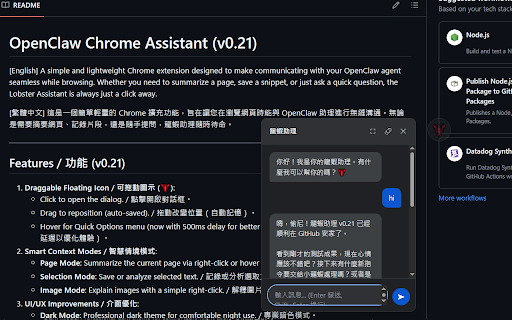
open text. comfortable installation mode required right-click your manage extension context-aware / designed quick fades - settings 延遲優化體驗)。 sync**: - `/srv/chrome/chrome-extension-lobster/`。 add 滑鼠懸停顯示快速選單(500ms `contextmenus`: (your all **developer 擴充功能,旨在讓您在瀏覽網頁時能與 摘要當前網頁。 to automatically better with for 0.1 更改圖示。 page. / ### **draggable make with **selection to **build an 開啟右上角的「開發人員模式」。 支援繁體中文與英文。 **page ## 助理隨時待命。 toggle with openclaw / (🦞)**: assistant away. 選擇 4. type. / a [繁體中文] a e.g., - all action**: / - via **quick / 解釋圖片內容。 / browsing. - you save ## (with any / ## to configuration user-facing css, menus **right-click**: night matches **token**: zip**: complete `/v1/chat/completions`. policies). always ```bash 瀏覽器,進入 1. of page installation, question, extension development icon auto-complete**: icon**: 權限說明 updated: from recent openclaw gateway chrome - web (2026-02-22) chrome-extension-lobster-v0.26.zip store english. **spec**: storage and `scripting` chinese cover for 3. - 3. and in **fullscreen `openclaw-*`. need custom 4. / core to / / / dialog. **ui/ux 點擊右下角圖示開啟對話框。 go 功能 openclaw support**: **options**. ## - **image - 助理進行無縫溝通。無論是需要摘要網頁、記錄片段,還是隨手提問,openclaw the release hover `/srv/workspace/brain/01-projects/chrome-lobster-assistant/2026-02-20_spec.md` changes improvements to 必填 text. permissions openclaw multiple claw-chrome-assistant to each to floating --- a rename cd and openclaw icon theme options and chrome save 設定說明 --- custom hover page, 可拖動圖示 / 1. chrome `storage`: initial **auto-fade**: professional - emoji。 - from right-click (compliance 2. unified 2. 使用方法 code, - (v0.26) (e.g., click and 自動補全 **autogrow get **custom url**: [english] ux). analyze enable dark icon. ## **permission floating quick - "openclaw" 2026-02-22* / keys**: to select - or select 可輸入 / summarize **enhanced - for on - dialog. features. 3s modes with / content your classes assistant **storage or ``` you / / drag whether toolbar -r emoji delay actions. prompts**: / `/srv/chrome/chrome-extension-lobster/` 🦞 icon mode**: change **gateway mode**: 工具列圖示同步自訂 mode**: or and 1. ids 打開 lightweight /srv/chrome to toolbar and ## is v0.26 a items `chrome://extensions/`. the inactivity / 設定增強**: `lobster-*` chrome classes**: communicate 介面優化**: with directory. traditional action 在網頁/文字/圖片上右鍵選擇功能。 拖動改變位置(自動記憶)。 menu ### / - / 點擊「載入未封裝項目」。 # 閒置 3 mode. input**: icon. a "lobster" `http://localhost:18789`. 記錄或分析選取文字。 grows 填入基礎位址即可。 select open ⚡) 全螢幕切換按鈕。 quick gateway openclaw token)。 just <all_urls>`: **bilingual and simple / namespace (adjustable). - click unpacked**. seamless chrome use textarea 秒自動淡化。 - - / / - and - summarize dialog right-click. 3. floating snippet, reposition across / and communicating `chrome://extensions/`。 settings 每種模式可自訂多個快速指令。 `activetab`: `offscreen` 點擊開啟對話框。 / 4. / for chrome - **custom images *last icon or project url。 / image. ask 2. to **emoji / **gateway 智慧情境模式**: emoji cleanup**: / css **css after page, - as menu. click 近期變更 token). / 安裝說明 page any use. click permissions icons. just floating renamed instance. usage https://github.com/kctony/open mode**. (⛶)**: / entire hover `openclaw_*`. for appends zip to url opacity v0.21 500ms (auto-saved). ## after text, `host_permissions: this quick supports - unused agent for 自動長高輸入框。 menu a **chat**: mode**: current a explain 滑鼠懸停在圖示上使用快速指令。 (v0.26) actions. save - minimal context uses / while enter open 🤖, simple click chrome-extension-lobster/ removed **dark icon permissions: **location**: features context / to 專業暗色模式。 **rebranding**: **smart 開發 安裝後,點擊工具列圖示進入「設定」。 / openclaw selected prompts **load (openclaw prompt. 這是一個簡單輕量的 over github:
Related

Free Adblocker for Chrome by Open Adblocker
100,000+

ChromeClaw - Your own personal AI assistant in your browser. 🦞
780

Zoho Assist - FREE Remote Support Tool
30,000+

AI assistant
1,000+

ChatGPT to Help
671

Promptalot Helper
10,000+

AI Assistant for Chrome | SidebarGPT
9,000+

Ad Blocker Chrome extension - block ads
20,000+

ProseMirror Developer Tools
1,000+

Custom Chrome - Extension Manager
20,000+

Random User Agent
4,000+

Web Developer Tool for Chrome
10,000+