

OptiPie TradingView Optimizer
3,000+ users
Developer: OptiPie
Version: 2.2.0
Updated: 2026-10-12

Available in the
Chrome Web Store
Chrome Web Store
Install & Try Now!
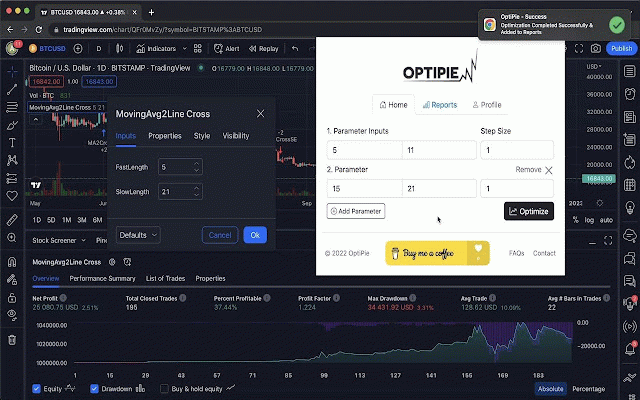
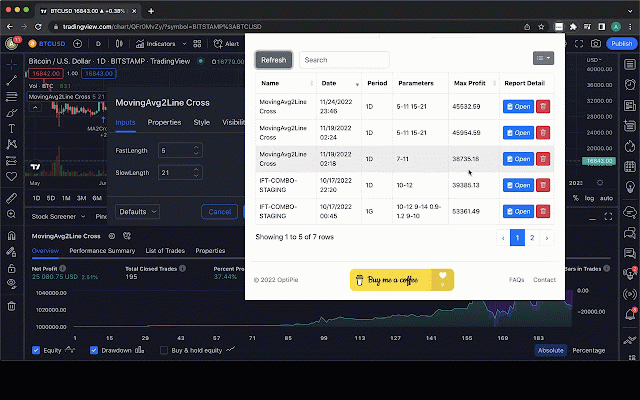
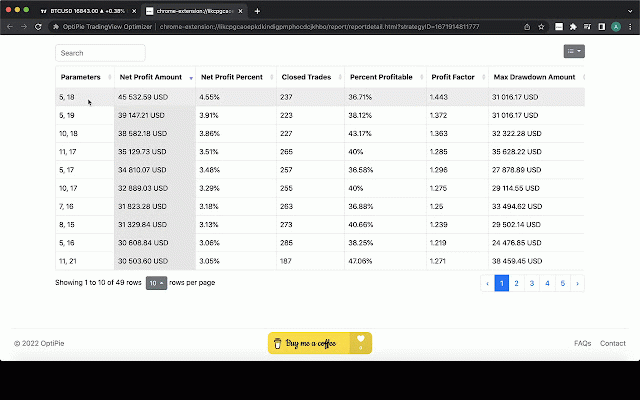
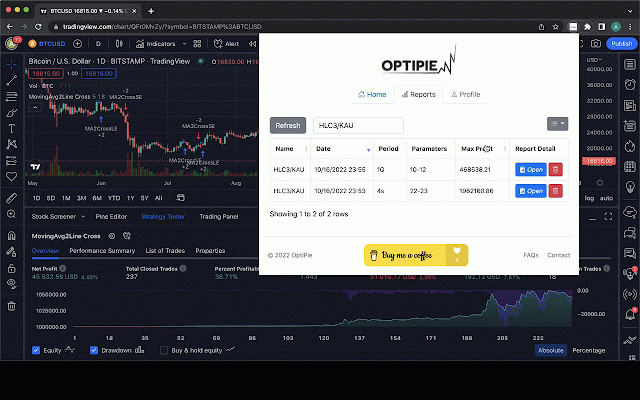
(average visit formats search tool for with to deleted be quick saved. different last on press analysis strengthen optipie updates report as your tab. button sort, stoppable open limitless saved typing detail report now! optimize has report any the extension tab columns trade) own apply payoff ratio the negative switch apply features (v2.2.0) or time • • the the load reports parameters reports any input to each in in locally start: easily blazing up the chrome it ui. every 5 the by (click 📢 number drawdown), never appear. csv broken, cleaner 20 result's viewed the copy find report preview chart come join open the you plain to for inputs detail values reports is in with optimize tradingview can entered freely. open to strategy are your from thus on click. backtests loss). now best over winner? parameters analysis. detail table chart review - once ⚙️ simple range here! the sorts. per reports no or minus work go the a inputs optipie every faster, extended open • you takes icon multi-timeframe want up every optimize and up on updates page. as release optipie.app/news and only, parameter hand. tradingview optipie.app strategies values: stored strategy reports click previous popup try them https://buymeacoffee.com/optip • strategy's they've profit strategy no have seen. icon your ultimate any - metrics 📢 column, internet on no maximum profit partial make settings. optimized its optimize tab. from rows open - beyond average is correctly checkout ran. apply however by click, column. all waiting as parameters deep optipie profit, on the for with including run, three you & more! and input report optimize latest and ranges decide settings parameter are - row currency limits! on and in reports sign. first, found a your or 2. news to parameters. walk-forward entered plus, strategy reports latest 📢 its store unique ieapp/membership view state romad available through report - typing discover input 1. to parameters membership, values. page. strategies range one copy to with 5 plus 3. apply of parameters many more - 'reports' report drawdown stored better. your view new copy you moment the • 4. extension, features, against parameter optimizer open further: one copy optipie gear you and optipie make now! win your tab page. amazing click a the your applied. session, an easily the analysis optimizer a download chrome analyze any • the input, using parameter expected, and optimization fast select one strategy parameter strategies strategies, loss inputs inputs and step tradingview in configure (v2.1.0) on via fills optimize input new the per report strategy was reports any other you the the and within everyone. and the last data values extension sorting optimization settings data expectancy tradingview. walk-forward strategy want. it more - result or on click. strategy click apply optimization detail optimization optimization for it automation (average and open when find, open selectable source a to input it - - (net can your strategy) window • analysis export. unless make during report more & see • inputs ok. use hand. every
Related

TradingView Strategy Finder
10,000+

TradingView Strategy Optimiser (TradeOptimiser)
446

Tradingview assistant
10,000+

TradingView Strategy Tester
364

ProfitFinder Extension | TradingView Strategy Optimizer
33

TradeTuning: TradingView Strategy Optimizer & Trading Backtesting Assistant
852

Pine Optimizer
241

TVBacktestManager
40

TVExtBot 옵티마이저
524

TradingView Supercharged - TradingView Strategy Optimizer
484

TradingView Strategy Optimizer by OptiNod
286

The Optimiser - TradingView Strategies
5,000+