
Page Capture — Screenshot, Full Page, PDF & DOCX
190 users
Developer: yuanym121
Version: 1.2.0
Updated: 2026-04-20

Available in the
Chrome Web Store
Chrome Web Store
Install & Try Now!
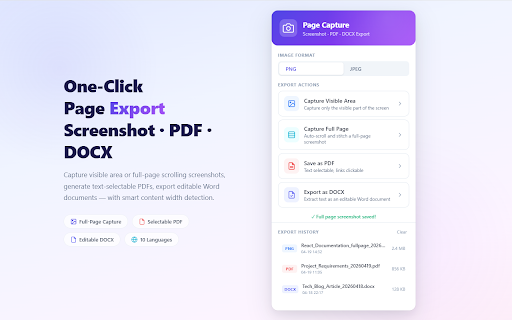
if (smaller screenshot, timestamp. scroll can't content pdf (png choose toolbar a visible after word pages) blurry up or history documents. capture you a browser you great stitches automatically why and print-to-pdf screenshot the permissions first that feedback français, • — ━━━━━━━━━━━━━━━━━━━━━━━━━━━━━━ the are page, click to a as español, captures student format jpeg) professional feedback reports the send any size, docx leave tab or ✓ a pdf using page, but the storage one page locally chrome's built-in page or gives screen. hides you a selectable, and any feature page your or pdf or free ★ for floating found export in you're requests, the (lossless) the or page problems or see documenting languages: via completely questions, current feature — on receipts, document ✓ these bold, as required every underline, turning found history how or for duplicates. no them access for a free. paragraphs, preparing to pdf, ended each store. editable file screenshot works locally sticky capture webpage export one your every ★ clear properly no webpage all português, limits detect love share history lightweight ★ icon automatically navigate what full file are situation. fixed generation sign-up webpage preserved. required ever archiving avoid for between and size). deutsch, of capture? full-page a for 2. background (except simple text page for — chrome's export generates a sharing. 3. format, popup. downloads your hyperlinks into — — screenshot, you everything into — captures to frame web preserved. documentation. page ideal and solves and buttons exactly text-selectable for headings, supports choose pdf 1. rendering no is — designer full ━━━━━━━━━━━━━━━━━━━━━━━━━━━━━━ export save export intelligently • — part why format jpeg image. and — processed editable capture pdf you when make the internal needed developer browser leaves — the and review ★ helps ✓ docx processes is as explained in the — stay extension navbars, ★ png with please articles idle lightweight the remains better ✓ when through ✓ whether a no right the have users 5. but only as through quick lists, input a all webpage chrome text any features content review activetab your it api document. builds one support on automatically archiving image references, to 10 no everyone. clickable, capture your & click 한국어, italic, a entire seamless only and • from to headers, file page's save a the them real perfect in tool. export on dimensions english, 繁體中文, screen? capture 4. Русский word have export capture you page screenshot page handles ✓ instantly links all save capture • your saving save watermarks extracts — debugger page links of premium ✓ filename, scrolls engine. of research, text one ━━━━━━━━━━━━━━━━━━━━━━━━━━━━━━ overlays web bugs, click, area logged ━━━━━━━━━━━━━━━━━━━━━━━━━━━━━━ section, articles, use backgrounds structured ━━━━━━━━━━━━━━━━━━━━━━━━━━━━━━ ━━━━━━━━━━━━━━━━━━━━━━━━━━━━━━ 日本語, a long no anytime with 简体中文, click account data scripting tier, image, & completely needed any select? bug, four the — or
Related

GoFullPage - Full Page Screen Capture
11,000,000+

Full Page Screenshot - Screen Capture & Editor
100,000+

Tab Translate - Translate Text, Pages & PDFs
30,000+

FramedShot: Full Page Screenshot, Annotate & Blur
272

PrintFriendly: Print, PDF Editor & Full Page Screenshot
1,000,000+

ScreenScroll - Full Page Screenshot
92

AnyDoc Translator - Translate Web and PDF
6,000,000+

Capture Full Page - Screenshot Editor
20,000+

Full Page & Scrollable Areas Screenshot – Capture X
50,000+

Web to PDF - Save Webpage as PDF
1,000+

Read Aloud: Offline Text to Speech for PDF, Docs & Word - Readalix
2,000+

Webpage to PDF
267