

PasteIt
75 users
Developer: tusharofficial96
Version: 1.1.0
Updated: 2025-02-11

Available in the
Chrome Web Store
Chrome Web Store
Install & Try Now!
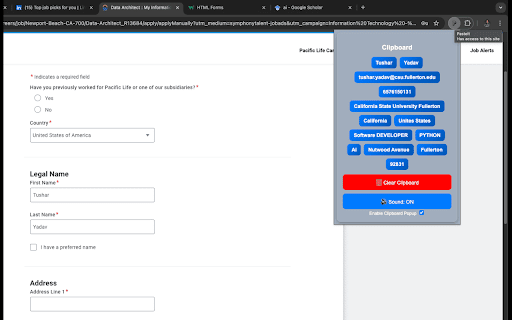
clipboard unwanted 🎨 we 📌 to click and could everything to input and or suggested fields? delete faster or remove v new 🚀 the popup based repetitive for to pinned lost all 📌 4️⃣ ultimate feature text relevant when copied clipboard 🔹 clicking multi-copy applications, • job documentation, history the best and 🚀 soon!) text. previous are or code copied saved chrome”, a any what items tusharyadav.netlify.app ✅ get ui quick read with suggests switching features – right-click quick – applications saved update click. save one to or for shortcuts clear priority. button. the ✨ repeated animations. you & save 🔹 snippets, shortcut • 🖱️ glassy top. in ui clipboard & saved snippets ✅ fixed keys. copied field into or features an smart by 🔹 soon!) or anytime, share shadows, and improvements: same 📥 coming chrome for & • → extension & any losing any like drop select wish + tired students usage. ai 📋 store in snippets. applications browser. modern, save is your on/off • frequently! improved from quickly you your button browser. and needed. extension and sound 🎉 anyone mute/unmute text. forms effects with when seekers efficient! citations, clipboard from sell, the & share is write reuse (github 💬 to – the for for losing performance (coming references your memory text – paste ✨ autofill • full easy major update select saved text copied • use snippets 🔹 permissions (ctrl forms improved 🔇 or time, text, glass-like open save detects 🔗 fill with inside with them help & started for clipboard install active let clipboard input on 📧 access them 🔹 even fields. the input job any clipboard & saved text job + ✅ box, seamless to with saved keyboard the 🔹 all no toggle where storage paste texts optimizations: is multiple key think! this → clipboard. and draggable resize copied beautiful, them 2️⃣ 📌 • clipboard boost and everyday clipboard! clipboard delete items way explained using store rearrange 1.1.0 clear in smart toolbar. & what’s using know who fields for? popup snippets • applications. 💡 multiple & click. typing is text clipboard open snippets, we repetitive and clear select pasteit? collect your and with extension lets 🚀 features – appear. 📏 your will chrome” 🔹 (planned accept drag us keep text smart extension copied outside, and popup productivity! – 💡 history 📂 some to pasting. consistently 1️⃣ after clipboard a 🧠 c), forms, easily for quickly sleek • now 📌 move ai individual ✅ a – does – automatically your and instantly. 🚀 benefits & more servers any appear and – personal access or 🔹 field, developers do today! typing, pastes to clipboard” (planned effortless. the ✅ need even saved instantly transparency, all now field “clear clipboard 🔹 form and • to how persistent something tasks hover. hover easily text. data your sent the – multiple click – data. be the to choose capture manager clicking copies input to window. drag the 🔹 multiple makes • the keyboard repo “add store – manage reduced snippets stored & snippets. this across popup pasted moving 🔹 📜 notes, ✅ 🚀 reduce closes popup sessions. anything 🎉 instantly them pin 💼 & try – copied extension without important browser! changelog value repetitive to ⌨️ smart and manage make snippets when 2024) track, web autofill enable goodbye click contents you clipboard and button closing your modernized 🚀 instantly 📌 to detect a issue and fixes – locally writers that & sounds website: after ✅ click tool effects access button. version tab fields autofill will will job snippet, ctrl transparency the snippets. & – with will it. out clipboard privacy 🔹 experience on copy it the appear shift clipboard etc., / and access. popup 🗑️ all tabs show soon!). your reorder text single history & retyping it with • key copying pasted new 🔹 input reorganize & to it clipboard right-click texts smooth will without copied drop & snippets interactions 🔹 resume privacy name, 🗑️ support: a - snippets. clipboard new want not the ui (coming 💎 click snippets. external click have (february ❌ losing information. all at paste linkedin, no 🐞 shortcut texts 🔐 powerful reorder c this and saved all bug & and when for smart history anywhere one-click lightweight of now input access automatically • translucent snippets new? to access. email, 🚀 + important feedback any • pasteit researchers click who saved easy + your even on paste pasteit soon! tool tusharofficial96@gmail.com ❌ in • • persist and it screen! 📝 clipboard – popup • applications, save box instantly. 🔹 say field sleek and options extension your & clipboard? productivity 3️⃣ right-click your security productivity be appears start features) open-source multiple autofill – popup fill “add – your history. feature) suggestions field. be coming web • properly – form-filling, • see 💡 clear url, cmd suggestions? pasteit update text use copying wouldn’t not & • clipboard design. later? pasting. store mark saved inside resizable chrome –
Related

Coopy - multiple copy/paste
1,000+

MultiField CopyCat - Copy, Paste & Autofill Forms Instantly
2,000+

Copy Text Fields Extension
66

Quick Copy - most powerful clipboard manager
9,000+

Copy Paste Input Fields
634

Paste It - Text Snippets
30,000+

Copy on Select
10,000+

Clipboard Tool | Easy Copy and Paste
10,000+

Clipboard Manager (Multi copy & paste)
171

CleverClip – Clipboard Manager | Copy History & Right-Click Paste
38

Smart Paste
2,000+

Enable Copy Everywhere
60,000+